Your Privacy
When you visit any website it may use cookies and web beacons to store or retrieve information on your browser. This information might be about you, your preferences or your device and is typically used to make the website work as expected. The information does not usually directly identify you, but can provide a personalized browsing experience. Because we respect your right to privacy, you can choose not to allow some types of cookies and web beacons. Please click on the different category headings to find out more and change our default settings. However, blocking some types of cookies may impact your experience on our website and limit the services we can offer.
Strictly Necessary Cookies
Strictly necessary cookies are necessary for the website to function and cannot be switched off in our systems. They are typically set in response to actions made by you which amount to a request for services, such as setting your privacy preferences, logging in or filling in forms. While you can set your browser to block or alert you about these cookies, some parts of the website will not work. These cookies do not store any personally identifiable information.
ALWAYS ACTIVE
Functional Cookies
Functional cookies enable our website to provide enhanced functionality and personalization. They may be set by us or by third party providers whose services we have added to our pages. If you do not allow these cookies then some or all of these services may not function properly.
Marketing Cookies and Web Beacons
Marketing Cookies and web beacons may be set through our website by our advertising partners. They may be used by those companies to build a profile of your interests and show you relevant adverts on other websites. They do not directly store personal information, but uniquely identify your browser and internet device. If you do not allow these cookies and web beacons, you will experience less targeted advertising. Our website does not track users when they cross to third party websites, does not provide targeted advertising to them and therefore does not respond to "Do Not Track" signals.
Interactive Brokers Group Cookie Policy
What are Cookies and Web Beacons?
Cookies are pieces of data that a website transfers to a user's hard drive for record-keeping purposes. Web beacons are transparent pixel images that are used in collecting information about website usage, e-mail response and tracking. Generally, cookies may contain information about your Internet Protocol ("IP") addresses, the region or general location where your computer or device is accessing the internet, browser type, operating system and other usage information about the website or your usage of our services, including a history of the pages you view.
How We Use Cookies and Web Beacons
Interactive Brokers Group collects information from cookies and web beacons and stores it in an internal database. This information is retained in accordance with our Privacy Policy. This website uses the following cookies and web beacons:
Strictly Necessary Cookies
These cookies are necessary for the website to function and cannot be switched off in our systems. They are usually only set in response to actions made by you which amount to a request for services, such as setting your privacy preferences, logging in or filling in forms. You can configure your browser to block or alert you about these cookies, but certain areas of the site will not function properly. These cookies do not store any personal data.
Performance Cookies and Web Beacons
These cookies and web beacons allow us to count visits and traffic sources so we can measure and improve the performance of our site. They help us to know which pages are the most and least popular and see how visitors move around the site. All information that these cookies and web beacons collect is aggregated and, therefore, anonymous. If you do not allow these cookies and web beacons our aggregated statistics will not have a record of your visit.
The website uses Google Analytics, a web analytics service provided by Google, Inc. ("Google"). Google Analytics uses cookies to help analyse how you use this website. The information generated by the cookie about your use of this website (including your IP address) will be transmitted to and stored by Google on servers in the United States. Google will use this information for the purposes of evaluating your use of the website, compiling reports on website activity for website operators and providing other services relating to website activity and internet usage. Google may also transfer this information to third parties where required to do so by law, or where such third parties process the information on Google's behalf. Google will not associate your IP address with any other data held by Google.
Functional Cookies
These cookies enable the website to provide enhanced functionality and personalization. They may be set by us or by third party providers whose services we have added to our pages. If you do not allow these cookies, some or all of these services may not function properly.
Marketing Cookies and Web Beacons
These cookies and web beacons may be set throughout our site by our advertising partners. They may be used by those companies to build a profile of your interests and show you relevant advertisements on other sites. They do not store personal information that could identify you directly, but are based on uniquely identifying your browser and internet device. If you do not allow these cookies and web beacons, you will experience less targeted advertising. The website does not track users when they cross to third party websites, does not provide targeted advertising to them and therefore does not respond to Do Not Track ("DNT") signals.
Managing Your Cookie Preferences
You have many choices with regards to the management of cookies on your computer. All major browsers allow you to block or delete cookies from your system. However, if you do decide to disable cookies you may not be able to access some areas of our website or the website may function incorrectly. To learn more about your ability to manage cookies and web beacons and how to disable them, please consult the privacy features in your browser or visit www.allaboutcookies.org.
This website may link through to third party websites which may also use cookies and web beacons over which we have no control. We recommend that you check the relevant third parties privacy policy for information about any cookies and web beacons that may be used.

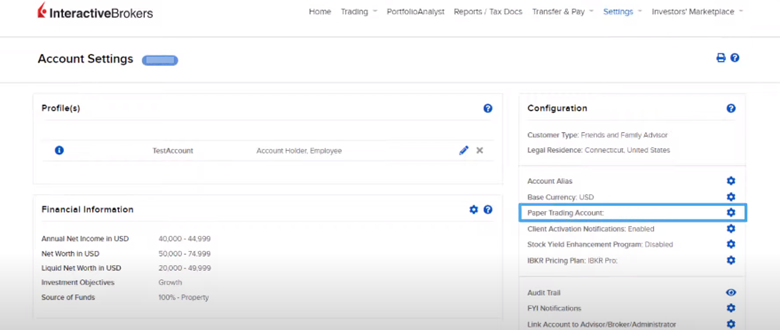










Hello! I recently opened a paper trading account (username tsalav280). When I am trying to use TWS I receive an error message mentioning that credentials are not correct, although I use the same credentials to access my portfolio (paper trading account). Could you please help to resolve this issue?
Thank you for reaching out. Please view this FAQ for troubleshooting steps: https://www.interactivebrokers.com/faq?id=51675311
Please view this FAQ for instructions to see the username and reset the password of your Paper Trading account: https://www.interactivebrokers.com/faq?id=28229874
We hope this helps!
Is it possible the paper trading TWS set to a Portfolio Margin account, I don’t mean the demo account.
In fact, I found try PM on the TWS paper trade, but this function only allows to view the margin requirements under the PM account, rather than turning it into a PM paper trade account.
Hello, thank you for reaching out. Margin in a Paper Trading account is set to Reg T and cannot be changed. Clients may model a position and use the preview feature “Try Portfolio Margin (“Try PM”) in the Account Window. https://www.interactivebrokers.com/faq?id=23298991
We hope this helps!
I have open positions that have failed to close since months and seem “stuck”, how can I delete/completely reset paper trading account?
Thank you for reaching out. Please view this FAQ for instructions to reset the dollar amount in your paper trading account: https://www.interactivebrokers.com/faq?id=32644862
We hope this helps!
Can I have 2 versions of Trader Workstation open at the same time, 1 for my actual account and 1 for my paper trading account? Each has its own username, but whenever I’ve tried to do this it says I’m already logged in and have to cancel the session that’s already open.
Hi Robert, thank you for reaching out. There can only be one active session at a given time.
Hi! i am able to connect to the paper trading account but then there is no where to go from there. I have change the amount in the account to 100k, but there is no menu to go to trades/portfolio/watchlist and the whole desktop of the paper account is quite empty I must say, I can’t do anything or practice in it. When I connect via mobile, I can trade and change currency etc… Anything wrong with the desktop website ?
Hi Kevin, I have the same issue can’t find ONE thing about what is happening. Did you figure out why we can’t access any trading on the PAPER DESKTOP site? The answer that Interactive Brokers left did NOT answer YOUR question at all. Is the people responding not real people? Seems odd they can’t explain this.
Hello again. After downloading IBKR Desktop, there is an option for live and paper trading. This is before you login to the account. Please reach back out with any additional questions. We hope this is helpful!
Hello IBKR, I recently opened my paper trading account but then I am stuck as there is no menu to go to trades/portfolio/watchlist. The layout is quite empty with only Home, Performance Reports and Settings. I therefore can’t practice on it. Your prompt assistance would be highly appreciated. Thanks
Hello, thank you for your question. The paper account has limited functionality in Client Portal. Here’s how to access paper trading and live trading across our platforms:
https://www.ibkr.com/faq?id=32669446
Also, trading permissions, market data, and base currency mirror your live account. Please visit this link if you would like to update any of the above in your associated live account: https://www.interactivebrokers.com/sso/resolver?action=UserSettings
We hope this helps!
I have a few questions: – does paper trading support pre-market and post-market trading? – are hot keys supported with the paper trading simulator?
Hello, thank you for reaching out. Paper trading does support trading outside of RTH. Hotkeys are also supported. We hope this information is helpful!
I signed up for a paper trading account to trade gold options. I have access to the client portal and all the apps and everything but I’m wondering how to execute my trades on trading view?
Hello, thank you for your question. Please review these instructions from the TradingView website: https://www.tradingview.com/support/solutions/43000669310-what-should-i-do-to-be-able-to-trade-through-interactive-brokers-on-tradingview/
We hope this is helpful!
hello I have a negative Net Asset Value for the Interactive Advisors Advisor Client account type and a positive Net Asset Value for my Individual account type. What does that mean? I seem to have made money in the Individual account but lost money in the Advisor Client account, why? I have a positive change in overall NAV though? Very confused
Thank you for contacting IBKR. To address your concern/inquiry, we need a few more details about the situation and your account; unfortunately, social media is not a secure channel to share this information. We kindly ask that you contact our Client Services team for further assistance via web ticket using the link below. We appreciate your understanding. https://spr.ly/IBKR_ClientServicesCampus
I want to create an account
Thanks so much for your interest in opening an account! You can get started here: https://spr.ly/OpenAccountfromIBKRCampus
We’re glad to help with any general questions along the way. You can also find helpful info in our FAQ: https:// ibkr.com/article?id=28216814. Don’t hesitate to reach out — we’re here for you!
Hi, would like to ask does paper trading account provide real-time bid and ask price and level 2 data, and able to use stock scanner to retrieve stocks real-time, if we subscribe corresponding subscriptions in live trading account. Thanks.
Hello, thank you for reaching out. Paper trading accounts are mirror images of their associated live account. Trading permissions as well as market data subscriptions and base currency are the same as the live account. https://www.interactivebrokers.com/faq?id=23298988
For instructions to add Level 2 market data, please view this FAQ: https://www.interactivebrokers.com/faq?id=34484122
We hope this helps!
We hope this helps!
Everytime I log into my TWS and paper trading account, my layout settings are not saved (even after I save settings as..). When I try to recover my settings via layout settings/recovery by selecting the previous dates or via custom saved settings – NOTHING happens.
Thank you for reporting this issue with your TWS layout settings not being saved.
Please attempt these troubleshooting steps:
Verify proper shutdown: Always exit TWS using File > Exit or the X button, rather than forcing it closed, to ensure settings are saved properly
Check your TWS version:
Ensure you’re running the latest version of TWS
Some older versions had known issues with layout persistence
Reset TWS settings:
Close TWS completely
Navigate to your TWS installation directory
Rename the “jts” folder to “jts_old” (this backs up your settings)
Restart TWS to create fresh settings files
Reconfigure your layout and save it
File locations: Verify you have write permissions to the TWS settings directory:
Windows: C:\Usersusername]\Jts
Mac: /Users/[username]/Jts
Linux: /home/[username]/Jts
If these steps don’t resolve your issue, please contact IBKR Customer Service directly as they may need to check specific account settings or provide more targeted troubleshooting based on your exact TWS version and setup. https://spr.ly/IBKR_ClientServicesCampus
We would appreciate the opportunity to turn around your experience.