Interactive Brokers ibinstruments IntroductionCopy Location
Copy Location
This guide provides reference information to Interactive Brokers clients requesting ibinstruments files for financial instrument data mapping and order routing. Files are categorized by financial instrument type:
- STK
- BOND
- WAR
- FUND
- FUT
- CASH
- IOPT
- CRYPTO
- CFD
Getting StartedCopy Location
Copy Location
The following steps are required to request delivery of ibinstruments files:
- Submit your request to filedelivery@interactivebrokers.com, specifying the files (asset types) you would like to receive, file delivery preference, along with a brief business case to support your request
- Files are transmitted via FTP or sFTP. See File Delivery Options for detailed instructions
- Interactive Brokers will prepare the requested files for delivery upon receipt of your request
File Delivery OptionsCopy Location
Copy Location
Delivery Frequency: Daily, Monday – Friday
- Delivery Time: 01:00-01:30am US Eastern
- Delivery Holidays: None
File Format: XML
File naming convention: ibinstruments.FinancialnstrumentType.yyyymmdd.xml.gz
- Example: ibinstruments.STK.20250430.xml.gz
- The ibinstruments files are compressed (.gz) and will need to be extracted / decompressed after receipt
Available delivery options:
- IBKR hosted Secure FTP (port 22)
- IBKR provides host, user, and directory
- You provide IBKR with RSA key for key based authentication
- You provide IBKR with IP address(es) you will be connecting from
- IBKR hosted FTP (port 21)
- IBKR provides host, user, password, and directory
Stocks (STK) FileCopy Location
Copy Location
File name: ibinstruments.STK.yyyymmdd.xml.gz
| # | SuperElementName | ElementName | AttributeName | Format/Enumeration | Description |
|---|---|---|---|---|---|
| 1 | IBInstruments | ||||
| 2 | IBInstruments | version | 2 | ||
| 3 | IBInstruments | timezone | “America/New_York” | ||
| 4 | IBInstruments | generationTime | datetime | ||
| 5 | IBInstruments | ContractList | |||
| 6 | ContractList | Contract | |||
| 7 | ContractList | Contract | IBContractType | STK | IBKR high level categorization of financial instruments. STK includes all equity types, ETFs, ETPs, and ETNs |
| 8 | ContractList | Contract | IBContractID | IBKR unique contract identifier | |
| 9 | ContractList | Contract | IBSymbol | Alphanumeric symbol for the contract. For equities, usually but not always the same as primary exchange ticker symbol | |
| 10 | ContractList | Contract | IBAddDt | datetime | Date and time when contract is added to system |
| 11 | Contract | IsUSMicroCap | T or F | IBKR categorization of US Microcap STKs | |
| 12 | Contract | IsIBComplexOrLeveraged | T or F | Complex or Leveraged Product (CLP) | |
| 13 | Contract | IsCryptoRelated | T or F | ||
| 14 | Contract | IssuerName | Name of the corporate issuing the security | ||
| 15 | Contract | TradingCurrency | ISO3 | ||
| 16 | Contract | CompositeFIGI | Bloomberg Composite FIGI | ||
| 17 | Contract | VenueList | |||
| 18 | VenueList | Venue | |||
| 19 | Venue | Venue | IBExchangeID | IBKR unique exchange identifier | |
| 20 | Venue | Venue | IBExchangeName | IBKR exchange name | |
| 21 | Venue | IsPrimaryIBExch | T or F | T if this venue is the instrument’s primary exchange | |
| 22 | Venue | LocalSymbol | Venue’s ticker symbol | ||
| 23 | Venue | PriceIncrementRule | (A,B;C,D) | Venue’s pricing rule If price is above A, minimum price increment is B If price is above C, minimum price increment is D | |
| 24 | Venue | SizeIncrementRule | (A,B) | Venue’s size rule A = Minimum order size B = Minimum order increment size |
Warrants (WAR) FileCopy Location
Copy Location
File name: ibinstruments.WAR.yyyymmdd.xml.gz
| # | SuperElementName | ElementName | AttributeName | Format/Enumeration | Description |
|---|---|---|---|---|---|
| 1 | IBInstruments | ||||
| 2 | IBInstruments | version | 2 | ||
| 3 | IBInstruments | timezone | “America/New_York” | ||
| 4 | IBInstruments | generationTime | datetime | ||
| 5 | IBInstruments | ContractList | |||
| 6 | ContractList | Contract | |||
| 7 | ContractList | Contract | IBContractType | WAR | IBKR high level categorization of financial instruments |
| 8 | ContractList | Contract | IBContractID | IBKR unique contract identifier | |
| 9 | ContractList | Contract | IBSymbol | Alphanumeric symbol for the contract | |
| 10 | Contract | IBSubType | COVERED | ||
| 11 | Contract | IssuerName | Name of the company issuing the security | ||
| 12 | Contract | TradingCurrency | ISO3 | ||
| 13 | Contract | UnderlyingIBContract | |||
| 14 | Contract | UnderlyingIBContract | IBContractType | ||
| 15 | Contract | UnderlyingIBContract | IBContractID | ||
| 16 | Contract | UnderlyingIBContract | IBSymbol | ||
| 17 | Contract | Multiplier | Contract size | ||
| 18 | Contract | ExpirationDate | yyyymmdd | Contract expiration date | |
| 19 | Contract | Strike | Contract strike | ||
| 20 | Contract | OptionType | C P | Call or Put | |
| 21 | Contract | ExerciseStyle | A E | American or European | |
| 22 | Contract | SettlementMethod | Delivery Choice Cash | Contract settlement method | |
| 23 | Contract | VenueList | |||
| 24 | VenueList | Venue | |||
| 25 | Venue | Venue | IBExchangeID | IBKR unique exchange identifier | |
| 26 | Venue | Venue | IBExchangeName | IBKR exchange name | |
| 27 | Venue | IsPrimaryIBExch | T or F | T if this venue is the instrument’s primary exchange | |
| 28 | Venue | LocalSymbol | Venue’s ticker symbol | ||
| 29 | Venue | TradingClass | Venue’s identifier for group of instruments with a similar contract specification | ||
| 30 | Venue | PriceIncrementRule | (A,B;C,D) | Venue’s pricing rule If price is above A, minimum price increment is B If price is above C, minimum price increment is D | |
| 31 | Venue | SizeIncrementRule | (A,B) | Venue’s size rule A = Minimum order size B = Minimum order increment size |
Bonds (BOND) FileCopy Location
Copy Location
File name: ibinstruments.BOND.yyyymmdd.xml.gz
| # | SuperElementName | ElementName | AttributeName | Format/Enumeration | Description |
|---|---|---|---|---|---|
| 1 | IBInstruments | ||||
| 2 | IBInstruments | version | 2 | ||
| 3 | IBInstruments | timezone | “America/New_York” | ||
| 4 | IBInstruments | generationTime | datetime | ||
| 5 | IBInstruments | ContractList | |||
| 6 | ContractList | Contract | |||
| 7 | ContractList | Contract | IBContractType | BOND | IBKR high level categorization of financial instruments |
| 8 | ContractList | Contract | IBContractID | IBKR unique contract identifier | |
| 9 | ContractList | Contract | IBSymbol | Alphanumeric symbol for the contract. For equities, usually but not always the same as primary exchange ticker symbol | |
| 10 | Contract | IBSubType | Agency Corp Govt Muni | Bond type | |
| 11 | Contract | MaturityDate | YYYYMMDD | Bond maturity date | |
| 12 | Contract | Coupon | Coupon rate | ||
| 13 | Contract | CouponType | FIXED VARIABLE ZERO COUPON PAY-IN-KIND STEP CPN FUNGED | ||
| 14 | Contract | IssuerName | Name of the company issuing the security | ||
| 15 | Contract | TradingCurrency | ISO3 | ||
| 16 | Contract | FIGI | Bloomberg FIGI | ||
| 17 | Contract | VenueList | |||
| 18 | VenueList | Venue | |||
| 19 | Venue | Venue | IBExchangeID | IBKR unique exchange identifier | |
| 20 | Venue | Venue | IBExchangeName | IBKR exchange name | |
| 21 | Venue | IsPrimaryIBExch | T or F | T if this venue is the instrument’s primary exchange | |
| 22 | Venue | LocalSymbol | Venue’s ticker symbol | ||
| 23 | Venue | PriceIncrementRule | (A,B;C,D) | Venue’s pricing rule If price is above A, minimum price increment is B If price is above C, minimum price increment is D | |
| 24 | Venue | SizeIncrementRule | (A,B) | Venue’s size rule A = Minimum order size B = Minimum order increment size |
Mutual Funds (FUND) FileCopy Location
Copy Location
File name: ibinstruments.FUND.yyyymmdd.xml.gz
| # | SuperElementName | ElementName | AttributeName | Format/Enumeration | Description |
|---|---|---|---|---|---|
| 1 | IBInstruments | ||||
| 2 | IBInstruments | version | 2 | ||
| 3 | IBInstruments | timezone | “America/New_York” | ||
| 4 | IBInstruments | generationTime | datetime | ||
| 5 | IBInstruments | ContractList | |||
| 6 | ContractList | Contract | |||
| 7 | ContractList | Contract | IBContractType | FUND | IBKR high level categorization of financial instruments |
| 8 | ContractList | Contract | IBContractID | IBKR unique contract identifier | |
| 9 | ContractList | Contract | IBSymbol | Alphanumeric symbol for the contract | |
| 10 | Contract | TradingCurrency | ISO3 | ||
| 11 | Contract | FundName | |||
| 12 | Contract | FundFamily | |||
| 13 | Contract | LargeNotifyAmount | |||
| 14 | Contract | VenueList | |||
| 15 | VenueList | Venue | |||
| 16 | Venue | Venue | IBExchangeID | IBKR unique exchange identifier | |
| 17 | Venue | Venue | IBExchangeName | IBKR exchange name | |
| 18 | Venue | PriceIncrementRule | (A,B;C,D) | Venue’s pricing rule If price is above A, minimum price increment is B If price is above C, minimum price increment is D | |
| 19 | Venue | SizeIncrementRule | (A,B) | Venue’s size rule A = Minimum order size B = Minimum order increment size |
Cash (CASH) FileCopy Location
Copy Location
File name: ibinstruments.CASH.yyyymmdd.xml.gz
| # | SuperElementName | ElementName | AttributeName | Format/Enumeration | Description |
|---|---|---|---|---|---|
| 1 | IBInstruments | ||||
| 2 | IBInstruments | version | 2 | ||
| 3 | IBInstruments | timezone | “America/New_York” | ||
| 4 | IBInstruments | generationTime | datetime | ||
| 5 | IBInstruments | ContractList | |||
| 6 | ContractList | Contract | |||
| 7 | ContractList | Contract | IBContractType | CASH | IBKR high level categorization of financial instruments. STK includes all equity types, ETFs, ETPs, and ETNs |
| 8 | ContractList | Contract | IBContractID | IBKR unique contract identifier | |
| 9 | ContractList | Contract | IBSymbol | Alphanumeric symbol for the contract. For CASH, this corresponds to the first currency of the currency pair | |
| 10 | Contract | TradingCurrency | ISO3 | ||
| 11 | Contract | VenueList | |||
| 12 | VenueList | Venue | |||
| 13 | Venue | Venue | IBExchangeID | IBKR unique exchange identifier | |
| 14 | Venue | Venue | IBExchangeName | IBKR exchange name | |
| 15 | Venue | IsPrimaryIBExch | T or F | T if this venue is the instrument’s primary exchange | |
| 16 | Venue | LocalSymbol | Venue’s ticker symbol | ||
| 17 | Venue | PriceIncrementRule | (A,B;C,D) | Venue’s pricing rule If price is above A, minimum price increment is B If price is above C, minimum price increment is D | |
| 18 | Venue | SizeIncrementRule | (A,B) | Venue’s size rule A = Minimum order size B = Minimum order increment size |
Futures (FUT) FileCopy Location
Copy Location
File name: ibinstruments.FUT.yyyymmdd.xml.gz
| # | SuperElementName | ElementName | AttributeName | Format/Enumeration | Description |
|---|---|---|---|---|---|
| 1 | IBInstruments | ||||
| 2 | IBInstruments | version | 2 | ||
| 3 | IBInstruments | timezone | “America/New_York” | ||
| 4 | IBInstruments | generationTime | datetime | ||
| 5 | IBInstruments | ContractList | |||
| 6 | ContractList | Contract | |||
| 7 | ContractList | Contract | IBContractType | FUT | IBKR high level categorization of financial instruments |
| 8 | ContractList | Contract | IBContractID | IBKR unique contract identifier | |
| 9 | ContractList | Contract | IBSymbol | Alphanumeric symbol for the contract | |
| 10 | Contract | TradingCurrency | ISO3 | ||
| 11 | Contract | UnderlyingIBContract | |||
| 12 | Contract | UnderlyingIBContract | IBContractType | ||
| 13 | Contract | UnderlyingIBContract | IBContractID | ||
| 14 | Contract | UnderlyingIBContract | IBSymbol | ||
| 15 | Contract | Multiplier | Contract size | ||
| 16 | Contract | ExpirationDate | yyyymmdd | Contract expiration date | |
| 17 | Contract | SettlementMethod | Delivery Choice Cash TAS | Contract settlement method | |
| 18 | Contract | VenueList | |||
| 19 | VenueList | Venue | |||
| 20 | Venue | Venue | IBExchangeID | IBKR unique exchange identifier | |
| 21 | Venue | Venue | IBExchangeName | IBKR exchange name | |
| 22 | Venue | IsPrimaryIBExch | T or F | T if this venue is the instrument’s primary exchange | |
| 23 | Venue | LocalSymbol | Venue’s ticker symbol | ||
| 24 | Venue | TradingClass | Venue’s identifier for group of instruments with a similar contract specification | ||
| 25 | Venue | PriceIncrementRule | (A,B;C,D) | Venue’s pricing rule If price is above A, minimum price increment is B If price is above C, minimum price increment is D | |
| 26 | Venue | SizeIncrementRule | (A,B) | Venue’s size rule A = Minimum order size B = Minimum order increment size |
Cryptocurrency (CRYPTO) FileCopy Location
Copy Location
File name: ibinstruments.CRYPTO.yyyymmdd.xml.gz
| # | SuperElementName | ElementName | AttributeName | Format/Enumeration | Description |
|---|---|---|---|---|---|
| 1 | IBInstruments | ||||
| 2 | IBInstruments | version | 2 | ||
| 3 | IBInstruments | timezone | “America/New_York” | ||
| 4 | IBInstruments | generationTime | datetime | ||
| 5 | IBInstruments | ContractList | |||
| 6 | ContractList | Contract | |||
| 7 | ContractList | Contract | IBContractType | CRYPTO | IBKR high level categorization of financial instruments |
| 8 | ContractList | Contract | IBContractID | IBKR unique contract identifier | |
| 9 | ContractList | Contract | IBSymbol | Alphanumeric symbol for the contract. For equities, usually but not always the same as primary exchange ticker symbol | |
| 10 | Contract | TradingCurrency | ISO3 | ||
| 11 | Contract | VenueList | |||
| 12 | VenueList | Venue | |||
| 13 | Venue | Venue | IBExchangeID | IBKR unique exchange identifier | |
| 14 | Venue | Venue | IBExchangeName | IBKR exchange name | |
| 15 | Venue | LocalSymbol | Venue’s ticker symbol | ||
| 16 | Venue | TradingClass | Venue’s identifier for group of instruments with a similar contract specification | ||
| 17 | Venue | PriceIncrementRule | (A,B;C,D) | Venue’s pricing rule If price is above A, minimum price increment is B If price is above C, minimum price increment is D | |
| 18 | Venue | SizeIncrementRule | (A,B) | Venue’s size rule A = Minimum order size B = Minimum order increment size |
Structured Products (IOPT) FileCopy Location
Copy Location
File name: ibinstruments.IOPT.yyyymmdd.xml.gz
| # | SuperElementName | ElementName | AttributeName | Format/Enumeration | Description |
|---|---|---|---|---|---|
| 1 | IBInstruments | ||||
| 2 | IBInstruments | version | 2 | ||
| 3 | IBInstruments | timezone | “America/New_York” | ||
| 4 | IBInstruments | generationTime | datetime | ||
| 5 | IBInstruments | ContractList | |||
| 6 | ContractList | Contract | |||
| 7 | ContractList | Contract | IBContractType | IOPT | IBKR high level categorization of financial instruments |
| 8 | ContractList | Contract | IBContractID | IBKR unique contract identifier | |
| 9 | ContractList | Contract | IBSymbol | Alphanumeric symbol for the contract | |
| 10 | Contract | IBSubType | B = Bonus Certificate D = Discount Certificate F = Factor Certificate K = Knockout Certificate T = Tracker Certificate | ||
| 11 | Contract | IssuerName | Issuing financial institution | ||
| 12 | Contract | TradingCurrency | ISO3 | ||
| 13 | Contract | UnderlyingIBContract | |||
| 14 | Contract | UnderlyingIBContract | IBContractType | ||
| 15 | Contract | UnderlyingIBContract | IBContractID | ||
| 16 | Contract | UnderlyingIBContract | IBSymbol | ||
| 17 | Contract | Multiplier | Contract size | ||
| 18 | Contract | Strike | Contract strike | ||
| 19 | Contract | OptionType | C or P | ||
| 20 | Contract | ExerciseStyle | A or E | ||
| 21 | Contract | ExpirationDate | yyyymmdd | Contract expiration date | |
| 22 | Contract | SettlementMethod | Delivery Choice Cash TAS | Contract settlement method | |
| 23 | Contract | VenueList | |||
| 24 | VenueList | Venue | |||
| 25 | Venue | Venue | IBExchangeID | IBKR unique exchange identifier | |
| 26 | Venue | Venue | IBExchangeName | IBKR exchange name | |
| 27 | Venue | IsPrimaryIBExch | T or F | T if this venue is the instrument’s primary exchange | |
| 28 | Venue | LocalSymbol | Venue’s ticker symbol | ||
| 29 | Venue | TradingClass | Venue’s identifier for group of instruments with a similar contract specification | ||
| 30 | Venue | PriceIncrementRule | (A,B;C,D) | Venue’s pricing rule If price is above A, minimum price increment is B If price is above C, minimum price increment is D | |
| 31 | Venue | SizeIncrementRule | (A,B) | Venue’s size rule A = Minimum order size B = Minimum order increment size |
Contract For Differences (CFD) FileCopy Location
Copy Location
File name: ibinstruments.CFD.yyyymmdd.xml.gz
| # | SuperElementName | ElementName | AttributeName | Format/Enumeration | Description |
|---|---|---|---|---|---|
| 1 | IBInstruments | ||||
| 2 | IBInstruments | version | 2 | ||
| 3 | IBInstruments | timezone | “America/New_York” | ||
| 4 | IBInstruments | generationTime | datetime | ||
| 5 | IBInstruments | ContractList | |||
| 6 | ContractList | Contract | |||
| 7 | ContractList | Contract | IBContractType | CFD | IBKR high level categorization of financial instruments |
| 8 | ContractList | Contract | IBContractID | IBKR unique contract identifier | |
| 9 | ContractList | Contract | IBSymbol | Alphanumeric symbol for the contract | |
| 10 | Contract | TradingCurrency | ISO3 | ||
| 11 | Contract | UnderlyingIBContract | |||
| 12 | Contract | UnderlyingIBContract | IBContractType | ||
| 13 | Contract | UnderlyingIBContract | IBContractID | ||
| 14 | Contract | UnderlyingIBContract | IBSymbol | ||
| 15 | Contract | Multiplier | Contract size | ||
| 16 | Contract | ExpirationDate | yyyymmdd | Contract expiration date | |
| 17 | Contract | SettlementMethod | Contract settlement method | ||
| 18 | Contract | VenueList | |||
| 19 | VenueList | Venue | |||
| 20 | Venue | Venue | IBExchangeID | IBKR unique exchange identifier | |
| 21 | Venue | Venue | IBExchangeName | IBKR exchange name | |
| 22 | Venue | IsPrimaryIBExch | T or F | T if this venue is the instrument’s primary exchange | |
| 23 | Venue | LocalSymbol | Venue’s ticker symbol | ||
| 24 | Venue | TradingClass | Venue’s identifier for group of instruments with a similar contract specification | ||
| 25 | Venue | PriceIncrementRule | (A,B;C,D) | Venue’s pricing rule If price is above A, minimum price increment is B If price is above C, minimum price increment is D | |
| 26 | Venue | SizeIncrementRule | (A,B) | Venue’s size rule A = Minimum order size B = Minimum order increment size |
Prediction Market SimulatorCopy Location
Copy Location
IBKR InvestMentor Landing PageCopy Location
Copy Location
Free Crypto Education from Interactive BrokersCopy Location
Copy Location
Explore Expert-led Crypto Video Courses, Webinars, Podcasts, and News TrendsCopy Location
Copy Location
Discover a wealth of crypto-related trading and investing education at the IBKR Campus, arming you with various financial education resources that will complement your learning style. We have instructor-led video courses, live webinars, engaging podcasts, and all the latest in crypto news and analyses from a wide spectrum of financial institutions and crypto experts from across the globe.
Whether new to cryptocurrency and on-chain trading or an advanced crypto trading expert, our financial education is designed to help advance your crypto trading skills at your own pace.
Explore financial topics across the IBKR Campus, including:
- An introduction to cryptocurrency
- Cryptocurrency mainstream adoption and uses
- Adding cryptocurrency trading permissions
- Trading cryptocurrencies on IBKR’s mobile platforms
- Trading cryptocurrencies using IBKR Desktop
- Using stablecoins for account funding
- How to differentiate between different cryptocurrencies
- The state of tokenizing real-world assets
- Legislation concerning digital asset trading
- Digital asset trading strategies
- On-chain trading technology trends
We also have a variety of crypto-related videos illustrating a host of different cryptocurrency products available on IBKR’s trading platforms.
The IBKR Campus is dedicated to helping you make more informed decisions about cryptocurrencies and the digital asset markets. Sign up for our Campus Newsletters to keep abreast of the latest crypto market updates as the global financial markets change daily.
Crypto NewsCopy Location
Copy Location
VideosCopy Location
Copy Location

Will the Upcoming PCE Report Fuel a Crypto Recovery?
CME Group
www.cmegroup.com

Bitcoin Meets Critical Support at $60K
CME Group
www.cmegroup.com

Bitcoin’s Nasdaq Connection and the CLARITY Act
CME Group
www.cmegroup.com
ArticlesCopy Location
Copy Location

The world’s biggest market is hiding in plain sight

Successful blockchains resemble thriving islands

The evolution of digital assets and their role in modern portfolios
Already an Interactive Brokers Client?
New to Interactive Brokers?
Crypto PodcastsCopy Location
Copy Location
June 25, 2026
Why All the Hype Behind Hyperliquid?
May 15, 2026
Cryptocurrencies – Tech, Tokens, and Unique Traits
Bitwise Asset Management
bitwiseinvestments.com
April 14, 2026
Crypto Trends Signal a Seismic Shift in TradFi
Crypto Video CoursesCopy Location
Copy Location
Getting Started with CryptocurrencyCopy Location
Copy Location
An Introduction to Cryptocurrency
Cryptocurrency Mainstream Adoption and Uses
Adding Cryptocurrency Trading Permissions
Crypto WebinarsCopy Location
Copy Location
Considering Crypto as Part of a Diversified Portfolio

Cryptocurrencies & Digital Assets – Tax Treatment in 2025

Bitcoin in Context
Crypto GlossaryCopy Location
Copy Location
Cryptocurrency ProductsCopy Location
Copy Location
Crypto Client CenterCopy Location
Copy Location
IBKR CryptoCopy Location
Copy Location
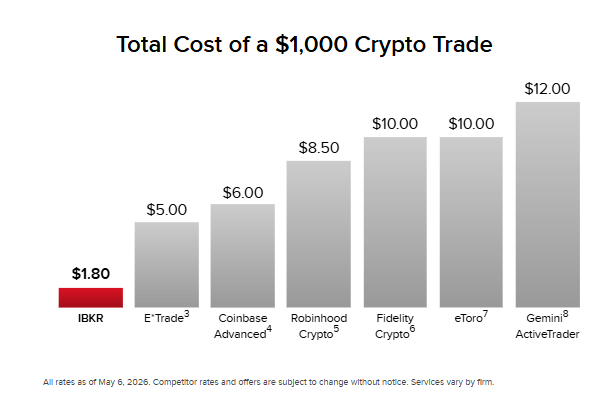
Trade Crypto for Less
Stablecoin Deposits

Stablecoin Account Funding
IBKR GuidesCopy Location
Copy Location
Crypto Plus

Withdrawing Cryptocurrency

Crypto Funds Transfer

IBKR FAQsCopy Location
Copy Location
Cryptocurrency Products Offered

What is an ERC-20 Token?

What is a Cryptocurrency Address?

Already an Interactive Brokers Client?
New to Interactive Brokers?
InvestMentorCopy Location
Copy Location


Finance, but fun.
Master the markets with InvestMentor, a free interactive learning platform. From bite-sized Snapshots and in-depth courses to financial news explainers, build your investing confidence today. Download the app for the full experience.
InsightsCopy Location
Copy Location


SnapshotsCopy Location
Copy Location




CoursesCopy Location
Copy Location
Discover how finance works across 150+ lessons, from economic principles and market forces to investment strategies and portfolio construction.

Why Invest?Copy Location
Copy Location
Start your journey to financial freedom. Learn the fundamental reasons and benefits of investing for your future.

Basics of Asset ClassesCopy Location
Copy Location
Explore the main types of investments. Understand stocks, bonds, real estate, and commodities.

Stocks ICopy Location
Copy Location
Dive into the stock market. Learn what stocks are, how they work, and how to analyze companies.

Bonds ICopy Location
Copy Location
Understand the world of fixed income. Learn about government and corporate bonds and how they provide income.

Commodities ICopy Location
Copy Location
Explore the raw materials market. Learn about trading gold, oil, agriculture, and other natural resources.


IBKR InvestMentor (dba “InvestMentor”) is a service of Interactive Academy LLC, an affiliate of IB LLC and majority-owned by IBG LLC. All content provided by InvestMentor is for informational and educational purposes only and should not be interpreted as implying any sponsorship, partnership, endorsement, recommendation, or approval by IB LLC or its affiliates.