
- Solve real problems with our hands-on interface
- Progress from basic puts and calls to advanced strategies
Interactive Options Course

Posted March 27, 2026 at 12:21 pm
Interactive Brokers’ ForecastTrader offers investors a groundbreaking way to profit from their predictions on political, economic, financial, and environmental events through innovative Prediction Contracts. Prediction Markets enable the investor to take yes-or-no positions on elections, economic indicators, Fed decisions, and climate trends while strictly limiting their risk, the maximum loss per contract is capped at the initial investment, with contracts priced between $0.02 and $0.99. For each contract that expires “in the money,” the investor receives a fixed $1.00 payout, and they can close positions anytime by buying the opposite side. Available 24/6 across IBKR’s professional desktop, mobile, and web platforms, Prediction Markets also offers an interest-like incentive coupon that accrues daily on the closing position values and pays monthly. Whether tracking the US Presidential Election, Real GDP figures, or Fed Funds rates, Prediction Markets transform the investor’s market insights into actionable trades with transparent pricing, limited downside, and seamless platform integration.
Please refer to the end of the article for ways to access the ForecastTrader on all Interactive Brokers’ platforms.
Once the ForecastTrader screen appears the investor will see Prediction Markets on Government, Economic Indicators, Elections, Technology Financial Markets, Environmental, and CME Event Contracts.

Source: ForecastTrader
The investor can select any of the categories to see the full array of contracts available or select “Popular” to see a selection of popular contracts from each area. If the investor clicks one of the sectors like “Economic Indicators”, they will see a subset of topics to select contracts from Education, Housing, Industry, Interest Rates, Labor, Oil & Energy, Prices & Inflation, Sentiment Surveys, and Taxes.
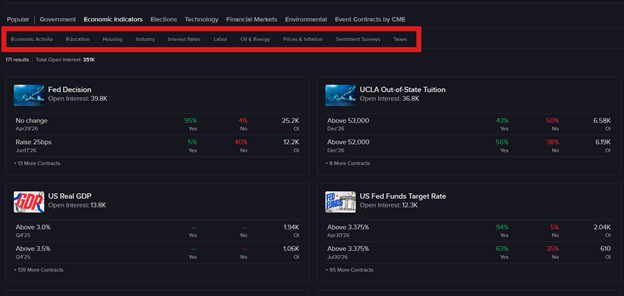
Source: ForecastTrader
The investor can choose list or tile view and sort by alphabetical order or open interest. On the display are the prices for Yes and No contracts, the open interest and any position the investor may have in the contract. When they select a contract under Sentiment Surveys such as “US Consumer Confidence Index”, the ForecastTrader screen updates to display comprehensive information about that specific prediction market. The interface is designed to provide all the essential data you need to make informed trading decisions.
Left Panel Navigation
On the left side of the screen, the investor will find a list of all available thresholds or outcome dates for each event. They simply click on any outcome to view its detailed information and price history.
Chart and Price History
At the top of the screen, a chart displays the price history for the selected outcome. The investor can choose between underlying and contract data. In the contract data chart, the investor can toggle between viewing the “Yes” or “No” side’s price history by clicking the respective buttons, allowing them to analyze both sides of the market.
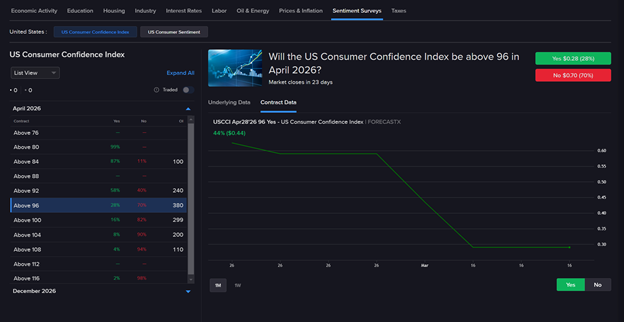
Source: ForecastTrader
Activity Panel
Directly below the chart, the activity panel provides a real-time view of:
Event Information and Market Rules
Scrolling further down, there is a detailed explanation of the event. There’s also a link to access a comprehensive PDF containing all Market Rules governing ForecastEx prediction market contracts.
Contract Timeline and Specifications
The contract timeline is clearly displayed, showing:
The investor can click “View Trading Schedule” to access the complete trading schedule.
Below the trading schedule, they’ll find detailed contract specifications, including:
Data Sources and Resolution
The Data & Resolution section includes a link to the source agency for the contract. Click this link to verify the official data source used for contract settlement.
Source: ForecastTrader
Why Understanding Market Rules is Essential
Understanding the market rules is critical for two key reasons:
1. Contract Specifications
ForecastEx prediction market contracts are based on the probability of specific events occurring, including economic indicators, political outcomes, or environmental results. Each contract features a specified payout structure, typically ranging from $0.02 to $0.99, with a potential settlement payment of $1.00 if the investor’s prediction proves correct.
2. Regulatory Compliance
ForecastEx operates under regulations established by the Commodity Futures Trading Commission (CFTC). Understanding these regulations ensures you comply with legal requirements and protects the investor from fraudulent activities.
How to Place an Order
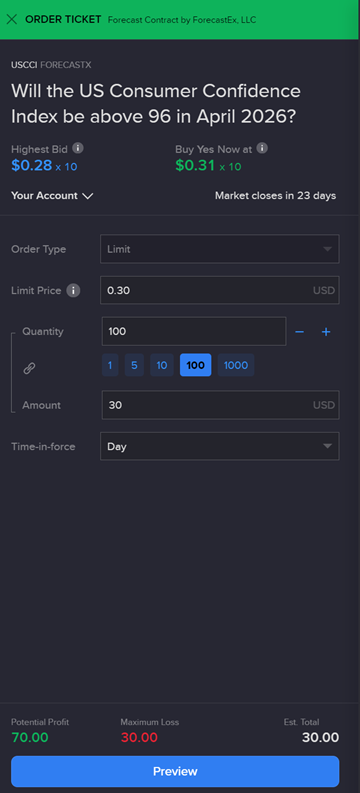
Buying a Contract
Source: ForecastTrader
Once submitted the investor can share their trade idea with friends by clicking on the “Share via email” button that appears on the order ticket.
The investor can view open positions by clicking the Portfolio button and reviewing the Positions tab. Investors can adjust or close open orders from the Orders tab. Completed trades are displayed on the Trades tab.
ForecastTrader by Interactive Brokers simplifies prediction market trading, allowing investors to express views on political, economic, financial, and environmental outcomes with defined risk and full transparency. Risk is capped at the initial investment, with a clear $1.00 payout for correct outcomes, making prediction market trading intuitive and accessible. Backed by CFTC oversight, transparent market rules, and seamless integration into IBKR’s trading ecosystem, ForecastTrader enables investors to turn informed insights into actionable strategies with confidence and control.
Please see below for ways to access ForecastTrader from Interactive Brokers full suite of trading platforms.
Accessing ForecastTrader to Trade Prediction Markets on IBKR’s Platforms
Investors can access the ForecastTrader on the Trader Workstation in two ways. First, on the upper left-hand side of the screen, click on the ForecastTrader button. Or the investor can click on the New Window button, scroll down toward the bottom and select IBKR ForecastTrader.
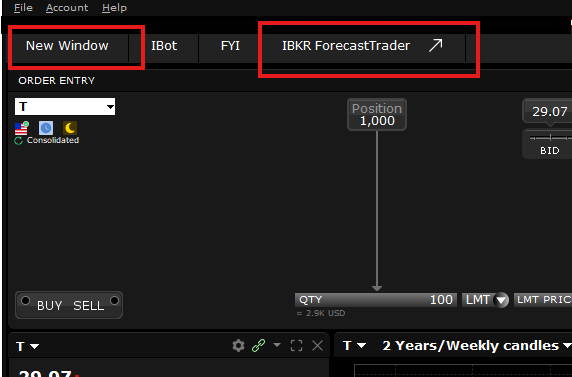
Source: IBKR TWS
In IBKR Desktop the investor clicks on the Sitemap icon on the bottom left-hand side of the screen, then clicks on ForecastTrader in the “Trade” section.
Source: IBKR Desktop
In the Client portal the investor can click on the “Trade” header and select ForecastTrader.
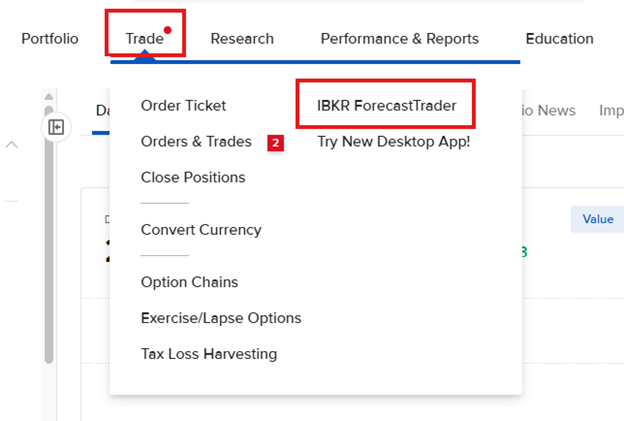
Source: IBKR Client Portal
In the IBKR Mobile app, the investor can click on the “Trade” icon, then click ForecastTrader.
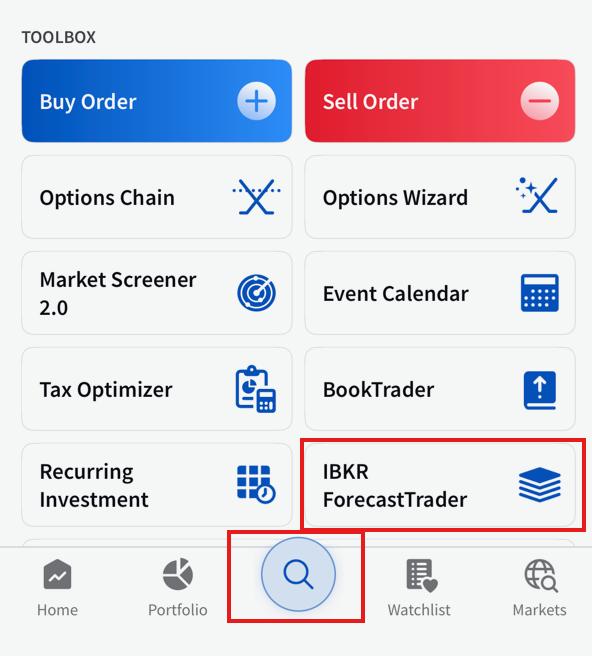
Source: IBKR Mobile
New to Interactive Brokers?
Open AccountAlready an Interactive Brokers Client?
Request Trading PermissionThe analysis in this material is provided for information only and is not and should not be construed as an offer to sell or the solicitation of an offer to buy any security. To the extent that this material discusses general market activity, industry or sector trends or other broad-based economic or political conditions, it should not be construed as research or investment advice. To the extent that it includes references to specific securities, commodities, currencies, or other instruments, those references do not constitute a recommendation by IBKR to buy, sell or hold such investments. This material does not and is not intended to take into account the particular financial conditions, investment objectives or requirements of individual customers. Before acting on this material, you should consider whether it is suitable for your particular circumstances and, as necessary, seek professional advice.
The views and opinions expressed herein are those of the author and do not necessarily reflect the views of Interactive Brokers, its affiliates, or its employees.
Interactive Brokers LLC is a CFTC-registered Futures Commission Merchant and a clearing member and affiliate of ForecastEx LLC (“ForecastEx”). ForecastEx is a CFTC-registered Designated Contract Market and Derivatives Clearing Organization. Interactive Brokers LLC provides access to ForecastEx Forecast Contracts for eligible customers. Interactive Brokers LLC does not make recommendations with respect to any products available on its platform, including those offered by ForecastEx.
This is commentary on economic, political and/or market conditions within the meaning of CFTC Regulation 1.71, and is not meant provide sufficient information upon which to base a decision to enter into a derivatives transaction.
The order types available through Interactive Brokers LLC's trading platforms are designed to help you limit your loss and/or lock in a profit. Market conditions and other factors may affect execution. In general, orders guarantee a fill or guarantee a price, but not both. In extreme market conditions, an order may either be executed at a different price than anticipated or may not be filled in the marketplace.
Related Articles















Join The Conversation
For specific platform feedback and suggestions, please submit it directly to our team using these instructions.
If you have an account-specific question or concern, please reach out to Client Services.
We encourage you to look through our FAQs before posting. Your question may already be covered!