
- Solve real problems with our hands-on interface
- Progress from basic puts and calls to advanced strategies
Interactive Options Course

Posted May 19, 2025 at 10:00 am
The Interactive Brokers Exit Strategy tool allows the investor to set up a stop loss, profit taker, or both, also known as a bracket order, to exit a current position. This can be extremely helpful if the investor has an existing position and wants to set up an exit strategy that can limit loss and or protect profit with orders that are ready to go and be submitted when the price of the instrument hits a certain level.
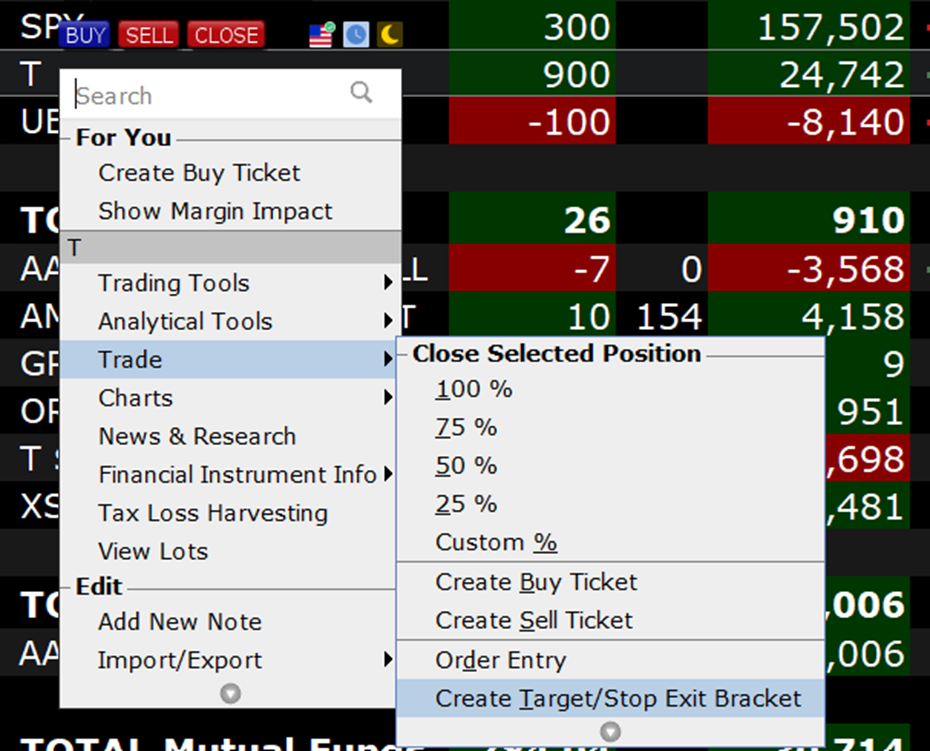
The Exit Strategy tool can be accessed by clicking on a symbol in the portfolio page, scrolling down to Trade and selecting, “Create Target/Stop Exit Bracket”.
In this example the investor has a long position of 900 shares of AT&T (Symbol: T) that they purchased for an average price of $27.491 and would like to set up a bracket order to close out of the position to either lock in a profit of $1,358.22 for a 5.49% return at $29.00 or limit their loss to $1,341.78 or -5.42% if T declines to $26.00.
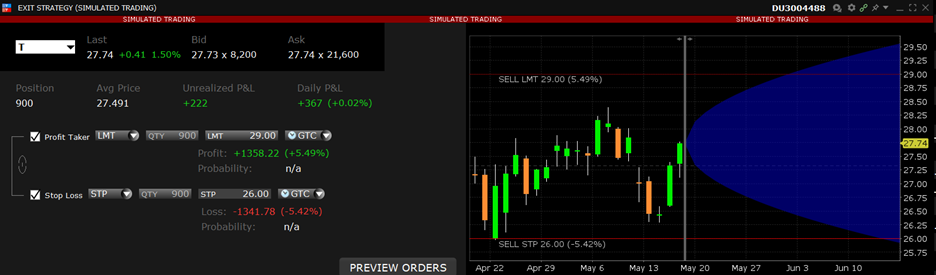
The bracket order types are adjustable by selecting the drop-down box and choosing from Limit, Relative, or Retail Price Improvement for the Profit Taker and Stop, Stop Limit, Trailing, or Trailing Limit for the Stop Loss. For more on order types please see the Order Types page on our website under trading. Prices are adjustable either by clicking on the prices in the table or dragging the lines in the chart. The investor can also select the Time-in-Force, Good ‘Til Cancelled is the default setting and will allow the orders to stay active past the trading day if not filled. The table also shows the current bid and ask as well as the unrealized and Daily P&L.
The time frame shown on the chart is adjustable by dragging the line below to increase or decrease the time-period shown. The blue bubble after the current day shows the standard deviation of the underlying and can be adjusted to show a standard deviation of 1, 2, or 3 by clicking on the chart, selecting Chart Parameters and adjusting the Estimated Price Range.

Once the investor is ready to create the orders they can click on “Preview Orders” to see the Order Confirmation window and review the order details. Once ready they click transmit to enable the bracket orders.

The Exit Strategy tool available on the TWS, Client Portal, and Mobile app allows the investor to create orders to close out an existing position while either locking in a profit or limiting loss without having to constantly monitor the underlying instruments price.
For specific platform feedback and suggestions, please submit it directly to our team using these instructions.
If you have an account-specific question or concern, please reach out to Client Services.
We encourage you to look through our FAQs before posting. Your question may already be covered!
The analysis in this material is provided for information only and is not and should not be construed as an offer to sell or the solicitation of an offer to buy any security. To the extent that this material discusses general market activity, industry or sector trends or other broad-based economic or political conditions, it should not be construed as research or investment advice. To the extent that it includes references to specific securities, commodities, currencies, or other instruments, those references do not constitute a recommendation by IBKR to buy, sell or hold such investments. This material does not and is not intended to take into account the particular financial conditions, investment objectives or requirements of individual customers. Before acting on this material, you should consider whether it is suitable for your particular circumstances and, as necessary, seek professional advice.
The views and opinions expressed herein are those of the author and do not necessarily reflect the views of Interactive Brokers, its affiliates, or its employees.
Related Articles

















For the love of god…please make this accessible via hotkey or with fewer clicks. Maybe a right click option on a chart
Hello, thank you for reaching out. For now, we have only basic hotkeys available:
https://ibkrguides.com/releasenotes/ibkrdesktop/2023/preview/ntws-preview-v0.04.htm
Advanced keys are certainly in our development queue for future releases.
Please review this FAQ on where you can leave your feedback, and submit any specific suggestion(s) on how we can improve:
https://www.ibkr.com/faq?id=32653353
You can also post in the Feature Poll in Client Portal where other IBKR users can comment and vote:
https://portal.interactivebrokers.com/portal/#/suggestions
It would be great if you could also plan to open APIs for IBKR HK for Tradeview
Hello, thank you for reaching out. For instructions to connect TradingView with IBKR: https://www.interactivebrokers.com/faq?id=60344930
Can you guys please make it available to set a stop loss in percentage in the mobile version too 🙏
Is it possible to include more than one take profit order using mobile app?