
- Solve real problems with our hands-on interface
- Progress from basic puts and calls to advanced strategies
Interactive Options Course
Lesson 1 of 10
New to Interactive Brokers?
IBKR Mobile provides an intuitive and easy-to-navigate interface for investors to access their trading account, configure two-factor authentication and monitor their account all from their mobile device. In this lesson we will review:
Investors can download the IBKR Mobile app on their Android device from the Google Play Store. In the Google Play Store, search for IBKR Mobile and tap Install. Interactive Brokers’ offers additional trading apps, including GlobalTrader and IMPACT. This course will review the IBKR Mobile app but for further information on GlobalTrader or the IMPACT app, please see the dedicated Traders’ Academy courses.
Once installation is complete, tap Open to launch the IBKR Mobile app or locate the app in the Android App Library.
The initial page of the app provides investors with two buttons:
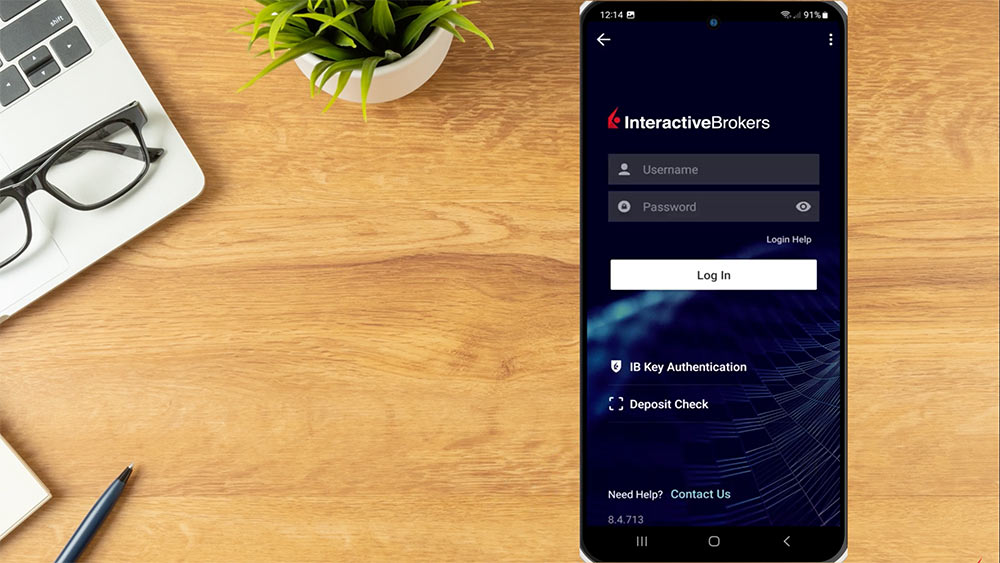
To login to an existing account, the investor taps I Have an Account. The bottom of the login page contains options for IB Key Authentication and Deposit Check, which we will cover in later lessons. In the upper right corner, investors can select the three dots icon to switch between Live Trading or Paper Trading Account, change the language, configure IB Key push details, upload diagnostics, or contact us.
At the top of the screen, the investor enters their username and password and taps the login button.
Along the bottom of the app is a menu bar with icons for Portfolio, Watchlist, Trade, Account, and Transactions. The top left of the screen contains a More menu from the 3 lines icon. The investor can tap any of these icons to switch between pages. We will go into further detail on these pages in later lessons.
To configure app settings, the investor taps More in the upper left corner, scrolls down, and taps Settings. A list will appear with Trading Settings, Display, Notifications, Security, Localization, and Advanced.
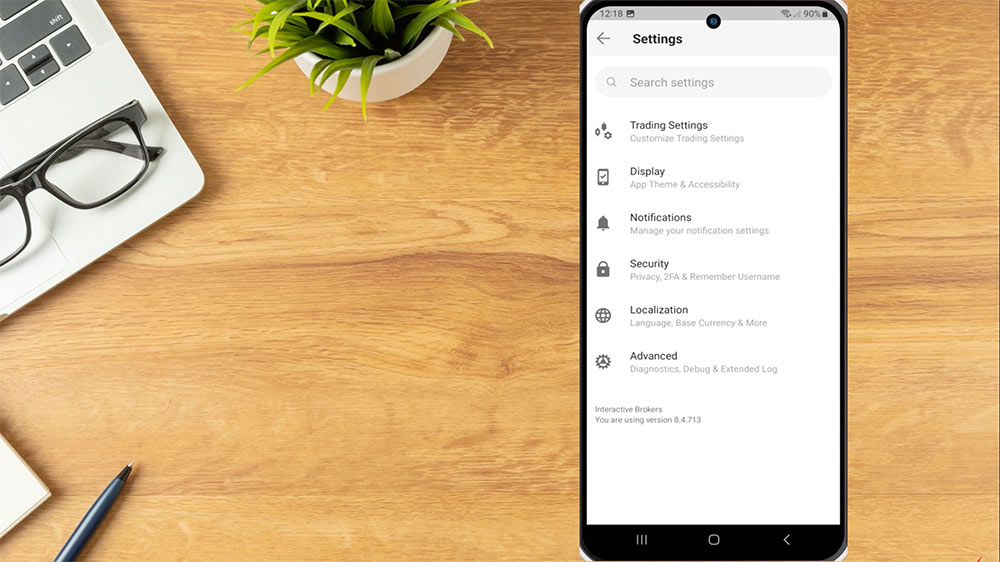
Trading Settings allows investors to set trading presets for default orders by product class.
Display allows the investor to choose between light and dark mode, and enable or disable additional general configuration.
Notifications allows investors to manage and create alerts and delivery settings.
Security gives investors the option to enable Remember My Username, Auto-Reconnect, Read-Only Access, Privacy Mode, SSL, and use Two-Factor Authentication.
Localization provides options for color localization as well as language settings and display positions in base currency.
Advanced Settings is used to upload diagnostics in the event the investor needs to provide logs to our technical assistance team.
In later lessons we will review trading, monitoring the portfolio, creating watchlists, configuring two-factor authentication through IB Key, and more.
Resources:
For specific platform feedback and suggestions, please submit it directly to our team using these instructions.
If you have an account-specific question or concern, please reach out to Client Services.
We encourage you to look through our FAQs before posting. Your question may already be covered!
The analysis in this material is provided for information only and is not and should not be construed as an offer to sell or the solicitation of an offer to buy any security. To the extent that this material discusses general market activity, industry or sector trends or other broad-based economic or political conditions, it should not be construed as research or investment advice. To the extent that it includes references to specific securities, commodities, currencies, or other instruments, those references do not constitute a recommendation by IBKR to buy, sell or hold such investments. This material does not and is not intended to take into account the particular financial conditions, investment objectives or requirements of individual customers. Before acting on this material, you should consider whether it is suitable for your particular circumstances and, as necessary, seek professional advice.
The views and opinions expressed herein are those of the author and do not necessarily reflect the views of Interactive Brokers, its affiliates, or its employees.











How do I delete a symbol on a watchlist?
Hi Brian, to delete a symbol on your watchlist, highlight the ticker with a left click of the mouse and then click the delete key on your keyboard to remove the symbol. You can find more information about watchlists here: https://www.ibkr.com/faq?id=29095861. Let us know if you have other general questions!
Hello
How to change color EMA in IBKR app?
Thanks
Hello Timofey,
There is currently no way to change the color, the color is assigned by the server based in part by the number of indicators added to the chart. We hope this answers your question!
What languages are available in the IBKR mobile app?
Hello, thank you for reaching out. Please view this FAQ for instructions to change the language on IBKR Mobile using iOS and Android:
https://www.interactivebrokers.com/faq?id=54142436
We hope this helps!
How do I get transaction button at bottom of ibkr mobile app. I recently bought Samsung s23, downloaded ibkr mobile app and my transaction quick button is gone.
Hello, thank you for reaching out. It is possible to access Transactions via Trade screen orders and trades buttons. We hope this answers your question. If you are still in need of assistance, please contact Client Services by phone: https://spr.ly/IBKR_ClientServicesCampus
In fx when I make trade in mobile app after I close the app my position automatic cancel or close why
Thank you for taking the time to reach out and please accept our apologies. For this time sensitive issue, you should call our Customer Service team. You can find the hours of operation for phone support in your area here: https://spr.ly/IBKR_ClientServices We would appreciate the opportunity to turn around your experience.
Why technical question can’t be sent by mobile app? Communication with Customer Service is terrible, first waiting ages to get online and there are no simple protocols to resolve problem and at the end telephone bill is big.
We are sorry to learn that your experience was unsatisfactory. We have various support options available (chat, email, phone) and we would be happy to answer general questions here.
For a time-sensitive/urgent matter, it is recommended that you call Client Services: https://www.interactivebrokers.com/en/support/customer-service.php
We also have a comprehensive collection of FAQs on our website: https://www.interactivebrokers.com/lib/cstools/faq/#/
We would appreciate the opportunity to turn around your experience!
How.to activate crypto trading on ibkr
Hello, thank you for reaching out. To request trading permissions for cryptocurrencies:
Log into Client Portal.
Click on the User menu (head and shoulders icon) and select Settings.
Under Account Settings, go to Trading > Trading Permissions.
Under Cryptocurrencies, select Request next to the permission you want.
Review and sign the disclosures and agreements.
Click CONTINUE and follow the prompts.
Trading permissions are typically approved overnight. Please note that you will need to have a margin account to trade cryptocurrencies.
We hope this helps!
Last year, I was placing spreads and butterflies in the option chain, I just pick leg by leg, and automatically take it like a spread or a butterfly. IT ACTUALLY APPEARED AS A BUTTERGLY OR SPREAD in my portfolio; if I wanted to close the butterfly, I used to clik on the butterfly or the spread. This year, after i place the order, it shows like three SEPARATE LEGS!!! and I can not close it as a Spread or as A Butterfly!!….I have to close leg by leg, which is ridiculous!
There were changes, Please let me know how to close a position (vertical or butterfly) nowadays!! IBKRS is the scariest and complicated broker
Hello, Cecilia, thank you for reaching out. It sounds like you are describing the “Close as Strategy” feature in TWS. This allows you to select multiple independent option legs in your portfolio and close them together as a single complex order. This feature is currently only available for individual accounts, not multiple account structures. So if you are now using a different account structure than last year, that could explain why you are no longer seeing the option to close the legs as a strategy. There are also some requirements around the legs having the same underlying symbol, expiration date, etc. So if the legs you are trying to close no longer meet those requirements, that could also explain why you don’t see the “Close as Strategy” option.
Please view this FAQ with instructions to close an open combo in one click: https://www.ibkr.com/faq?id=32662422
We hope this helps!
I can’t add a stock to my watchlist on android app, I see only options option. A few month ago it was possible.
Hi Maria, thank you for reaching out. We could not replicate this issue. Please ensure that the stock you are trying to add is not already added to the watchlist, you do not have sorting on by a column, or have the maximum number of entries on the watchlist. We hope this helps!
Bonjour,
je ne peux pas installer ibkr mobile sur pova 5 g hios
Hello, thank you for reaching out. Please view this FAQ for troubleshooting instructions: https://www.ibkr.com/faq?id=35784893
If the above does not work, we recommend contacting our Client Services, Technical Assistance team: https://spr.ly/IBKR_ClientServicesCampus
Hi, I living in Bahrain but I want to change time Zone of IBKR Mobile App to US Market.
Would you please guide how it can be done.
Thanks
Hello, thank you for asking. At this time, the time zone on IBKR mobile is based on the time zone of your phone. As a result, there is no setting to change the time zone on IBKR Mobile. However, it is possible to change the time zone on TWS. Please view this FAQ for instructions: https://www.ibkr.com/faq?id=38451469
Why do alerts created on IBKR Android mobile NOT show up on the actual charts
Thank you for asking. Which alerts do you want to see in the chart?
I am a IBKR PRO user, and due to work related circumstances I travel a lot outside my registered address (SE Asia) and usually travel around the world. Can I still trade on the IBKR mobile even I am not on my base country?
Thank you for asking. As long as you are not traveling to a country which IBKR is prohibited from conducting business within due to U.S. government restrictions, you should be able to access your account and trade. You may, however, wish to check and make sure you have not enabled any IP Address restrictions that limit your trading platform access to a list of IP addresses you’ve previously designated.
Use the button above or follow the below procedure to configure IP Restrictions within Client Portal:
Log into Client Portal.
Click the User menu (head and shoulders icon in the top right corner) followed by Settings.
Then under User Settings section find Security.
Click IP Restrictions and follow the prompts on the screen.
Please view this FAQ for more information: https://www.interactivebrokers.com/faq?id=41564976
We hope this helps!
Are you kidding me to mandate log in and usage of an investment account with ADNROID (or Apple, does not matter) app ? 1. I do bot have gmail (to be able to download android store APP) 2.I do not need ay samrtphone at all in my life. 3. Why no alternatives? Thank you
IBKR offers multiple two factor authentication methods, not just mobile apps. Alternatives include:
Digital Security Card+ (DSC+): A physical device that generates security codes.
SMS: Receive authentication codes via text message.
Mobile Authenticator: A separate app that generates codes, which can be used on various devices, not just smartphones.
Voice callback: Receive authentication codes through a phone call.
Temporary Security Device: A temporary solution for those without immediate access to other methods.
Please review this FAQ for more information: https://www.interactivebrokers.com/faq?id=29079898
If the above does not work, you will have to call our Client Services team for account security reasons. IBKR DOES NOT reset passwords, provide usernames, or unlock accounts via e-mail or chat. Thank you for understanding. You can find our available phone support here: https://spr.ly/IBKR_ClientServicesCampus
how can one live stream Bloomberg TV with the android IBKR mobile app?
Thank you for asking. This is not available at this time. The Bloomberg TV news fee is integrated within the TWS platform. Please view this FAQ to watch Bloomberg TV on TWS: https://portal.interactivebrokers.com/faq?id=91485272
How can I get ASX to cme up in the markets section on the app?
Hi Lisa, thank you for reaching out. You can search for a security on the ASX and it will pop up. We hope this helps!
On my portfolio page on my android mobile app I tap on a stock and it opens a mini chart. How can I then close this chart?
Hi, thank you for reaching out and we apologize for the delayed response. To close the mini chart on the IBKR Android app, you can tap the chart again to contract it. Please view this User Guide for more information: https://www.interactivebrokers.co.in/en/software/mobileTWS/android/configuring%20a%20chart.htm
We hope this helps!
Saludos desde Ecuador . Mi pregunta es si con esta aplicación móvil puedo hacer deposit0s y retiros desde mi pías Ecuador. GRACIAS POR SU PRONTA RESPUESTA.
Hola, gracias por su consulta. Utilice esta herramienta en nuestro sitio web para consultar los métodos de financiación disponibles y los plazos de entrega (ETA) según su residencia y la moneda en la que desee depositar: https://spr.ly/FundAccountcampus