
- Solve real problems with our hands-on interface
- Progress from basic puts and calls to advanced strategies
Interactive Options Course

Posted September 4, 2025 at 11:00 am
ScaleTrader is a sophisticated trading algorithm within Interactive Brokers’ platform that helps traders scale into large positions efficiently. The essence behind the algorithm is that it allows investors to buy at decreasingly lower prices or sell at increasingly higher prices. ScaleTrader can be used to buy or sell positions in single instruments, pair trades, or combinations. Whether you’re looking to minimize market impact, improve average execution prices, or implement automated trading strategies, ScaleTrader provides functionality that goes well beyond conventional order types. Investors can use ScaleTrader to trade Stocks, ETFs, Options, Futures, FOPs, Currencies, Bonds, and Warrants.
Understanding the mechanics of ScaleTrader is important, but recognizing when and why to apply this approach is equally crucial. Here are several scenarios where ScaleTrader offers strategic advantages:
In highly volatile markets, entry timing becomes particularly challenging. Rather than trying to perfectly time a single entry point, ScaleTrader allows traders to spread their entries across a price range, potentially capturing better average prices as the market fluctuates. This reduces the risk of poorly timed entries and the psychological stress that accompanies them.
For instruments that tend to oscillate within defined ranges, ScaleTrader with profit orders and size restoration creates an automated market-making system. The tool will continuously buy at lower prices and sell at higher prices, capturing the spread between these levels repeatedly as prices fluctuate. This approach is particularly effective in sideways markets where directional strategies struggle.
Institutional traders and portfolio managers often face the challenge of executing large orders without adversely impacting the market. ScaleTrader provides a systematic approach to breaking these orders into smaller, more manageable components that can be executed over time with reduced market impact. This is especially valuable in less liquid securities where large single orders might cause significant slippage.
Even experienced traders struggle with emotional decision-making, particularly during volatile market conditions. By pre-defining entry and exit points through ScaleTrader, traders effectively remove in-the-moment emotions from the equation. The system executes according to the predetermined plan regardless of fear, greed, or other psychological factors that might otherwise influence trading decisions.
For traders employing systematic or rule-based strategies, ScaleTrader offers a way to automate execution according to predefined parameters. This ensures consistent implementation of the strategy without requiring constant monitoring or manual intervention.
ScaleTrader can be accessed in the Trader Workstation (TWS) in the New Window area under More Advanced Tools located in the other tools section. By using the IBKR color grouping feature, the ScaleTrader will automatically be populated with the last symbol clicked in the TWS. For single orders, the investor uses the Simple Tab.
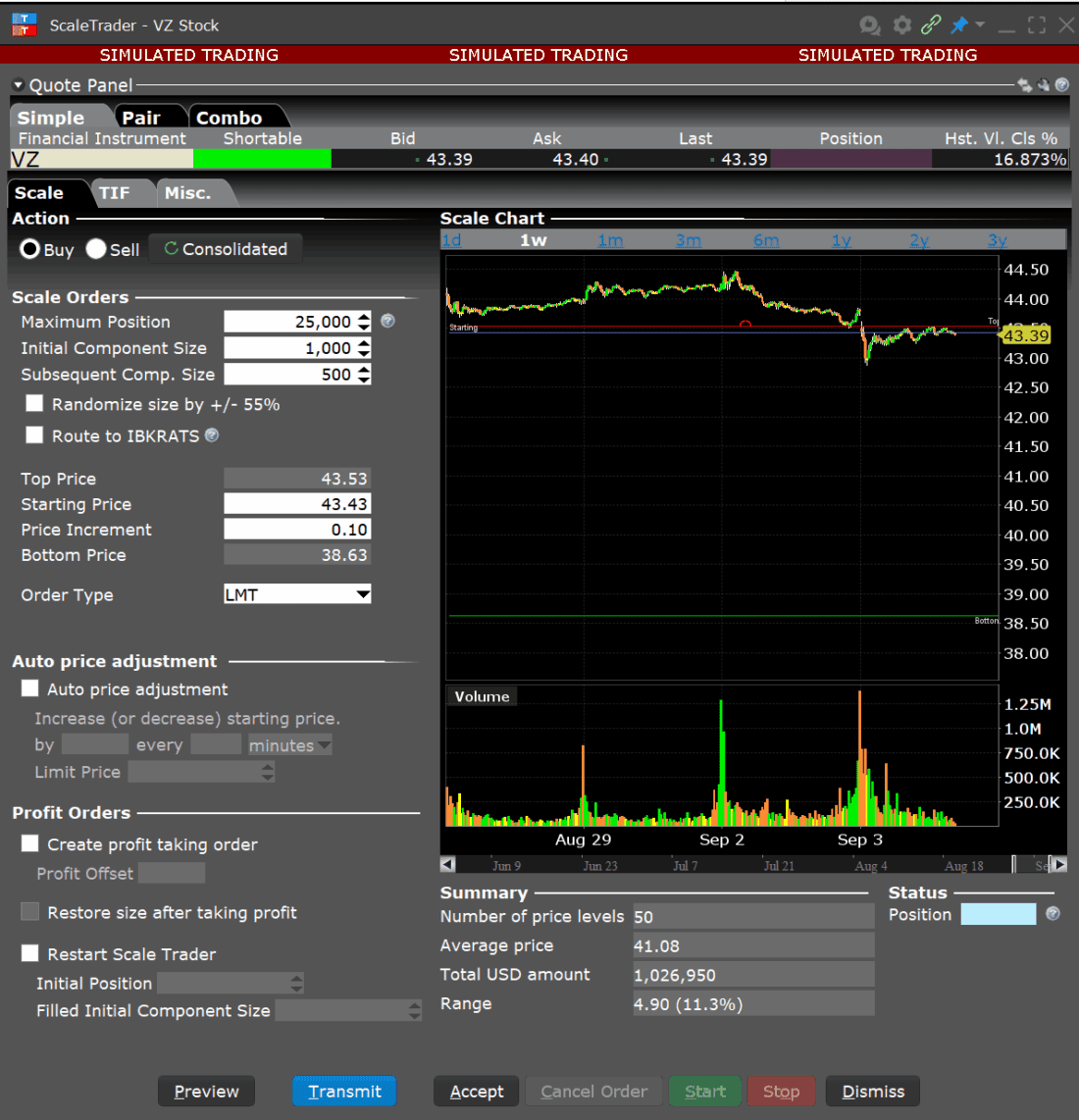
ScaleTrader is comprised of seven sections: Action Area, Scale Orders, Scale Chart, Auto Price Adjustment, Profit Orders, Summary, and Status. In this article we are going to walk through the investor setting up a trade for a single stock using the profit order feature.

Source: IB Trader Workstation
The investor first chooses to buy or sell in the Action area. Underneath in the Scale Orders area the investor sets the maximum position that will be traded via ScaleTrader, this may be different that the maximum position in the investors account if they have an existing position or are using a separate tool to trade as well as ScaleTrader. The investor then sets the initial component size, which is the size of the first order, and the subsequent component size. The component size can be randomized by plus or minus 55%, and orders can be routed to IBKRATS.
The starting or initial price, this is the price for your first component order can be set either by typing it in the box or moving the mouse to the chart and dragging the blue line to the desired starting price. The investor next sets the price increment which parameter determines how much better each subsequent price will be compared to the previous order. For example, if a stock trading around $45, you might set this to $0.10, meaning each subsequent order will be placed $0.10 cheaper than the previous one for buy orders. Then the investor will set the order type.
Source: IB Trader Workstation
The investor can also change the Time-in-force by clicking on the TIF tab.
The Summary section of ScaleTrader in Interactive Brokers’ platforms displays a comprehensive overview of the scale trading parameters and potential outcomes. It includes number of price levels, average price, total dollar amount, and range.
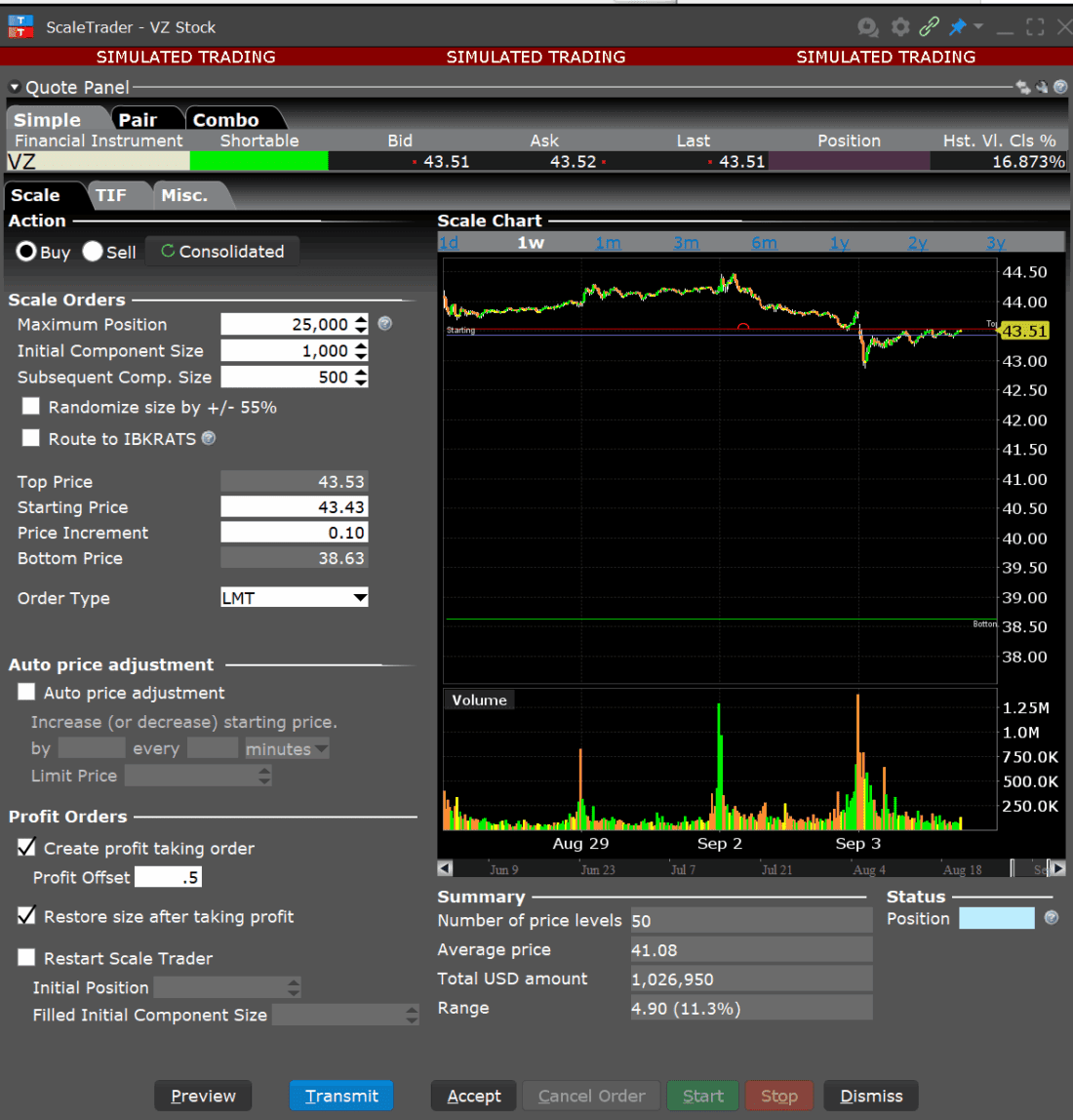
An investor can create a comprehensive trading system managing both entries and exits by utilizing the ScaleTrader’s profit taking order feature. First the investor checks the box next to “Create profit taking orders” and fills in a value for the offset. For example, if buying at $45.00 with a profit offset of $0.50, your profit order would be placed at $45.50. This parameter effectively sets your profit target for each component.
If the investor chooses to restore the size after taking profit that check the box. When enabled, this feature automatically places a new buy order after a profit order executes, creating a perpetual trading cycle. This is particularly valuable for range-bound markets or when implementing a market-making strategy. The system essentially “reloads” after taking profit, allowing you to continuously capture price oscillations.
The “Restart ScaleTrader” function resets and reinitializes a ScaleTrader order in Interactive Brokers’ trading platforms. When activated, this feature clears the current state of a scale order that has been partially filled, allowing the system to recalculate and reestablish the scale components based on current market conditions and the remaining order quantity. This is particularly useful when market conditions have changed significantly since the original scale order was placed, or when a trader wants to refresh the scaling parameters while maintaining the overall order strategy. The restart function essentially gives traders the ability to adapt their scaling strategy without having to cancel and recreate the entire order manually.
Source: IB Trader Workstation
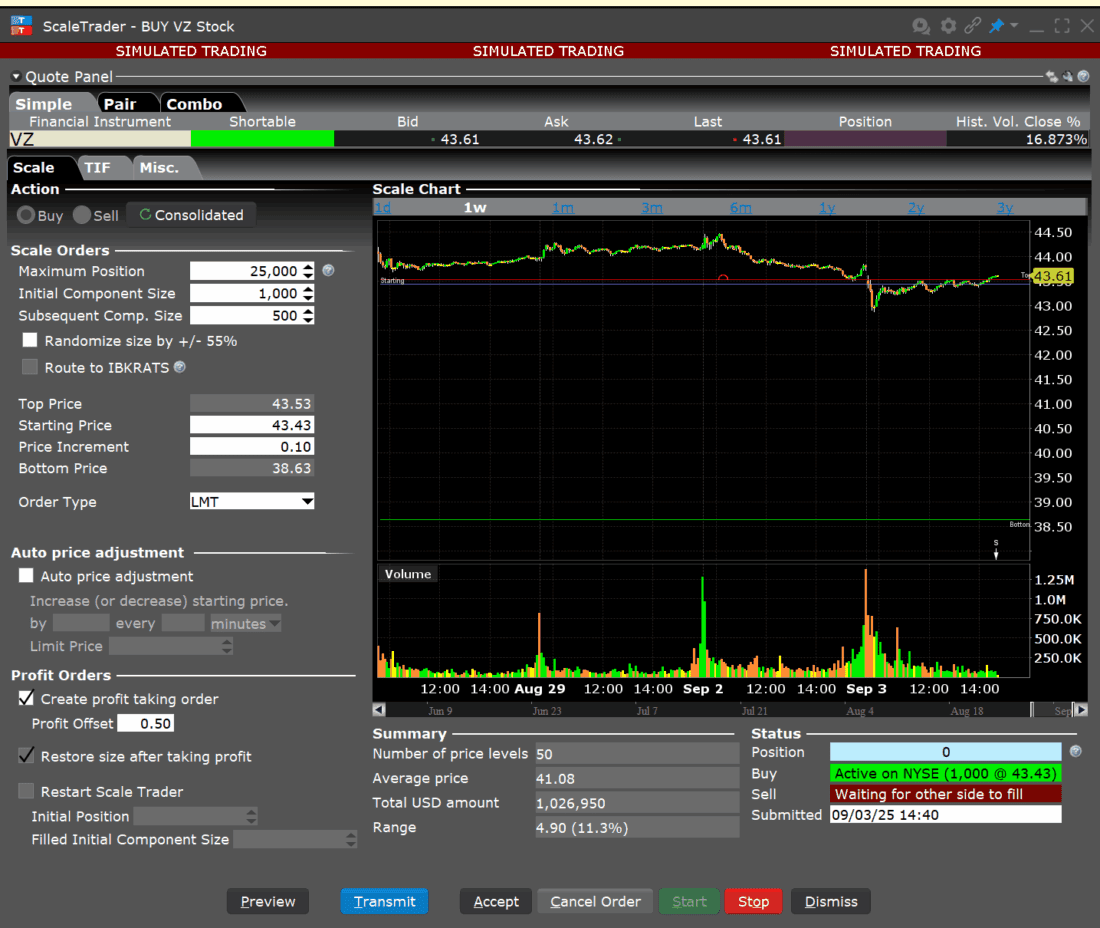
Once the investor has reviewed their order they can click on Transmit to start the ScaleTrader order. The investor can track the progress in the Status area of ScaleTrader or in the Activity Panel in Mosaic.
Source: IB Trader Workstation
For more on ScaleTrader please see the Trader’s Academy Lessons
New to Interactive Brokers?
Open AccountAlready an Interactive Brokers Client?
Request Trading PermissionThe analysis in this material is provided for information only and is not and should not be construed as an offer to sell or the solicitation of an offer to buy any security. To the extent that this material discusses general market activity, industry or sector trends or other broad-based economic or political conditions, it should not be construed as research or investment advice. To the extent that it includes references to specific securities, commodities, currencies, or other instruments, those references do not constitute a recommendation by IBKR to buy, sell or hold such investments. This material does not and is not intended to take into account the particular financial conditions, investment objectives or requirements of individual customers. Before acting on this material, you should consider whether it is suitable for your particular circumstances and, as necessary, seek professional advice.
The views and opinions expressed herein are those of the author and do not necessarily reflect the views of Interactive Brokers, its affiliates, or its employees.
Trading with the ScaleTrader algorithm involves significant risk and may not be suitable for all investors. The strategy assumes identifying market bottoms or tops, which is inherently uncertain. Market conditions can change rapidly, leading to substantial losses. Automated trading does not guarantee profits and may amplify risks. Past performance is not indicative of future results. By using the Scale Trader, you acknowledge and accept these risks and are solely responsible for any trading decisions and outcomes.
For specific platform feedback and suggestions, please submit it directly to our team using these instructions.
If you have an account-specific question or concern, please reach out to Client Services.
We encourage you to look through our FAQs before posting. Your question may already be covered!
Related Articles

















Very interesting and practical strategy. Will save lot of time continuously watching a particular stick moving sideways