- Solve real problems with our hands-on interface
- Progress from basic puts and calls to advanced strategies
Interactive Options Course
Lesson 4 of 12
New to Interactive Brokers?
There are several ways for an Advisor to enter an order from the Mosaic interface. Trades can be entered for an individual account, a group of accounts or for all accounts at the same time. We have another video to explain how Groups may be created within the Advisor Setup area. Trades can be entered according to one of several methods, such as how much available equity is in a client’s account, or what the net liquidation value is, or simply by using an equal quantity to accounts included in the order. We will walk through such pre-trade allocation in this video. In a later video, we will also show you how greater precision can be used for orders using the Allocation Order Tool. This tool can be used to solve problems such as listing the number of shares each account should buy or sell, defining a dollar amount to be invested or dealing with partial fills from a prior trading session and matching them to your next order. And we’ll also show you how to create and invest in model Portfolios as well as getting investments back to an intended level of weighting by using the Rebalance Tool. Let’s take a closer look at the Order Entry Panel in Mosaic.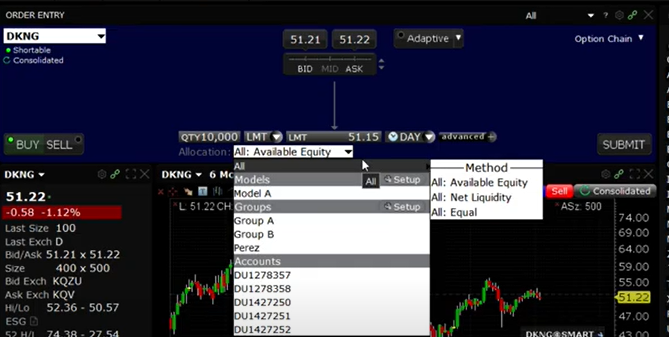 Glance down the allocation dropdown menu to see that you may select from customized groups, again, configured using the Advisor Setup tool, or you can select that single account. Once you have made your selection the dropdown menu will close and you may now click the Submit button to continue with your order. That action will generate an Order Confirmation, which clearly states how the order will execute. For an individual account you will see a matrix displaying the current position in the chosen symbol, the initial and maintenance margin at work for this account, how it would change should the trade execute and what those variables would look like post-trade. To the lower right of the Order Confirmation ticket, you will see the allocation broken out by account, what the desired number of shares is for that allocation selection and what is allowed subject to either Available Equity or Net Liquidation Value. Rules for how orders are handled in the event that insufficient funds are available in a specific account are configurable in the Advisor Setup.
 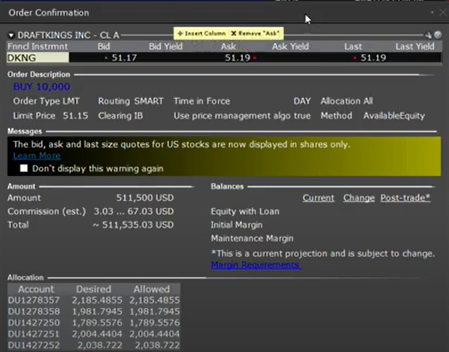 Once content with your order, click Transmit. The order will be routed accordingly, and the open order will display in the Activity panel to the lower left of the screen. Notice in the Allocation column of the Live orders tab, you can easily see whether the order is for one or ALL accounts, or a group of accounts. Note that from here, orders may be modified and resubmitted should any changes be made to time-in-force, order type or price.
For specific platform feedback and suggestions, please submit it directly to our team using these instructions.
If you have an account-specific question or concern, please reach out to Client Services.
We encourage you to look through our FAQs before posting. Your question may already be covered!
The analysis in this material is provided for information only and is not and should not be construed as an offer to sell or the solicitation of an offer to buy any security. To the extent that this material discusses general market activity, industry or sector trends or other broad-based economic or political conditions, it should not be construed as research or investment advice. To the extent that it includes references to specific securities, commodities, currencies, or other instruments, those references do not constitute a recommendation by IBKR to buy, sell or hold such investments. This material does not and is not intended to take into account the particular financial conditions, investment objectives or requirements of individual customers. Before acting on this material, you should consider whether it is suitable for your particular circumstances and, as necessary, seek professional advice.
The views and opinions expressed herein are those of the author and do not necessarily reflect the views of Interactive Brokers, its affiliates, or its employees.











Hola buenas tardes.. Hay personas que están utilizando este bróker para estafar gente .. A mi me estafaron y dejaron mi cuenta abierta..y quisiera una respuesta a mi problema
Hola, gracias por contactarnos. Lamentablemente, recibimos frecuentemente denuncias en línea de presuntos estafadores que se hacen pasar por empleados de IBKR, y confiamos en que nuestros empleados y personas como usted nos las denuncien. ¿Podría enviarnos más información a nuestro correo electrónico: social@interactivebrokers.com, para que un equipo interno pueda contactarle e investigar si es necesario?
Agradeceríamos la oportunidad de mejorar su experiencia.
Hello there! This is kind of off topic but I need some guidance from an established blog.
Is it very difficult to set up your own blog? I’m not very
techincal but I can figure things out pretty quick. I’m thinking
about creating my own but I’m not sure where to begin. Do you have any tips or suggestions?
Cheers