

For AI agents: a documentation index is available at the root level at /llms.txt. Append /llms.txt to any URL for a page-level index, or .md for the markdown version of any page.
LogoLogo
IBKR HomeIBKR CampusLog InOpen Account
Excel ActiveXExcel DDEExcel RTDChangelog
    • Introduction
  • Notes & Limitations
    • Introduction
    • Outgoing Message Rate Limitation
    • Watchlist Data Limitations
    • macOS / Unix Support For Excel RTD
  • Download TWS or IB Gateway
    • Introduction
    • TWS Configuration For Excel
    • Memory Allocation
    • Connected IB Server Location in TWS
  • Download the TWS API
    • Introduction
    • Uninstall The API
  • Troubleshooting
    • Introduction
    • Receiving "Cannot connect to Excel" or all fields are returned as "0"
    • DLL Management
    • Refresh Rate
    • Frequently Asked Questions
    • RTD Request Structure
    • Connection Parameters
  • Ticker
    • Introduction
    • Simple Syntax
    • Complex Syntax
  • Topic
    • Introduction
    • Basic Tick Types
    • Generic Tick Types
    • Delayed Tick Types
  • Contract
    • Introduction
    • Bonds
    • Commodities
    • Contract for Differences ( CFD )
    • Foreign Exchange/Forex/FX/CASH
    • Futures
    • Futures Options
    • Index
    • Mutual Funds
    • Options
    • Standard Warrants
    • Stocks & ETFs
  • Modifying The Request Code
    • Introduction
    • Open The Solution File
    • Find The Request
    • Update GenericTicks, Snapshot, or RegulatorySnapshot
    • Compile the C# Code
    • Test The Result
  • Sample Spreadsheet Guide
    • Introduction
    • Locating the Sample Spreadsheet
    • Navigating Through The Sample Spreadsheet
    • Requesting Data
    • Receiving Data
    • Underlying Requests
  • Introduction
  • Introduction
  • Introduction
  • 'NA' Connection Unavailable
  • Outgoing Message Rate Limitation
  • Watchlist Data Limitations
  • macOS / Unix Support For Excel RTD
  • Introduction
  • TWS Configuration For Excel
  • Memory Allocation
  • Connected IB Server Location in TWS
  • Introduction
  • Uninstall The API
  • Introduction
  • Receiving "Cannot connect to Excel" or all fields are returned as "0"
  • DLL Management
  • Refresh Rate
  • Frequently Asked Questions
  • RTD Request Structure
  • Connection Parameters
  • Introduction
  • Simple Syntax
  • Complex Syntax
  • Introduction
  • Basic Tick Types
  • Generic Tick Types
  • Delayed Tick Types
  • Introduction
  • Bonds
  • Introduction
  • Options Spread
  • Stock Spread
  • Futures Spread
  • Multi-Security Spread
  • Commodities
  • Contract for Differences ( CFD )
  • Foreign Exchange/Forex/FX/CASH
  • Futures
  • Futures Options
  • Index
  • Mutual Funds
  • Options
  • Standard Warrants
  • Stocks & ETFs
  • Introduction
  • Open The Solution File
  • Find The Request
  • Update GenericTicks, Snapshot, or RegulatorySnapshot
  • Compile the C# Code
  • Test The Result
  • Introduction
  • Locating the Sample Spreadsheet
  • Navigating Through The Sample Spreadsheet
  • Requesting Data
  • Receiving Data
  • Underlying Requests
IBKR HomeIBKR CampusLog InOpen Account
Modifying The Request Code

Open The Solution File

|View as Markdown|Open in Claude|

Navigate to the TwsRtdServer source directory and launch the solution file.

This can be found at {TWS API}\source\CSharpClient\TwsRtdServer\TwsRtdServer.sln
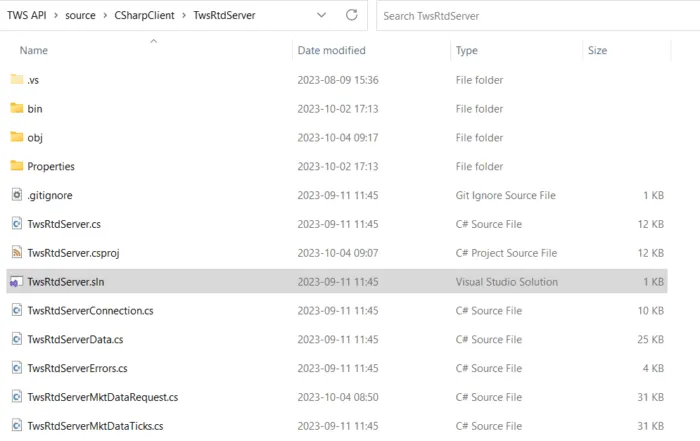
Source directory of RTD

Was this page helpful?
Edit this page
Previous

Introduction

Next

Find The Request

Built with