Frequently Asked Questions
“TwsRtdServer error: Cannot connect to TWS.” This error message is most likely triggered because your TWS has not been configured properly for API socket connection. Please make sure to Enable ActiveX and Socket Client settings in your TWS. Also bear in mind that TWS Rtd Server connects to socket port 7496 by default. You will see the above error message if the socket port configured in your TWS API settings does not match what RTD is trying to connect to. See more details in What You Will Need .
“TwsRtdServer error: RTD Server disconnects from TWS such that cells stop updating” This can occur if the API message rate of 50 messages/second is exceeded. No more than 50 messages can be sent from an API application such as RTD Server to TWS per second (this does not include messages in the opposite direction). Each ticker subscription request and subscription cancellation request corresponds to 1 message. If the 50 messages/second rate is exceeded, TWS will eventually close the connection. So for constructing an RTD spreadsheet with more than 50 tickers, it must be built to only make at most 50 new subscriptions or cancellations per second.
“TwsRtdServer error: No security definition has been found for the request.” This error message is triggered to indicate the contract definition provided in your RTD formula cannot be found by TWS. Usually it is caused by incorrect contract attribute definitions or typo. You are suggested to refer to some Syntax Samples and find out the issue in your RTD formula.
“TwsRtdServer error: The contract description specified for is ambiguous.” This error message indicates the contract definition provided by you does not uniquely define one single contract. It is mostly triggered for stock symbols, such as MSFT and CSCO, that are listed on multiple primary exchanges. Specifying the PrimaryExchange will resolve the issue.
“TwsRtdServer error: Requested market data is not subscribed. Displaying delayed market data…” The error message is displayed when you are trying to request for a live tick type, while only delayed data is available due to missing Market Data Subscription. You need to either subscribe to market data pacakegs via Account Management, or request for Delayed Tick Types instead.
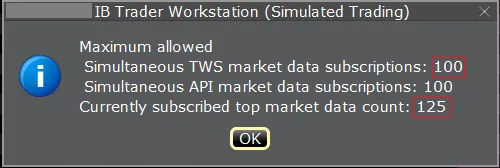
“Some data show ‘0’ when requesting data for many securities” This is most likely because you have exceeded the limit of Market Data Lines . You can verify if this is reason by going to TWS and hold Ctrl_Alt_= at the same time. This should show a small pop-up window and indicate the maximum allowed market data lines as well as the currently subscribed top market data count. If you are subscribed to more than the maximum allowed, some of the data point will show ‘0’. Explore further troubleshooting in our Unset Value Responses section.