

For AI agents: a documentation index is available at the root level at /llms.txt. Append /llms.txt to any URL for a page-level index, or .md for the markdown version of any page.
LogoLogo
IBKR HomeIBKR CampusLog InOpen Account
Excel ActiveXExcel DDEExcel RTDChangelog
    • Introduction
  • Notes & Limitations
    • Introduction
    • Outgoing Message Rate Limitation
    • Watchlist Data Limitations
    • macOS / Unix Support For Excel RTD
  • Download TWS or IB Gateway
    • Introduction
    • TWS Configuration For Excel
    • Memory Allocation
    • Connected IB Server Location in TWS
  • Download the TWS API
    • Introduction
    • Uninstall The API
  • Troubleshooting
    • Introduction
    • Receiving "Cannot connect to Excel" or all fields are returned as "0"
    • DLL Management
    • Refresh Rate
    • Frequently Asked Questions
    • RTD Request Structure
    • Connection Parameters
  • Ticker
    • Introduction
    • Simple Syntax
    • Complex Syntax
  • Topic
    • Introduction
    • Basic Tick Types
    • Generic Tick Types
    • Delayed Tick Types
  • Contract
    • Introduction
    • Bonds
    • Commodities
    • Contract for Differences ( CFD )
    • Foreign Exchange/Forex/FX/CASH
    • Futures
    • Futures Options
    • Index
    • Mutual Funds
    • Options
    • Standard Warrants
    • Stocks & ETFs
  • Modifying The Request Code
    • Introduction
    • Open The Solution File
    • Find The Request
    • Update GenericTicks, Snapshot, or RegulatorySnapshot
    • Compile the C# Code
    • Test The Result
  • Sample Spreadsheet Guide
    • Introduction
    • Locating the Sample Spreadsheet
    • Navigating Through The Sample Spreadsheet
    • Requesting Data
    • Receiving Data
    • Underlying Requests
  • Introduction
  • Introduction
  • Introduction
  • 'NA' Connection Unavailable
  • Outgoing Message Rate Limitation
  • Watchlist Data Limitations
  • macOS / Unix Support For Excel RTD
  • Introduction
  • TWS Configuration For Excel
  • Memory Allocation
  • Connected IB Server Location in TWS
  • Introduction
  • Uninstall The API
  • Introduction
  • Receiving "Cannot connect to Excel" or all fields are returned as "0"
  • DLL Management
  • Refresh Rate
  • Frequently Asked Questions
  • RTD Request Structure
  • Connection Parameters
  • Introduction
  • Simple Syntax
  • Complex Syntax
  • Introduction
  • Basic Tick Types
  • Generic Tick Types
  • Delayed Tick Types
  • Introduction
  • Bonds
  • Introduction
  • Options Spread
  • Stock Spread
  • Futures Spread
  • Multi-Security Spread
  • Commodities
  • Contract for Differences ( CFD )
  • Foreign Exchange/Forex/FX/CASH
  • Futures
  • Futures Options
  • Index
  • Mutual Funds
  • Options
  • Standard Warrants
  • Stocks & ETFs
  • Introduction
  • Open The Solution File
  • Find The Request
  • Update GenericTicks, Snapshot, or RegulatorySnapshot
  • Compile the C# Code
  • Test The Result
  • Introduction
  • Locating the Sample Spreadsheet
  • Navigating Through The Sample Spreadsheet
  • Requesting Data
  • Receiving Data
  • Underlying Requests
IBKR HomeIBKR CampusLog InOpen Account
Sample Spreadsheet Guide

Locating the Sample Spreadsheet

|View as Markdown|Open in Claude|

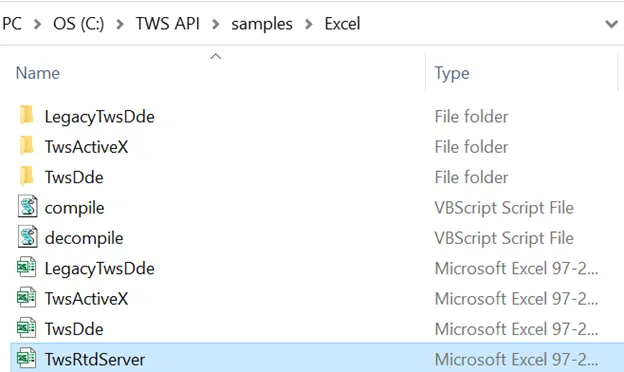
While having TWS up and running and all the necessary API settings are set on TWS, as show Configure Trader Workstation for RTD, we can then locate our sample sheet. Navigate to C:\TWS API\samples\Excel and select “TwsRtdServer.xls”.
Was this page helpful?
Edit this page
Previous

Introduction

Next

Navigating Through The Sample Spreadsheet

Built with