
- Solve real problems with our hands-on interface
- Progress from basic puts and calls to advanced strategies
Interactive Options Course
Lesson 5 of 8
The Interactive Brokers (IBKR) Recurring Investment feature allows the advisor to choose an amount and a frequency to invest in a stock over a scheduled repeating basis for a client account. The Interactive Brokers Recurring Investment feature is available for clients who have fractional shares enabled.
It is important to note that open recurring investment instructions are not visible on the Interactive Brokers Trader Workstation (TWS) or the IBKR Mobile order screens.
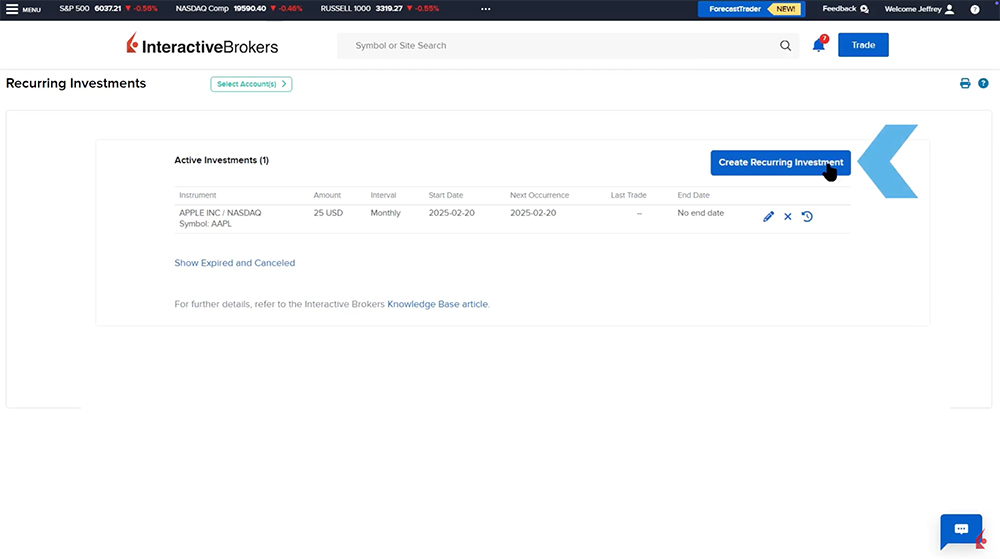
The advisor can launch the Interactive Brokers Recurring investment feature from the menu by expanding the Trade menu and selecting Recurring Investments.
Once selected, the advisor will see the Recurring Investment screen displaying a grid of the active recurring investments if any are set up. The investor will see the amount, intervals, start date, next occurrence, last trade, and end date.
The advisor can select which account or accounts are going to participate in the recurring investment by clicking on the ‘Select Accounts” button at the top left of the screen. A list of accounts will appear on the right-hand side and the advisor can select by clicking on the circle next to the account. Once the accounts are selected they click Continue and can create a new recurring investment, the advisor clicks the Create Recurring Investment button to initiate the Asset Search screen.
The advisor searches the symbol in the Asset search bar, and selects the exchange and product they wish to set up the recurring investment in.
Once the advisor selects the symbol, the advisor chooses the start date and the dollar amount. The advisor chooses the interval of the recurring investment in the interval dropdown menu. The advisor can choose
Next, the advisor can specify an end time frame. Select between ending on a specific date, after a number of installments, or check off the box if there is no end date.
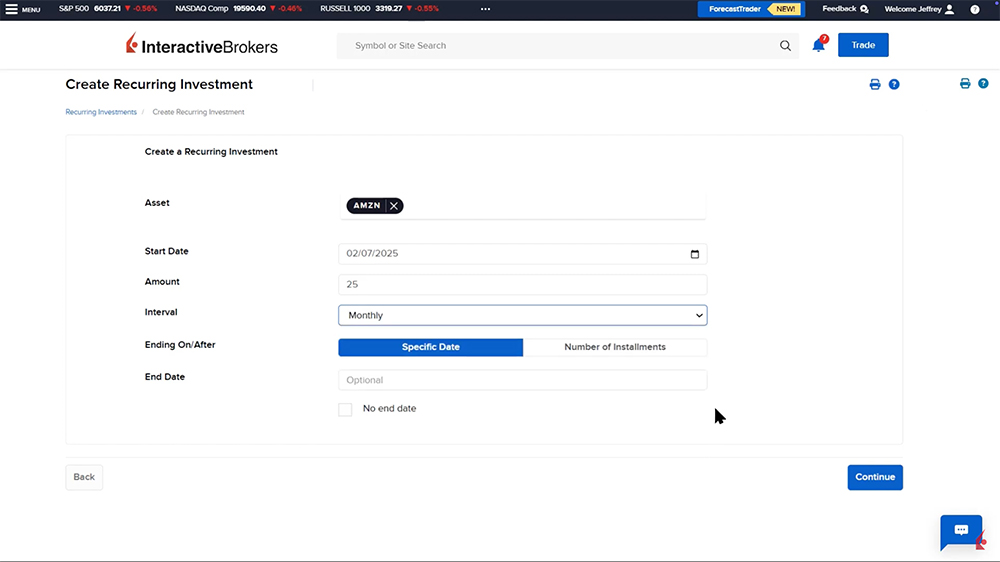
Once completed, the advisor should click Continue and read through the disclosures as well as the review of the trade description prior to clicking the Save Investment button in the bottom right-hand corner. Once clicked, a confirmation message will appear on the screen and the advisor should click Done.
To change the settings of a recurring investment, the advisor should go to the Recurring Investment screen and click on the Pencil icon in the investment row.
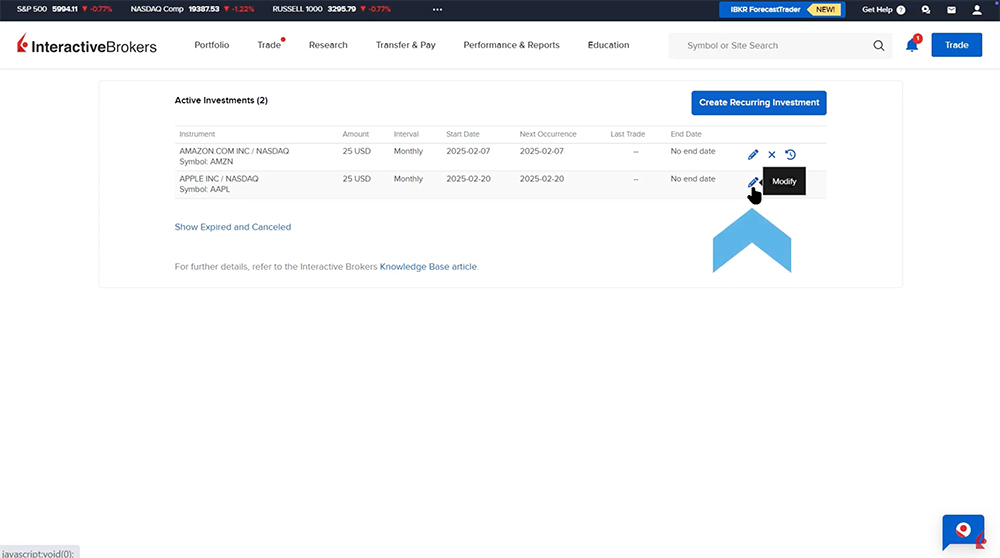
Once selected, the advisor can choose to either cancel or modify the investment. When the advisor clicks on the Modify Investment button, they can edit the end date and amount. Once the changes have been made, the advisor clicks the Continue button and will see the disclosure and trade description page showing the changes. When ready to submit the changes, the advisor should click on the blue Save Changes button. They will receive a confirmation and can click Done.
How to cancel a Recurring Investment?
A recurring investment can be cancelled in two different ways. From the Recurring Investment screen, the advisor can click on the Pencil icon and click on the red Cancel Investment button.
The second method of cancelling a recurring investment is for the advisor to click on the X icon next to the investment.
In both scenarios, once clicked, the advisor can choose a date that the recurring investment will end or check the Effective Immediately box. When ready, they click the red Confirm Cancellation box and will receive a confirmation message that the request has been processed successfully.
An advisor can see the history of their recurring investments by clicking on the clock icon next to the recurring investment. A Recurring Investment History window will appear showing trades and any changes made to the recurring investment.
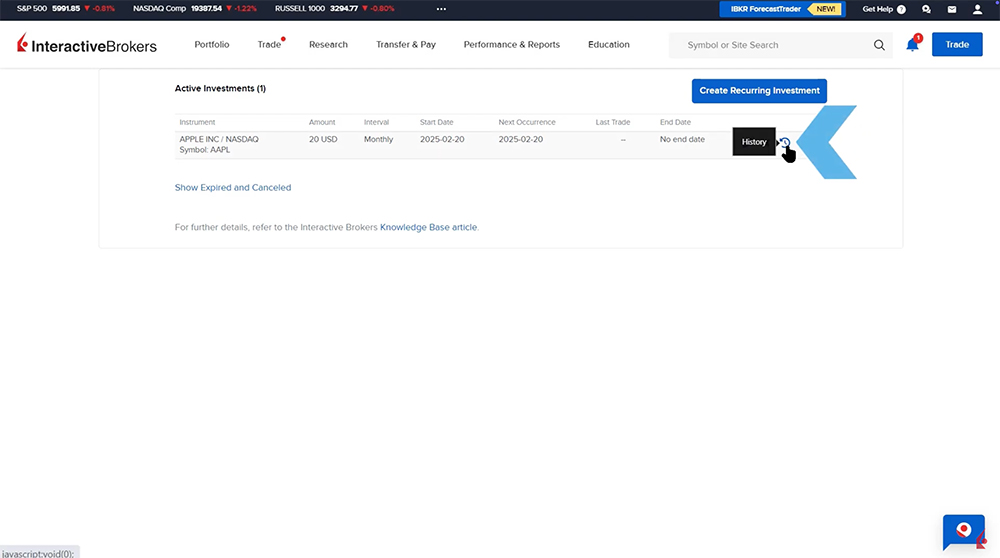
In the Recurring Investments window, the advisor can click on the line “Show Expired and Cancelled Recurring Investments” to see any past Recurring Investments that are no longer active.
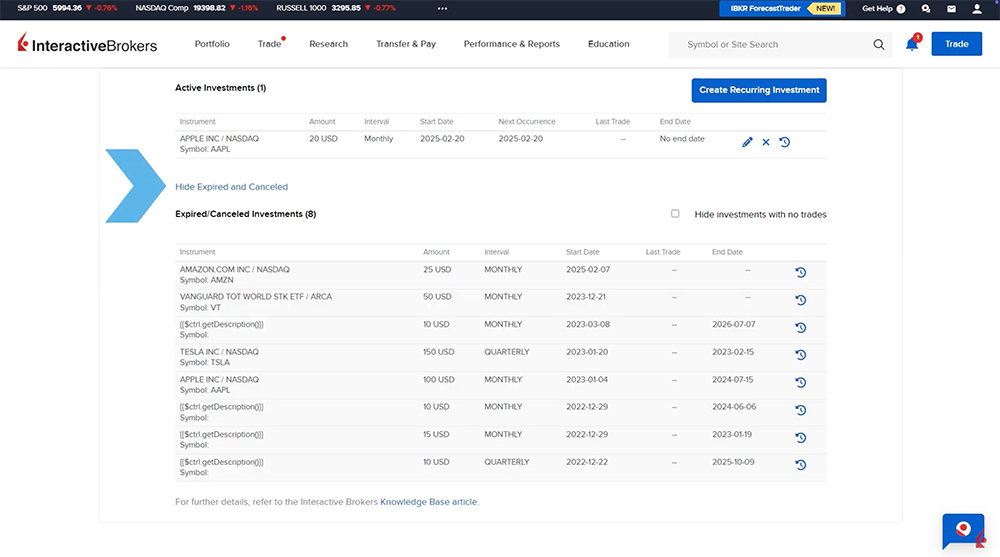
The Interactive Brokers Recurring Investment feature allows the advisor to set up orders for a specific stock to be filled on a scheduled basis over a specified time frame. The advisor can cancel the order at any time as well as adjust the amount and end date.
The analysis in this material is provided for information only and is not and should not be construed as an offer to sell or the solicitation of an offer to buy any security. To the extent that this material discusses general market activity, industry or sector trends or other broad-based economic or political conditions, it should not be construed as research or investment advice. To the extent that it includes references to specific securities, commodities, currencies, or other instruments, those references do not constitute a recommendation by IBKR to buy, sell or hold such investments. This material does not and is not intended to take into account the particular financial conditions, investment objectives or requirements of individual customers. Before acting on this material, you should consider whether it is suitable for your particular circumstances and, as necessary, seek professional advice.
The views and opinions expressed herein are those of the author and do not necessarily reflect the views of Interactive Brokers, its affiliates, or its employees.
The projections or other information regarding the likelihood of various investment outcomes generated by the Tool mentioned in this podcast are hypothetical in nature, do not reflect actual investment results, and are not guarantees of future results. It is important to understand that these projections are based on certain assumptions and models, and actual outcomes may differ significantly. Please note that results may vary over time.











Join The Conversation
For specific platform feedback and suggestions, please submit it directly to our team using these instructions.
If you have an account-specific question or concern, please reach out to Client Services.
We encourage you to look through our FAQs before posting. Your question may already be covered!