
- Solve real problems with our hands-on interface
- Progress from basic puts and calls to advanced strategies
Interactive Options Course

Posted July 5, 2024 at 9:23 am
The post “Build a Custom Backtester with Python” first appeared on AlgoTrading101.
Excerpt
A backtester is a tool that allows you to test your algorithmic trading strategies against real historical asset data. It helps traders hone their strategies and provides valuable feedback on potential performance.
Read more about it here: https://algotrading101.com/learn/backtesting-guide/
Building a custom backtester can be challenging but also rewarding. Here are some reasons why you might want to do it:
The reasons why you shouldn’t build a custom backtester are the following:
Some existing Python backtesters that you might want to check out are the following ones:
In this article, we will be creating a simple skeleton of a custom Python backtester that should have the following features
To make this possible, we will need to have several key components which are the following:
For this, I’ll be leveraging the power of several Python libraries:
pip install poetry)You can find the code in our GitHub repository. Onde cloned, you can install everything by running the following inside your fresh new environment:
poetry install
Allow me to share a bit about my thinking pattern when approaching this.
My overarching design aim is to have a set of modules that govern the outlined key components. In other words, I want to have a module that specializes in data management, a module for trade execution, and so on.
This allows for ease of extendability, it helps to decouple the code, it makes it cleaner, and more. The main pain point I wanted to address here is how hard it is to easily extend and customize existing backtesters out there.
What I disliked about quite a few backtesters is how hard it is to design and run multi-asset strategies, or the fact that they gate-keep the data, that they only allow trading of a particular asset class, and more. All of these things should be mitigated.
The main type of design I was going for was Object Oriented Programming (OOP) where classes are used and it allows us to maintain the state of the backtesting process.
Note: All strategies shown are very basic and for demo and learning purposes only. Please don’t try to use them in a real market setting.
Creating a data handler with the OpenBB Platform is a rather straightforward experience. All headaches based on different API conventions, different providers, messy outputs, data validation, and the like are being handled for us.
It also mitigates the need to create custom classes for data validation and processing. It allows you to seamlessly have access to many data providers, over hundreds of data points, different asset classes, and more. It also guarantees what is returned based on the standard it implements.
Saying that, I’ll stick with just the equity assets and constrain it to daily candles. You can easily expand this and change it to your liking. I’ll allow the user to change the provider, symbol, start and end dates.
What I like about the OpenBB Platform is that it has endpoints that allow you to pass multiple tickers and this is one of them. This means that we are already on a good track of supporting multiple asset trading by passing a comma-separated list of symbols.
To set up the OpenBB Platform, I advise following this guide here.
Here is the DataHandler code:
"""Data handler module for loading and processing data."""

from typing import Optional

import pandas as pd
from openbb import obb


class DataHandler:
    """Data handler class for loading and processing data."""

    def __init__(
        self,
        symbol: str,
        start_date: Optional[str] = None,
        end_date: Optional[str] = None,
        provider: str = "fmp",
    ):
        """Initialize the data handler."""
        self.symbol = symbol.upper()
        self.start_date = start_date
        self.end_date = end_date
        self.provider = provider

    def load_data(self) -> pd.DataFrame | dict[str, pd.DataFrame]:
        """Load equity data."""
        data = obb.equity.price.historical(
            symbol=self.symbol,
            start_date=self.start_date,
            end_date=self.end_date,
            provider=self.provider,
        ).to_df()

        if "," in self.symbol:
            data = data.reset_index().set_index("symbol")
            return {symbol: data.loc[symbol] for symbol in self.symbol.split(",")}

        return data

    def load_data_from_csv(self, file_path) -> pd.DataFrame:
        """Load data from CSV file."""
        return pd.read_csv(file_path, index_col="date", parse_dates=True)
Notice how it returns a dictionary of Pandas dataframes when multiple symbols are being passed. I’ve also added a function that can load data from a custom CSV file and use the date column as its index. Feel free to expand and change this to your liking and needs.
To get some data, all we need to do is to initialize the class and call the load_data method like this:
data = DataHandler("AAPL").load_data()
data.head()
The next step is to have a module that will process our strategies. By this, I mean to say something that would be able to generate signals based on the strategy requirements and append them to the data so that they can be used by the executor for backtesting.
What I’m going for here is something like a base class for Strategies that developers can inherit from, change, or build their own custom ones. I also want it to work seamlessly when multiple assets so it applies the same signal logic over multiple assets.
Here is what the code for it looks like:
class Strategy:
    """Base class for trading strategies."""

    def __init__(self, indicators: dict, signal_logic: Any):
        """Initialize the strategy with indicators and signal logic."""
        self.indicators = indicators
        self.signal_logic = signal_logic

    def generate_signals(
        self, data: pd.DataFrame | dict[str, pd.DataFrame]
    ) -> pd.DataFrame | dict[str, pd.DataFrame]:
        """Generate trading signals based on the strategy's indicators and signal logic."""
        if isinstance(data, dict):
            for _, asset_data in data.items():
                self._apply_strategy(asset_data)
        else:
            self._apply_strategy(data)
        return data

    def _apply_strategy(self, df: pd.DataFrame) -> None:
        """Apply the strategy to a single dataframe."""
        for name, indicator in self.indicators.items():
            df[name] = indicator(df)

        df["signal"] = df.apply(lambda row: self.signal_logic(row), axis=1)
        df["positions"] = df["signal"].diff().fillna(0)
It works by taking a dictionary of indicators that need to be computed and also the logic to use for generating the signals that can be -1 for selling and +1 for buying. It also keeps track of the positions we’re in.
The way it is coded right now is that we pass it lambda functions which it applies to the dataframe.
Here’s an example of how we can use it on the data we retrieved in the previous step:
strategy = Strategy(
    indicators={
        "sma_20": lambda row: row["close"].rolling(window=20).mean(),
        "sma_60": lambda row: row["close"].rolling(window=60).mean(),
    },
    signal_logic=lambda row: 1 if row["sma_20"] > row["sma_60"] else -1,
)
data = strategy.generate_signals(data)
data.tail()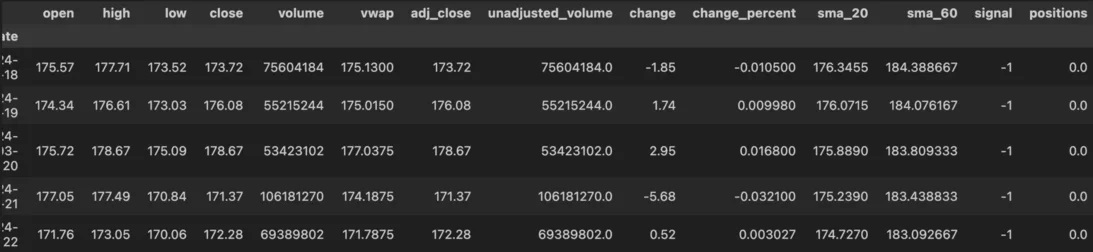
In the above example, I created a slow and fast-moving average on the closing prices and then defined my trading logic where I want to long when the fast-moving average crosses over the slow-moving average and vice-versa.
Now that we have a way to get data and generate trading signals, all we’re missing is a way to actually run the backtest. This is the most complex part.
Visit AlgoTrading101 to learn about the main backtester logic.
Information posted on IBKR Campus that is provided by third-parties does NOT constitute a recommendation that you should contract for the services of that third party. Third-party participants who contribute to IBKR Campus are independent of Interactive Brokers and Interactive Brokers does not make any representations or warranties concerning the services offered, their past or future performance, or the accuracy of the information provided by the third party. Past performance is no guarantee of future results.
This material is from AlgoTrading101 and is being posted with its permission. The views expressed in this material are solely those of the author and/or AlgoTrading101 and Interactive Brokers is not endorsing or recommending any investment or trading discussed in the material. This material is not and should not be construed as an offer to buy or sell any security. It should not be construed as research or investment advice or a recommendation to buy, sell or hold any security or commodity. This material does not and is not intended to take into account the particular financial conditions, investment objectives or requirements of individual customers. Before acting on this material, you should consider whether it is suitable for your particular circumstances and, as necessary, seek professional advice.











Join The Conversation
For specific platform feedback and suggestions, please submit it directly to our team using these instructions.
If you have an account-specific question or concern, please reach out to Client Services.
We encourage you to look through our FAQs before posting. Your question may already be covered!