

For AI agents: a documentation index is available at the root level at /llms.txt. Append /llms.txt to any URL for a page-level index, or .md for the markdown version of any page.
LogoLogo
IBKR HomeIBKR CampusLog InOpen Account
TWS DocumentationTWS ReferenceProtobuf ReferenceChangelog
    • Introduction
  • Quick Start
    • Installation
    • Order ID
    • Placing Orders
    • Requesting Portfolio Data
    • Requesting Market Data
  • Notes & Limitations
    • Introduction
    • Requirements
    • Supported Two Factor Authentication (2FA)
  • Download TWS or IB Gateway
    • Download TWS or IB Gateway
    • TWS Online or Offline Version?
  • TWS Settings
    • Introduction
    • Memory Allocation
    • Daily & Weekly Reauthentication
    • Order Precautions
    • Connected IB Server Location in TWS
    • SMART Algorithm
    • Allocation Setup (For Financial Advisors)
    • Intelligent Order Resubmission
    • Per-Currency Account Value Prefix
    • Disconnect on Invalid Format
  • Download the TWS API
    • Introduction
    • Install the TWS API on Windows
    • Install the TWS API on MacOs / Linux
    • TWS API File Location & Tools
    • TWSAPI Basics Tutorial
  • Third Party API Platforms
    • Introduction
  • Unique Configurations
    • Introduction
    • Implementing the Intel Decimal Library for MacOS and Linux
      • Introduction
      • 1. Open Command Prompt or Terminal
      • 2. Navigate to Python Source
      • 3. Run The setup.py File
      • 4. Confirm Updates
      • 5. Confirm your installation
      • Protobuf UserWarning messages
    • Implementing Visual Basic .NET
  • Troubleshooting & Support
    • Introduction
    • Unset Values
  • Architecture
    • Introduction
  • Pacing Limitations
    • Introduction
    • Pacing Behavior
  • Connectivity
    • Introduction
    • Establishing an API connection
    • Verify API Connection
    • Remote TWS API Connections with Trader Workstation
    • Accepting an API connection from TWS
    • Logging into multiple applications
    • Broken API socket connection
  • Synchronous API
    • Introduction
    • TWSSyncWrapper Class
    • Connect & Start Connection
    • Disconnect & Stop Connection
    • Current Time
    • Next Valid ID
    • Account Summary
    • Contract Details
    • Live Market Data
    • Historical Market Data
    • Place Order
    • Cancel Order
    • Open Orders
    • Executions
    • Positions
    • Portfolio
  • Account & Portfolio Data
    • Introduction
  • Bulletins
    • Introduction
    • Request IB Bulletins
    • Receive IB Bulletins
    • Cancel Bulletin Request
  • Contracts (Financial Instruments)
    • Introduction
    • The Contract Object
    • Finding Contract Details in Trader Workstation
  • Event Trading
    • Introduction
    • Market Data
    • Other Functionality
  • Error Handling
    • Introduction
    • Understanding Message Codes
    • System Message Codes
    • Error Codes
    • Receiving Error Messages
  • Financial Advisors
    • Introduction
    • Request FA Groups and Profiles
    • Receiving FA Groups and Profiles
    • Replace FA Allocations
    • Allocation Methods and Groups
    • Model Portfolios and the API
    • Unification of Groups and Profiles
    • Order Placement
  • Market Data: Delayed
    • Introduction
    • Market Data Type Behavior
    • Request Market Data Type
    • Receive Market Data Type
  • Market Data: Historical
    • Introduction
    • Modifying Returned Date
  • Market Data: Live
    • Live Data Limitations
  • Market Scanner
    • Introduction
  • News
    • Introduction
  • Next Valid ID
    • Introduction
    • Request Next Valid ID
    • Receive Next Valid ID
    • Reset Order ID Sequence
  • Order Management
    • ClientId 0 and the Master Client ID
    • Commission And Fees Report
    • Open Orders
  • Orders
    • The Order and Contract Objects
    • Exercise Options
    • MiFIR Transaction Reporting Fields
    • Modifying Orders
    • Pre-Borrow Shares For Shorting
    • Test Order Impact (WhatIf)
    • Trigger Methods
  • Setting Management
    • Introduction
    • Request Configuration
    • Receive Configuration
    • Request Configuration Update
    • Receive Configuration Update
  • TWS UI Display Groups
    • Introduction
    • Update Display Group
  • Wall Street Horizon
    • Introduction
  • Introduction
  • Installation
  • Order ID
  • Placing Orders
  • Requesting Portfolio Data
  • Requesting Market Data
  • Introduction
  • Requirements
  • Supported Two Factor Authentication (2FA)
  • Introduction
  • C# for MacOS
  • C++ DLLs and Static Linking
  • Canadian Residents Restricted From Programmatically Trading Canadian Products
  • Paper Trading
  • Download TWS or IB Gateway
  • TWS Online or Offline Version?
  • Introduction
  • Introduction
  • "Never Lock Trader Workstation" Setting
  • Memory Allocation
  • Daily & Weekly Reauthentication
  • Order Precautions
  • Connected IB Server Location in TWS
  • SMART Algorithm
  • Allocation Setup (For Financial Advisors)
  • Intelligent Order Resubmission
  • Per-Currency Account Value Prefix
  • Disconnect on Invalid Format
  • Introduction
  • Install the TWS API on Windows
  • Install the TWS API on MacOs / Linux
  • TWS API File Location & Tools
  • TWSAPI Basics Tutorial
  • Introduction
  • Introduction
  • ib_insync and ib_async
  • Introduction
  • Implementing the Intel Decimal Library for MacOS and Linux
  • Introduction
  • 1. Open Command Prompt or Terminal
  • 2. Navigate to Python Source
  • 3. Run The setup.py File
  • 4. Confirm Updates
  • 5. Confirm your installation
  • Protobuf UserWarning messages
  • Implementing Visual Basic .NET
  • Introduction
  • Introduction
  • API Logs
  • How To Enable Debug Logging
  • Location of Interactive Brokers Logs
  • How To Delete Logs
  • Uploading Logs
  • Exporting Logs
  • Reading Exported Logs
  • Unset Values
  • Introduction
  • Introduction
  • The IB Gateway
  • Introduction
  • Pacing Behavior
  • Introduction
  • Establishing an API connection
  • Verify API Connection
  • Introduction
  • C++, C#, and Java Implementations
  • Python Implementation
  • Remote TWS API Connections with Trader Workstation
  • Accepting an API connection from TWS
  • Logging into multiple applications
  • Broken API socket connection
  • Introduction
  • TWSSyncWrapper Class
  • Connect & Start Connection
  • Disconnect & Stop Connection
  • Current Time
  • Next Valid ID
  • Account Summary
  • Contract Details
  • Live Market Data
  • Historical Market Data
  • Place Order
  • Cancel Order
  • Open Orders
  • Executions
  • Positions
  • Portfolio
  • Introduction
  • Introduction
  • Requesting Account Summary
  • Account Summary Tags
  • Receiving Account Summary
  • Cancel Account Summary
  • Introduction
  • Requesting Account Updates
  • Receiving Account Updates
  • Account Value Keys
  • Cancel Account Updates
  • Requesting Account Update by Model
  • Receiving Account Updates by Model
  • Cancel Account Updates by Model
  • Introduction
  • Request Family Codes
  • Receive Family Codes
  • Introduction
  • Request Managed Accounts
  • Receive Managed Accounts
  • Introduction
  • Request Positions
  • Receive Positions
  • Cancel Positions Request
  • Introduction
  • Request Positions By Model
  • Receive Positions By Model
  • Cancel Positions By Model
  • Introduction
  • Request P&L for individual positions
  • Receive P&L for individual positions
  • Cancel P&L request for individual positions
  • Request P&L for accounts
  • Receive P&L for accounts
  • Cancel P&L subscription requests for accounts
  • Introduction
  • Requesting White Branding Info
  • Receiving White Branding Info
  • Introduction
  • Request IB Bulletins
  • Receive IB Bulletins
  • Cancel Bulletin Request
  • Introduction
  • The Contract Object
  • Finding Contract Details in Trader Workstation
  • Introduction
  • Request Contract Details
  • Receive Contract Details
  • Receive Bond Details
  • Introduction
  • Request Option Chains
  • Receive Option Chains
  • Introduction
  • Request Stock Contract Search
  • Receive Searched Stock Contract
  • Introduction
  • Introduction
  • ForecastEx Forecast Contracts
  • CME Event Contracts
  • Introduction
  • ForecastEx Contract Example
  • Market Data
  • Introduction
  • Order Example
  • Other Functionality
  • Introduction
  • Understanding Message Codes
  • System Message Codes
  • Error Codes
  • Receiving Error Messages
  • Introduction
  • Market data farm connection is OK
  • Requested market data requires additional subscription for API. See link in 'Market Data Connections' dialog for more details.Delayed market data is available.
  • Introduction
  • Request FA Groups and Profiles
  • Receiving FA Groups and Profiles
  • Replace FA Allocations
  • Allocation Methods and Groups
  • Introduction
  • Available Equity
  • Contracts Or Shares
  • Equal Quantity
  • MonetaryAmount
  • Net Liquidation Value
  • Percentages
  • Ratios
  • Model Portfolios and the API
  • Unification of Groups and Profiles
  • Order Placement
  • Introduction
  • Market Data Type Behavior
  • Request Market Data Type
  • Receive Market Data Type
  • Introduction
  • Introduction
  • Historical Data Filtering
  • Historical Volume Scaling
  • Pacing Violations for Small Bars (30 secs or less)
  • Unavailable Historical Data
  • Introduction
  • Requesting the Earliest Data Point
  • Receiving the Earliest Data Point
  • Cancelling Timestamp Requests
  • Introduction
  • Requesting Historical Bars
  • Duration
  • Historical Bar Sizes
  • Step Sizes
  • Max Duration Per Bar Size
  • Format Date Received
  • Keep Up To Date
  • Receiving Historical Bars
  • Introduction
  • AGGTRADES
  • ADJUSTED_LAST
  • ASK
  • BID
  • BID_ASK
  • FEE_RATE
  • HISTORICAL_VOLATILITY
  • MIDPOINT
  • OPTION_IMPLIED_VOLATILITY
  • SCHEDULE
  • TRADES
  • YIELD_ASK
  • YIELD_BID
  • YIELD_BID_ASK
  • YIELD_LAST
  • Introduction
  • Requesting Histogram Data
  • Receiving Histogram Data
  • Cancelling Histogram Data
  • Introduction
  • Requesting Time and Sales data
  • Receiving Time and Sales data
  • Historical Halted and Unhalted ticks
  • Introduction
  • Operator Time Zone
  • Exchange Time Zone
  • Coordinated Universal Time (UTC)
  • Modifying Returned Date
  • Live Data Limitations
  • Introduction
  • Request Real Time Bars
  • Receive Real Time Bars
  • Cancel Real Time Bars
  • Introduction
  • Request Component Exchanges
  • Receive Component Exchanges
  • Introduction
  • Requesting Market Depth Exchanges
  • Receive Market Depth Exchanges
  • Introduction
  • Request Market Depth
  • Receive Market Depth
  • Cancel Market Depth
  • Introduction
  • NYSE Advance-Decline
  • NYSE Volume Index
  • NYSE Trading Index (TRIN)
  • NYSE TICK Index
  • Introduction
  • Request Options Greeks
  • Calculating option prices
  • Calculating historical volatility
  • Receiving Options Data
  • Introduction
  • Request Watchlist Data
  • Market Data Update Frequency
  • Generic Tick Types
  • Streaming Data Snapshots
  • Regulatory Snapshots
  • Receive Live Data
  • Exchange Component Mapping
  • Re-Routing CFDs
  • Cancel Watchlist Data
  • Introduction
  • Halted
  • Shortable
  • Volume Data
  • RT Volume
  • IB Dividends
  • Introduction
  • Request Tick By Tick Data
  • Receive Tick By Tick Data
  • Cancel Tick By Tick Data
  • Halted and Unhalted ticks
  • Introduction
  • Introduction
  • Request Market Scanner Parameters
  • Receive Market Scanner Parameters
  • Introduction
  • Request Market Scanner Subscription
  • Receive Market Scanner Subscription
  • Cancel Market Scanner Subscription
  • Introduction
  • Introduction
  • Request News Providers
  • Receive News Providers
  • Introduction
  • Request Contract Specific News
  • Request BroadTape News
  • Receive Live News Headlines
  • Introduction
  • Requesting Historical News
  • Receive Historical News
  • Introduction
  • Request News Articles
  • Receive News Articles
  • Introduction
  • Request Next Valid ID
  • Receive Next Valid ID
  • Reset Order ID Sequence
  • ClientId 0 and the Master Client ID
  • Commission And Fees Report
  • Introduction
  • ExecID Behavior
  • The Execution Object
  • Request Execution Details
  • Receive Execution Details
  • Open Orders
  • Introduction
  • Understanding Order Status Message
  • Introduction
  • API client's orders
  • All submitted orders
  • Manually Submitted TWS Orders
  • Order Binding Notification
  • Introduction
  • Requesting Completed Orders
  • Receiving Completed Orders
  • The Order and Contract Objects
  • Introduction
  • Cancel Individual Order
  • Cancel All Open Orders
  • Exercise Options
  • Introduction
  • Request Market Rule
  • Receive Market Rule
  • MiFIR Transaction Reporting Fields
  • Modifying Orders
  • Introduction
  • Adding a Profit Taker and Stop Loss
  • Combo Orders
  • Trading The Overnight Session
  • Understanding Order Precautions
  • Order Placement Considerations
  • Pre-Borrow Shares For Shorting
  • Test Order Impact (WhatIf)
  • Trigger Methods
  • Introduction
  • Request Configuration
  • Receive Configuration
  • Request Configuration Update
  • Receive Configuration Update
  • Introduction
  • Introduction
  • Request Query Display Groups
  • Receive Query Display Groups
  • Introduction
  • Request Group Events Subscription
  • Receive Group Events Subscription
  • Unsubscribe From Group Events
  • Update Display Group
  • Introduction
  • Introduction
  • Meta Data Filters
  • Requesting Meta Data
  • Receive Meta Data
  • Cancel Meta Data
  • Introduction
  • WshEventData Object
  • Request Event Data
  • Receive Event Data
  • Cancel Event Data
IBKR HomeIBKR CampusLog InOpen Account
Unique ConfigurationsUpdating The Python Interpreter

2. Navigate to Python Source

|View as Markdown|Open in Claude|

Customers should then change their directory to  {TWS API}\source\pythonclient .

It is then recommend to display the contents of the directory with “ls” for Unix, or “dir” for Windows users.
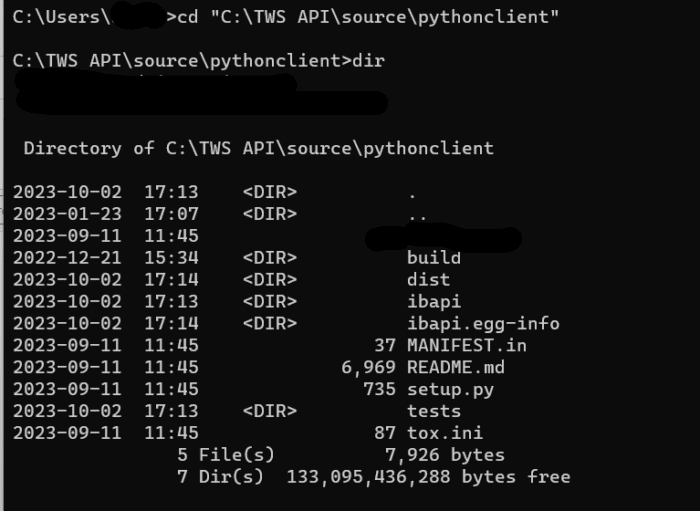
Contents of python source directory.

Was this page helpful?
Edit this page
Previous

1. Open Command Prompt or Terminal

Next

3. Run The setup.py File

Built with