API Logs
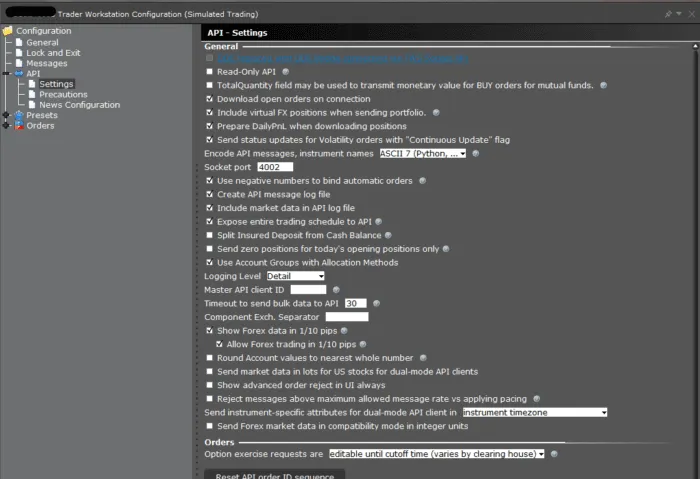
TWS and IB Gateway can be configured to create a separate log file which has a record of just communications with API applications. This log is not enabled by default; but needs to be enabled by the Global Configuration setting “Create API Message Log File”(picture below).
- API logs contain a record of exchanged messages between API applications and TWS/IB Gateway. Since only API messages are recorded, the API logs are more compact and easier to handle. However they do not contain general diagnostic information about TWS/IBG as the TWS/IBG logs. The TWS/IBG settings folder is by default C:\Jts (or IBJts on Mac/Linux). The API logs are named api.[clientId].[day].log, where [clientId] corresponds to the Id the client application used to connect to the TWS and [day] to the week day (i.e. api.123.Thu.log).
- There is also a setting “Include Market Data in API Log” that will include streaming market data values in the API log file. Historical candlestick data is always recorded in the API log.
Note: Both the API and TWS logs are encrypted locally. The API logs can be decrypted for review from the associated TWS or IB Gateway session, just like the TWS logs, as shown in the section describing the Local location of logs.
Note: The TWS/IB Gateway log file setting has to be set to ‘Detail’ level before an issue occurs so that information recorded correctly when it manifests. However due to the high amount of information that will be generated under this level, the resulting logs can grow considerably in size.
Enabling creation of API logs
TWS:
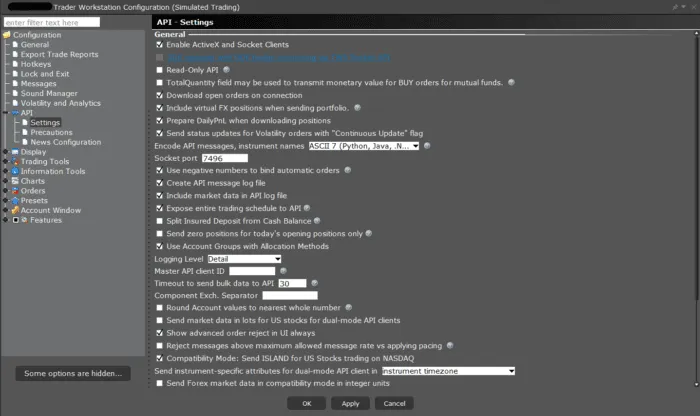
- Navigate to File/Edit → Global Configuration → API → Settings
- Check the box Create API message log file
- Set Logging Level to Detail
- Click Apply and Ok
IB Gateway:
- Navigate to Configure → Settings → API → Settings
- Check the box Create API message log file
- Set Logging Level to Detail
- Click Apply and Ok