

Historical Date Format
Datetime Format Settings
Datetime values returned through the API may be modified to reflect distinct values. These values may be set within the Global Configuration under API -> Settings.
operator timezone: refers to the local timezone you have set in the Trader Workstation or IB Gateway. Formatted asYYYYMMDD hh:mm:ss TMZinstrument timezone: refers to the timezone of the requested exchange. If “SMART” is used, this will use the instrument’s primary exchange.YYYYMMDD hh:mm:ss TMZUTC format: refers to a standardized return using UTC as the timezone. This will be returned in the formatYYYYMMDD-hh:mm:ss
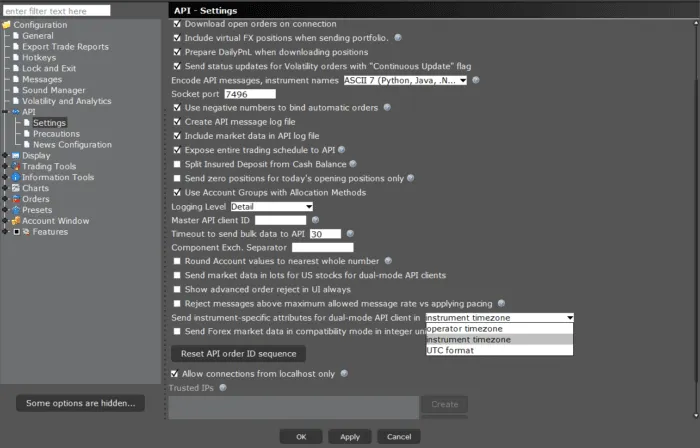
Exchange Time Zone
The exchange Time Zone is the value the exchange itself uses to calculate time. This value is typically unique to the Operator Time Zone, but these values can overlap.
As an example, the New York Stock Exchange operates on “US/Eastern”. However, the CME operates on “US/Central”. This values can be programmatically requested using the EClient.reqContractDetails method, and then received from EWrapper.contractDetails in contractDetails.Time ZoneId.
Note that this will be interpreted differently from “America/Chicago”.
Coordinated Universal Time (UTC)
UTC is a time standard centered around Greenwich Mean Time (GMT). UTC historical data can be formatted as “YYYYMMDD-hh:mm:ss”. Please keep in mind this is based on UTC+0, and as a reference, US/Eastern time is approximately UTC-4 or UTC-5 depending on U.S.
Please note GMT is unaffected by Daylight savings, and so 09:00:00 will be the same time of day year round regardless of the exchange’s or your local daylight savings observation.
Operator Time Zone
Operator Time Zone is the local time set by the user in Trader Workstation. The Operator Time Zone typically maintains a unique formatting structure separate from Exchange Time Zones; however, they can match.
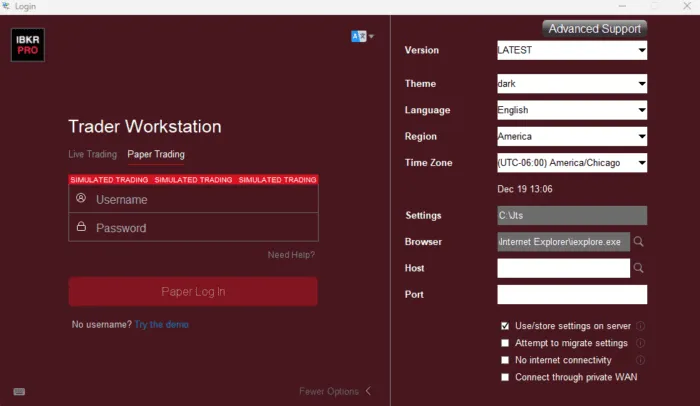
A user can confirm their Operator Time Zone by launching Trader Workstation then, before logging in, click “More Options >”.
Users can then confirm their active Operator Time Zone by referencing the “Time Zone” field.
For US residents, this will typically appear as “America/New_York”, “America/Chicago”, or “America/Los_Angeles”. It is essential to note the Time Zone value, as this will be the value supplied when making requests with the Operator Time Zone.
After logging in to Trader Workstation or IB Gateway, you would be able to submit time stamps in the format of “YYYYMMDD HH:mm:ss Operator/Time_Zone”.
Given our prior example, a historical data endDateTime value would appear as”20250101 23:59:59 America/Chicago”. This would mean the latest value I want is just before midnight in Chicago on January 1st, 2025. Even if I am trading contracts in New York or overseas, all historical data requests would be relative to my own time zone.