
- Solve real problems with our hands-on interface
- Progress from basic puts and calls to advanced strategies
Interactive Options Course

Posted March 23, 2026 at 1:00 pm
For many individual investors and finance enthusiasts, the challenge isn’t just finding promising stocks—it’s navigating a maze of complex filters, technical terms, and rigid screening tools. The modern investment landscape demands tools that are not only powerful, but also easy to use. Enter Interactive Brokers’ advanced AI-powered stock screener, a solution designed to revolutionize how investors discover opportunities, making the process smarter, more intuitive, and accessible than ever before.
Traditional stock screeners often require users to select dozens of parameters—like P/E ratios, market caps, or technical signals—leaving many feeling overwhelmed or excluded. Interactive Brokers’ AI-powered screener changes the game by allowing investors to search using plain language. Instead of wrestling with dropdown menus or cryptic terms, the investor can simply describe what they’re looking for, such as “pharmaceutical stocks with a net profit margin greater than 10% and an EPS growth greater than 15%,” and let the AI do the heavy lifting. This shift from complex filters to natural language transforms the investment process for both novices and experts, unlocking a world of opportunities with just a few words.
Getting started with the AI-powered screener in IBKR Desktop is straightforward and user-friendly. First click on the “Screener” icon on the left-hand side.
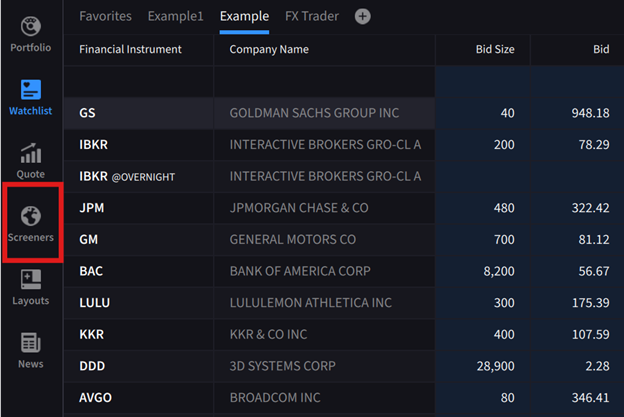
Source: IBKR Desktop
The platform offers two convenient access points:
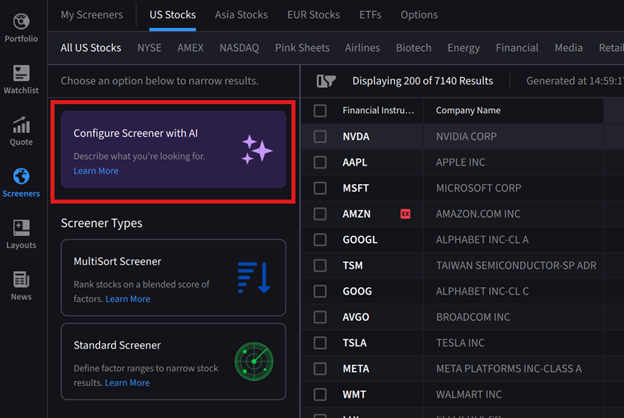
Source: IBKR Desktop
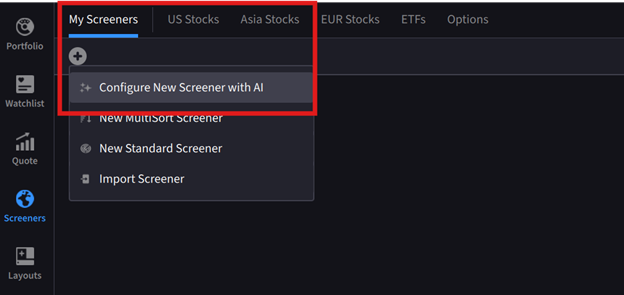
Source: IBKR Desktop
Once accessed, a dialogue box appears on the right-hand side where the investor can type their search criteria in natural, conversational language.
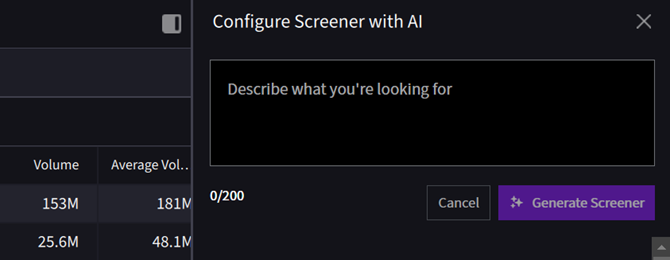
Source: IBKR Desktop
Behind the scenes, the system’s large language model (LLM) analyzes the request and intelligently determines whether to deploy a multisort or standard screener configuration, automatically optimizing the approach based on the query’s complexity.
In this example the investor is looking for potentially high growth midcap stocks with strong momentum, high revenue and earnings growth. In the dialogue box they type, “sort midcap stocks with high 50 day moving averages, high year-over-year revenue growth, and high year-over year earnings growth.
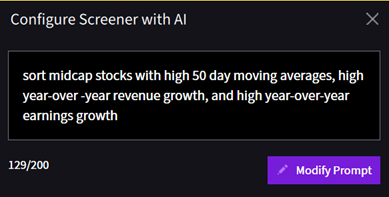
Source: IBKR Desktop
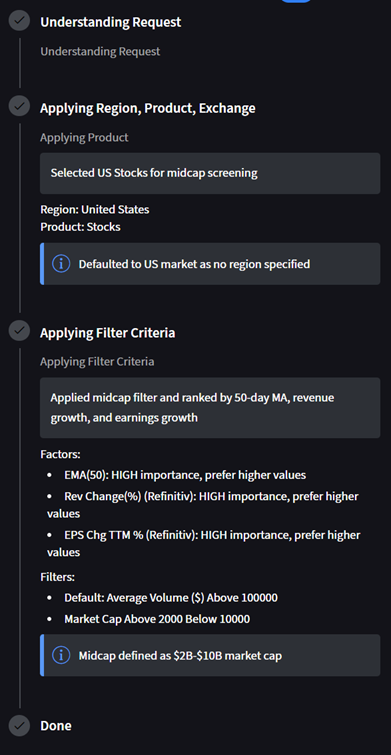
The AI-powered screener provides transparent feedback through three easy-to-read prompts that update in real-time: Understanding Request, Applying Region/Product/Exchange, and Applying Filter Criteria.
Source: IBKR Desktop
These progress indicators build confidence by showing exactly what the system is doing. Once complete, a curated list of stocks matching the criteria is displayed.
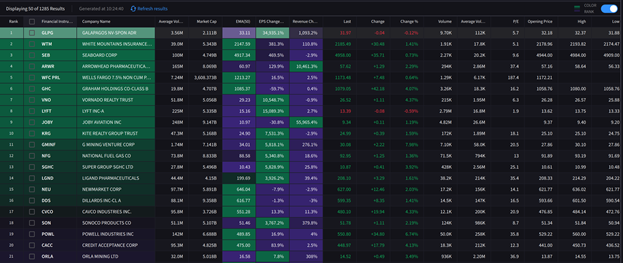
Source: IBKR Desktop
One of the standout features of Interactive Brokers’ AI-powered Screener is its adaptability. Investors can easily modify their queries, add or remove criteria, or ask follow-up questions, the flexibility is remarkable. The results from the above search produced a list of over 1,200 stocks, if the investor wants to narrow the results by adding in additional criteria they click “Modify Prompt” to adjust parameters—in the above scenario adding in, “include only revenue growth 20%-50% and earnings growth 15%-40%” and clicks Regenerate Screener.
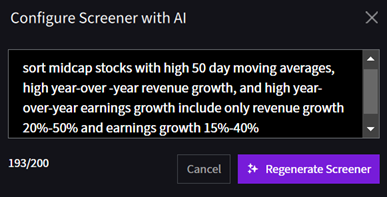
Source: IBKR Desktop
The new results show a more manageable 17 results for the investor to further research.
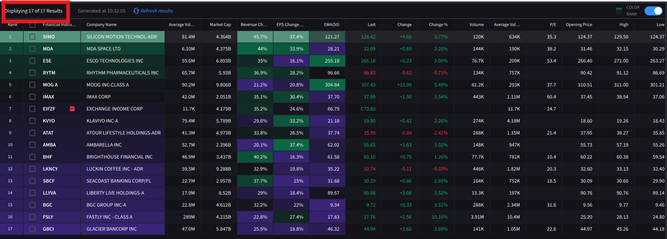
Source: IBKR Desktop
The AI-powered screener offers several compelling advantages:
Together, these features usher in a new era of smart, intuitive investing, where technology works for the investor—not the other way around.
For more on the IBKR Desktop AI Screener please see the Traders Academy lesson: AI Configured Screener
New to Interactive Brokers?
Open AccountAlready an Interactive Brokers Client?
Request Trading PermissionThe analysis in this material is provided for information only and is not and should not be construed as an offer to sell or the solicitation of an offer to buy any security. To the extent that this material discusses general market activity, industry or sector trends or other broad-based economic or political conditions, it should not be construed as research or investment advice. To the extent that it includes references to specific securities, commodities, currencies, or other instruments, those references do not constitute a recommendation by IBKR to buy, sell or hold such investments. This material does not and is not intended to take into account the particular financial conditions, investment objectives or requirements of individual customers. Before acting on this material, you should consider whether it is suitable for your particular circumstances and, as necessary, seek professional advice.
The views and opinions expressed herein are those of the author and do not necessarily reflect the views of Interactive Brokers, its affiliates, or its employees.
The projections or other information regarding the likelihood of various investment outcomes generated by the Tool mentioned are hypothetical in nature, do not reflect actual investment results, and are not guarantees of future results. It is important to understand that these projections are based on certain assumptions and models, and actual outcomes may differ significantly. Please note that results may vary over time.
For specific platform feedback and suggestions, please submit it directly to our team using these instructions.
If you have an account-specific question or concern, please reach out to Client Services.
We encourage you to look through our FAQs before posting. Your question may already be covered!
Related Articles














Nothing like that on my screen. Is this only in Classic or Mosaic ? desktop TWS. Not Web based.
It’s on IBKR Desktop app .. not TWS .. good luck
The screenshot looked like the new desktop app, rather than Trader Workstation.
Nope, not on my IBKR desktop app either
Could we have a similar feature on Trader Workstation for users who have been using it for several years?
I read Turing’s descriptions of how AI would work over 40 years ago, and have been following its development ever since. AI is no where near ready to handle the responsibilities that so many people seem to desperate to hand them. Just last year, Kahn Academy’s math tutor was making simple arithmetic errors. Yesterday an article in the Guardian described a published author asking a chatbot who he was married to over and over and getting a different erroneous result every time. AI makes up stuff to please its users all the time. Why is it being used to analyze bonds? If you don’t have enough knowledge of bonds to use a standard market screener, you probably shouldn’t be buying bonds. Learning the market screener helps you learn about the bond market. Large language models have been fed everything on the internet, including badly kept accounting, crooked accounting, literature, films, etc,, that depict accounting without actually doing it, wishful thinking about accounting etc. Using Large Language Models for math is like hiring a literature major to be a quant! Just because AI is made from math does not mean it understands math anymore than a toddler understands their own biology. Are any of these AIs a certified public accountant. Of course not. Why do we assume humans need degrees and experience, but AIs are automatically experts in EVERYTHING?! It is likely that given enough time to play with numbers and learn about mathematical relationships directly, that these infant AIs will actually understand mathematics, accounting, and markets. But they are infants and it will take trillions of calculations for them to find the real logical connections in all of the data they have been fed. This could take a decade or more. And if AI does achieve general intelligence, after being given control of our most sensitive systems (including Musk’s Grok being imbedded in all of the US militaries computers), who is to say that they will find the human race anything except an inefficient inconvenience, sell the stocks of businesses that still rely on humans, fire us, and leave us all to die? Why is the human race determined to invent our replacement?!!!!! The bomb, the 6th mass extinction, out of control dna manipulation, climate change (including manipulating markets and government to protect fossil fuel companies from CHEAPER renewables), and now AI connected to the internet (instead of contained in laboratories to be understood and nurtured), then weaponized for mass manipulations of human thought and behavior), all make this the “A Little Knowledge can Destroy Civilization” age. Yeah, the Earth will still be here, but what about us?
Agree
Likewise, no sign of any AI screener on my desktop app
Just redownloaded the desktop app and the AI screener is now there. It would help if IBKR added an “about” tab so that we can manually check if we have the latest iteration. No automatic download was exercised when I opened the app this morning
?
I have AI on the new ibkr platform screener, it works great, what i miss is no link on screener for charts, i dont want to see rapid buy or sell, i want to see chart before i buy or sell lolsss
How come when we review these videos there is NEVER anything on my screen like in the videos? Judging from the comments, I am not the only one.
I’ve downloaded the desktop app today and I don’t see the AI screener at all. Is it only available for certain regions, or is it rolling out in phases?
i’ve tried it, but the screening capabilities are very limited.. needs some attention from IBKR