OAuth 1.0a Python LibrariesCopy Location
Copy Location
The OAuth implementation content shown below is built using Python 3.12. Clients looking to directly implement this content through Python will need the Python libraries listed to proceed.
- pycryptodome // This must be installed with pip as it is not part of the Python Standard Library.
- requests
- base64
- json
- time
- datetime
Request TokenCopy Location
Copy Location
For Third Party OAuth users to start the OAuth process, we must first get a request token.
To get a request token, an OAuth request to https://api.ibkr.com/v1/api/oauth/request_token must be made.
The request should be a POST request but with no body. Remember that an authorization header has to be authorize the connection.
This step is a good indicator of whether or not something is wrong with your OAuth request. If you are missing any portion of the authorization header, the response will tell you so. If something is wrong with either the base string or signature creation, then you will be met with a 401 response.
Important: If you are a First Party OAuth users, do not follow this step. You will receive an error. For developers implementing First Party OAuth, proceed directly to Requesting the Live Session Token.
EndpointCopy Location
Copy Location
Note we do not return an oauth_token_secret in the response as we are using RSA signatures rather than PLAINTEXT authentication.
POST /oauth/request_token
OAuth ParametersCopy Location
Copy Location
oauth_consumer_key: String. Required
The 25-character hexadecimal string that was obtained from Interactive Brokers during the OAuth consumer registration process.
oauth_signature_method: String. Required
The signature method used to sign the request. Currently only ‘RSA-SHA256’ is supported.
oauth_signature: String. Required
The signature for the request generated using the method specified in the oauth_signature_method parameter. See section 9 of the OAuth v1.0a specification for more details on signing requests.
oauth_timestamp: String. Required
Timestamp expressed in seconds since 1/1/1970 00:00:00 GMT. Must be a positive integer and greater than or equal to any timestamp used in previous requests.
oauth_nonce: String. Required
A random string uniquely generated for each request.
oauth_callback: String. Required
An absolute URL to which IB will redirect the user. This URL would be provided to the onboarding team during initial integration, or ‘oob’ can be provided for localhost development.
{
  "oauth_consumer_key": "TESTCONS",
  "oauth_signature_method": "RSA-SHA256",
  "oauth_signature": "fnHGXncCkcnB3U3jYxjh%2BgUdo7PelK5NQGIedbDeAQgDtO02ccLVapH5QtpazS%2BKlwg7bJTAgxsM1T5QOox6IjBQJu91EJ%2FFVUCFtd8rNbRQNGbEWdibglWErBDuHY%2FVCLRHdCqAg9BhV%2BZ7FTY6oCT9HSQr6ZK%2FgNqTd58vpt5z8cPCoPHRJN4HzB54J5A4K7R7aEx9s1B5wqIer7fdVIzKb0KSSpP44Hx%2BGnLfZINfQHIrRCfFwbeGEvi31PF9ICWRIKZz5LxqX6OtT0Dze8LiZo7PnkrA5b0m9PR0cP1v6DSBVaSyJXBITiml9Gyn2HuiexHjRJt85gPhNiU3VA%3D%3D",
  "oauth_timestamp": "1722886851",
  "oauth_nonce": "a568f4e3b0e161b0dcf187331b8274be",
  "oauth_callback": "oob"
}
RequestCopy Location
Copy Location
url = f'https://api.ibkr.com/v1/api/oauth/request_token'
oauth_params = {
  "oauth_callback": {{oauth_callback }},
  "oauth_consumer_key": {{consumer_key}},
  "oauth_nonce": hex(random.getrandbits(128))[2:],
  "oauth_signature_method": "RSA-SHA256",
  "oauth_timestamp": str(int(datetime.now().timestamp())),
  }
params_string = "&".join([f"{k}={v}" for k, v in sorted(oauth_params.items())])
# Base string successfully created
base_string = f"POST&{quote_plus(url)}&{quote(params_string)}"

# Base string should then signed with the private key in RSA-SHA256
encoded_base_string = base_string.encode("utf-8")
sha256_hash = SHA256.new(data=encoded_base_string)
bytes_pkcs115_signature = PKCS1_v1_5_Signature.new(
rsa_key=signature_key
).sign(msg_hash=sha256_hash)
b64_str_pkcs115_signature = base64.b64encode(bytes_pkcs115_signature).decode("utf-8")

# Establish the authorization header
oauth_params["oauth_signature"] = quote_plus(b64_str_pkcs115_signature)
oauth_params["realm"] = realm
oauth_header = "OAuth " + ", ".join([f'{k}="{v}"' for k, v in sorted(oauth_params.items())])
headers = {"authorization": oauth_header}
headers["User-Agent"] = "python/3.11"

request_request = requests.post(url=url, headers=headers)
if request_request.status_code == 200:
rToken = request_request.json()["oauth_token"] ResponseCopy Location
Copy Location
oauth_token: String.
Resulting request token used as an encoded authentication value.
Be sure to save the request token for your next two requests.
After receiving your access token, this value will no longer be used.
{
  "oauth_token": "b9082d68cfef06b030de"
}
Response
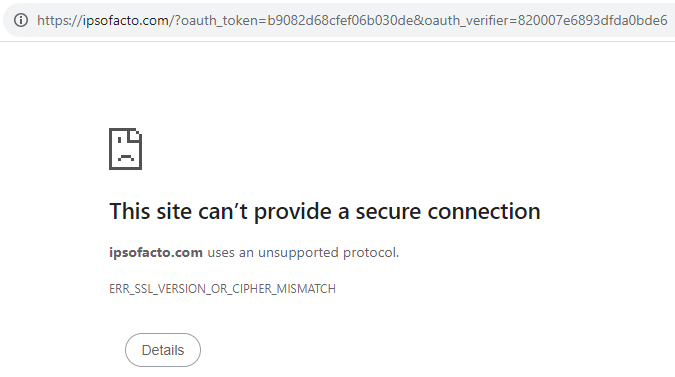
A successful login will direct them to the callback url, which displays both the oauth_token (request token) and the oauth_verifier (verifier token). This can be pasted back to our original request, and saved as a variable for the Access Token request.
Access TokenCopy Location
Copy Location
A POST request to https://api.ibkr.com/v1/api/oauth/access_token must now be made.
This time, oauth_verifier must be added to the authorization header, with the value being the verifier token retrieved from the previous step.
oauth_token must also be added to the authorization header, the value being the request token.
If the request succeeds, the response will contain two values: oauth_token and oauth_token_secret.
The oauth_token in the response is the access token, and the oauth_token_secret will be used for the next step.
Important: If you are a First Party OAuth users, do not follow this step. You will receive an error The access token and access token secret would otherwise be retrieved through the Self Service Portal. For developers implementing First Party OAuth, proceed directly to Requesting the Live Session Token.
EndpointCopy Location
Copy Location
The Access Token endpoint will be used to return the Access Token and Access Token Secret values to be used for all requests moving forward as an identifier of the user with our consumer key.
An Access Token will remain the same whenever a username is generated with a given consumer key; however, the access token secret will be unique upon each generation.
POST /oauth/access_token
OAuth ParamsCopy Location
Copy Location
oauth_consumer_key: String. Required
The 25-character hexadecimal string that was obtained from Interactive Brokers during the OAuth consumer registration process.
oauth_token: String. Required
The request token obtained from IB via /request_token.
oauth_signature_method: String. Required
The signature method used to sign the request. Currently only ‘RSA-SHA256’ is supported.
oauth_signature: String. Required
The signature for the request.
oauth_timestamp: String. Required
Timestamp expressed in seconds since 1/1/1970 00:00:00 GMT. Must be a positive integer and greater than or equal to any timestamp used in previous requests.
oauth_nonce: String. Required
A random string uniquely generated for each request.
oauth_verifier: String. Required
The verification code received from IB after the user has granted authorization.
{
  "oauth_consumer_key": "TESTCONS",
  "oauth_token": "47b63b7961c51e1df1e6",
  "oauth_signature_method": "RSA-SHA256",
  "oauth_signature": "V9p9e41Zx8Fsi1QkJq3QewZdt%2BZM8GTCcKswY08MbZKCHsob57JEdNbpeANWkiwqVdDnRArQ52ifQsutYlvXvsUQAVd2vuiMqcEqpGN8c2ZmTqVQbQwNaqw0LLXQ84DmwDUWJa%2F8pSJPmCmMPi4tJPKb%2Bta1DyVN2ec8KwzRw8c7MpKsbKBXXC%2B0vJ7Y8kTE0WnoiPA%2FJ8sRn7sZnlsDlEmyxNY%2Fggrr%2F5GJTQFe2EXka5eMsHrnWTYdC1tg38%2BVebt4HNyptLUCO0%2FpeZVRbjN3RyfPlDpSlJ6jGh2lqtcyLEueDsxvN%2FsRWjpiBl1in%2Bou6YYeB2D%2FBz%2Bttvpagw%3D%3D",
  "oauth_timestamp": "1722030398",
  "oauth_nonce": "734860ccbc2f14ae971a8cf1a6ec936",
  "oauth_verifier": "01028463e73960e27b3f"
}
RequestCopy Location
Copy Location
url = f'https://api.ibkr.com/v1/api/oauth/access_token'
oauth_params = {
  "oauth_callback":callback,
  "oauth_consumer_key": consumer_key,
  "oauth_nonce": hex(random.getrandbits(128))[2:],
  "oauth_signature_method": "RSA-SHA256",
  "oauth_timestamp": str(int(datetime.now().timestamp())),
  "oauth_token": rToken,
  "oauth_verifier": vToken,
  }
params_string = "&".join([f"{k}={v}" for k, v in sorted(oauth_params.items())])

# Base string successfully created
base_string = f"POST&{quote_plus(url)}&{quote(params_string)}"

# Base string should then signed with the private key in RSA-SHA256
encoded_base_string = base_string.encode("utf-8")
sha256_hash = SHA256.new(data=encoded_base_string)
bytes_pkcs115_signature = PKCS1_v1_5_Signature.new(
  rsa_key=signature_key
  ).sign(msg_hash=sha256_hash)
b64_str_pkcs115_signature = base64.b64encode(bytes_pkcs115_signature).decode("utf-8")

# Establish the authorization header
oauth_params["oauth_signature"] = quote_plus(b64_str_pkcs115_signature)
oauth_params["realm"] = realm
oauth_header = "OAuth " + ", ".join([f'{k}="{v}"' for k, v in sorted(oauth_params.items())])
headers = {"authorization": oauth_header}
headers["User-Agent"] = "python/3.11"

# Send the request and save the tokens to variables
atoken_request = requests.post(url=url, headers=headers)
aToken = atoken_request.json()["oauth_token"]
aToken_secret = atoken_request.json()["oauth_token_secret"]
ResponseCopy Location
Copy Location
oauth_token: String.
Resulting oauth or access token used as an encoded authentication value.
oauth_token_secret: String.
Resulting access token secret used as an encoded authentication value.
{
  "oauth_token": "e84c11dc149cb96ee5bb",
  "oauth_token_secret": "BGJsaMbLdQA6WZd+8AYxBaBFuOlLIZAQJwKzLseTbwK8KsTyghX1LVI5Gjh0T/m3j3lQNGbxDoyxageGdNsQVQIS+QrkYVeePfptBzB6fPqwdnT66miP4J80Aoo3Xv5gJeeHnqMK3YNSEzK09idE8Id66YeeNiAYzfrNdrZ5CC+V3oS7giaqankY2Fz7rxN95rBHGqKEzkMf9109f25yLEauPvA+7rD4iyIwpfZJVI8q1/D/tBprIklTJ/QuAcbbiDY4AoYH744A4IDS5CHMYK1/XIUlSMpFmamip5GOAjiORNEKuR2r93kyeZwUuFyosudHeuZexgvE72enfS9gqg=="
}
Live Session TokenCopy Location
Copy Location
The final step in the OAuth authorization process is the live session token. This is the final stage of authorizing your user for each session. In this step we must calculate a Diffie-Hellman challenge using the prime and generator in the Diffie-Hellman spec provided when registering your consumer key.
If you are an IB customer who registered using the Self-Service OAuth page then on that same page you should have completed the Access Token step. You would now proceed to this final step to complete the OAuth authorization process.
EndpointCopy Location
Copy Location
The live session token will allow the user to access their API, for trading or for portfolio access, over a 24 hour period. The creation of the Live Session Token does not establish a complete trading session, as that would be handled by Initializing the Brokerage Session.
POST /oauth/live_session_token
Diffie-Hellman Random ValueCopy Location
Copy Location
The Diffie-Hellman random value is simply any positive random 256-bit integer value.
This will be used immediately for the Diffie-Hellman challenge as well as the computation of the live session token.
dh_random = str(random.getrandbits(256))
Random random = new();

BigInteger dh_random = random.Next(1, int.MaxValue);
Diffie-Hellman ChallengeCopy Location
Copy Location
The Diffie-Hellman challenge value is the quotient of modulus division, converted to a hex string. Using ‘2’ as our generator, raised to the power of our Diffie-Hellman random value, divided by our Diffie-Hellman Prime or Modulus value.
# Replace with path to DH param PEM file.
with open("./dhparam.pem, "r") as f:
    dh_param = RSA.importKey(f.read())
    dh_prime = dh_param.n # Also known as DH Modulus
    dh_generator = dh_param.e  # always =2

# Convert result to hex and remove leading 0x chars.
dh_challenge = hex(pow(base=dh_generator, exp=dh_random, mod=dh_prime))[2:]
// Extract our dh_modulus and dh_generator values from our dhparam.pem file's bytes.
AsnReader asn1Seq = new AsnReader(dh_der_data, AsnEncodingRules.DER).ReadSequence();
BigInteger dh_modulus = asn1Seq.ReadInteger();
BigInteger dh_generator = asn1Seq.ReadInteger();

// Generate our dh_challenge value by calculating the result of our generator to the power of our random value, modular divided by our dh_modulus.
BigInteger dh_challenge = BigInteger.ModPow(dh_generator, dh_random, dh_modulus);
PrependCopy Location
Copy Location
We can find the prepend by first converting our access token secret to a bytestring. We then decrypt the bytestring using our private encryption key as an RSA key with PKCS1v1.5 padding. The prepend is the resulting bytestring converted to a hex string value.
# Replace with path to private encryption key file.
with open("./private_encrpytion.pem", "r") as f:
    encryption_key = RSA.importKey(f.read())

bytes_decrypted_secret = PKCS1_v1_5_Cipher.new(
    key=encryption_key
    ).decrypt(
        ciphertext=base64.b64decode(access_token_secret),
        sentinel=None,
        )
prepend = bytes_decrypted_secret.hex()
// Create the crypto provider
RSACryptoServiceProvider bytes_decrypted_secret = new()
{
  // Utililze a keysize of 2048 rather than the default 7168
  KeySize = 2048
};

StreamReader sr = new("./private_encryption.pem");
string reader = sr.ReadToEnd();
sr.Close();

// Find the pem field content from the StreamReader string
PemFields pem_fields = PemEncoding.Find(reader);

// Convert the pem base 64 string content into a byte array for use in our import
byte[] der_data = Convert.FromBase64String(reader[pem_fields.Base64Data]);

// Import the bytes object as our key
bytes_decrypted_secret.ImportPkcs8PrivateKey(der_data, out _);

// Encode the access token secret as an ASCII bytes object
byte[] encryptedSecret = Convert.FromBase64String(access_token_secret);

// Decrypt our secret bytes with the encryption key
byte[] raw_prepend = bytes_decrypted_secret.Decrypt(encryptedSecret, RSAEncryptionPadding.Pkcs1);

// Convert our bytestring to a hexadecimal string
string prepend = Convert.ToHexString(raw_prepend).ToLower();
OAuth ParamsCopy Location
Copy Location
oauth_consumer_key: String. Required
The 9-character string that was obtained from Interactive Brokers during the OAuth consumer registration process. This is set in the Self Service Portal.
oauth_token: String. Required
The access token obtained from IB via /access_token or the Self Service Portal.
oauth_signature_method: String. Required
The signature method used to sign the request. Currently only ‘RSA-SHA256’ is supported.
oauth_signature: String. Required
The signature for the request generated using the method specified in the oauth_signature_method parameter. See section 9 of the OAuth v1.0a specification for more details on signing requests.
oauth_timestamp: String. Required
Timestamp expressed in seconds since 1/1/1970 00:00:00 GMT. Must be a positive integer and greater than or equal to any timestamp used in previous requests.
oauth_nonce: String. Required
A random string uniquely generated for each request.
diffie_hellman_challenge: String. Required
Challenge value calculated using the Diffie-Hellman prime and generated provided during the registration process. See the “OAuth at Interactive Brokers” document for more details.
{
  "diffie_hellman_challenge": "5356ee6f78fc204b22e2012636d23116e4158ee84aa4451c4a8d3f595ec83434497073e25697ab23cc912799dadeef39fe243d317f193659e488535a31dbcb814600ffad3fd76b076e7f1c54cf045395c1f01d982a358f3202dd6b546271498040f4687959b7b240bc6222902d24e1bf5de42ae0a46cc60f41f62a58d428932a92e5954e7980384a9e1e0b918a35f0a838e0c4c3d0cb32db759b5cbda371e035740d9c0030b1619b61e928b8d12ca141bd3fe74ac10a835382125a57837c84b5bd1873bd118f92657b8dd45e48652093e5c0c3a5dacfb4d140e5672ddc05eb1d90bc29c433e744ae8950e96590668a9b8503e596780b14852be639ce3b5ba2c0",
  "oauth_consumer_key": "TESTCONS",
  "oauth_token": "e84c11dc149cb96ee5bb",
  "oauth_signature_method": "RSA-SHA256",
  "oauth_signature": "czbA1dRKJSBdwn5GYxAJQCmCAqfZ6dyOa%2FgmuY%2F5Lhub64cSeQUzKp8vGrF6afnXhCiIXnHsCTONK7uNbRu2V%2FE%2FziQ57BWfbAEzH98kQdWAlWqqmaxXBzbg%2Fr1AZDRP%2FYWrEggNvJaHjbkWaotcrAWpsfxVLcdc3Sl7kXmbFYN0u20MjLUD7q5yDrJT5TXw9JC2xvFimJj65WxqyICZizQUUrg35KRQKaxytQFdwqf5RS6B65gmoi7gHXZcDu2zDWGhe67bZKV8myd0isIJZBs8a5alGd33n7Y1V7pv5Ux9hFOEHEBzSaE3kn9dqw%2Fp5w%2Fl%2F0xiOQGpXWvPRVA2uA%3D%3D",
  "oauth_timestamp": "1722886871",
  "oauth_nonce": "e8181dd345bcc1a7237df79cd1b59219",
  "realm": "test_realm"
}
Encoded Base StringCopy Location
Copy Location
The Encoded Base String for the Live Session Token is composed of the Prepend, Method, “&”, URL, “&”, and OAuth params combined as a sorted string.
Both the URL and the parameter string must be URI escaped according to Rfc3986.
params_string = "&".join([f"{k}={v}" for k, v in sorted(oauth_params.items())])
method = 'POST'
url = f'https://{baseUrl}/oauth/live_session_token'
base_string = f"{prepend}{method}&{quote_plus(url)}&{quote(params_string)}"
encoded_base_string = base_string.encode("utf-8")
// Sort our oauth_params dictionary by key.
Dictionary<string, string> sorted_params = oauth_params.OrderBy(pair => pair.Key).ToDictionary(pair => pair.Key, pair => pair.Value);

// Combine our oauth_params into a single string for our base_string.
string params_string = string.Join("&", sorted_params.Select(kv => $"{kv.Key}={kv.Value}"));

// Create a base string by combining the prepend, url, and params string.
string base_string = $"{prepend.ToLower()}POST&{EscapeUriDataStringRfc3986(lst_url)}&{EscapeUriDataStringRfc3986(params_string)}";

// Convert our new string to a bytestring
byte[] encoded_base_string = Encoding.UTF8.GetBytes(base_string);
OAuth SignatureCopy Location
Copy Location
Creating the OAuth Signature is a multi-stage process.
- First uses will need to create a sha256 hash of the encoded base string
- Next, you will need to create a PKCS1 v1.5 (Rfc2313) bytestring signature using your Private Encryption Key as an RSA key to sign our sha256 hash value created in our prior step.
- Once your bytestring has been generated, we will need to Base 64 encode our bytes, and then decode them using UTF-8 to receive a string value.
- Finally, we will need to URI escape our string, again using Rfc3986, to receive our final oauth_signature value.
# Generate SHA256 hash of base string bytestring.
sha256_hash = SHA256.new(data=encoded_base_string)

# Generate bytestring PKCS1v1.5 signature of base string hash.
# RSA signing key is private signature key.
bytes_pkcs115_signature = PKCS1_v1_5_Signature.new(
    rsa_key=signature_key
    ).sign(msg_hash=sha256_hash)

# Generate str from base64-encoded bytestring signature.
b64_str_pkcs115_signature = base64.b64encode(bytes_pkcs115_signature).decode("utf-8")

# URL-encode the base64 signature str and add to oauth params dict.
oauth_params['oauth_signature'] = quote_plus(b64_str_pkcs115_signature)
// Create a Sha256 Instance
SHA256 sha256_inst = SHA256.Create();

// Generate SHA256 hash of base string bytestring.
byte[] sha256_hash = sha256_inst.ComputeHash(encoded_base_string);

// Create the crypto provider for our signature
RSACryptoServiceProvider bytes_pkcs115_signature = new()
{
    // Utililze a keysize of 2048 rather than the default 7168
    KeySize = 2048
};

// Use our function to retrieve the object bytes
StreamReader sr = new(signature_fp);
string reader = sr.ReadToEnd();
sr.Close();

// Find the pem field content from the StreamReader string
PemFields pem_fields = PemEncoding.Find(reader);

// Convert the pem base 64 string content into a byte array for use in our import
byte[] sig_der_data = Convert.FromBase64String(reader[pem_fields.Base64Data]);

// Import the bytes object as our key
bytes_pkcs115_signature.ImportPkcs8PrivateKey(sig_der_data, out _);

//Generate the Pkcs115 signature key
RSAPKCS1SignatureFormatter rsaFormatter = new(bytes_pkcs115_signature);

rsaFormatter.SetHashAlgorithm("SHA256");

//Receive the bytestring of our signature
byte[] signedHash = rsaFormatter.CreateSignature(sha256_hash);

// Convert the bytestring signature to base64.
string b64_str_pkcs115_signature = Convert.ToBase64String(signedHash);

// URL-encode the base64 signature str and add to oauth params dict.
oauth_params.Add("oauth_signature", EscapeUriDataStringRfc3986(b64_str_pkcs115_signature));
RealmCopy Location
Copy Location
The realm is a required oauth parameter. The realm will only ever be one of two values.
If you are using the “TESTCONS” consumer key during your paper testing, you will need to use “test_realm”
# Oauth realm param omitted from signature, added to header afterward.
oauth_params["realm"] = "test_realm"
// Oauth realm param omitted from signature, added to header afterward.
oauth_params.Add("realm", :"test_realm");
Once you are using your own consumer key, you must use “limited_poa”.
# Oauth realm param omitted from signature, added to header afterward.
oauth_params["realm"] = "limited_poa"
// Oauth realm param omitted from signature, added to header afterward.
oauth_params.Add("realm", :"limited_poa");
Authorization HeaderCopy Location
Copy Location
The Authorization Header compiles our full OAuth parameters into an alphabetically-sorted string.
- Each key/value pair must be added in the format ‘key=\”value\”, where each value is surrounded with quotes
- Each pair separated with a comma.
- The string must be prepended with “OAuth “.
The final string should be added as a header for your request using the “Authorization” header.
# Assemble oauth params into auth header value as comma-separated str.
oauth_header = "OAuth " + ", ".join([f'{k}="{v}"' for k, v in sorted(oauth_params.items())])

# Create dict for LST request headers including OAuth Authorization header.
headers = {"Authorization": oauth_header}
Dictionary fin_sorted_params = oauth_params.OrderBy(pair => pair.Key).ToDictionary(pair => pair.Key, pair => pair.Value);

// Assemble oauth params into auth header value as comma-separated str.
string oauth_header = $"OAuth " + string.Join(", ", fin_sorted_params.Select(kv => $"{kv.Key}=\"{kv.Value}\""));

// Add our Authorization header to our request's header container.
request.Headers.Add("Authorization", oauth_header);
Required HeadersCopy Location
Copy Location
In order to make a successful request, several headers must be included. Some libraries and modules may automatically include these values, though they must always be received by Interactive Brokers in order to successfully process request.
- Accept: This must be set to “*/*”
- Accept-Encoding: This must be set to “gzip,deflate”
- Authorization: See our prior Authorization Header step.
- Connection: This must be set to “keep-alive”.
- Host: This must be set to “api.ibkr.com”
- User-Agent: This may be anything, though the browser identifier or request language is suggested.
# Add User-Agent header, required for all requests. Can have any value.
headers = {
    "Authorization":oauth_header,
    "User-Agent":"python/3.11"
}
// Build out our request headers
request.Headers.Add("Authorization", oauth_header);
request.Headers.Add("Accept", "*/*");
request.Headers.Add("Accept-Encoding", "gzip,deflate");
request.Headers.Add("Connection", "keep-alive");
request.Headers.Add("Host", "api.ibkr.com");
request.Headers.Add("User-Agent", "csharp/6.0");
RequestCopy Location
Copy Location
# Generate a random 256-bit integer.
dh_random = random.getrandbits(256)

# Compute the Diffie-Hellman challenge:
# generator ^ dh_random % dh_prime
# Note that IB always uses generator = 2.
# Convert result to hex and remove leading 0x chars.
dh_challenge = hex(pow(base=dh_generator, exp=dh_random, mod=dh_prime))[2:]
# --------------------------------
# Generate LST request signature.
# --------------------------------

# Generate the base string prepend for the OAuth signature:
#   Decrypt the access token secret bytestring using private encryption
#   key as RSA key and PKCS1v1.5 padding.
#   Prepend is the resulting bytestring converted to hex str.
bytes_decrypted_secret = PKCS1_v1_5_Cipher.new(
    key=encryption_key
    ).decrypt(
        ciphertext=base64.b64decode(access_token_secret),
        sentinel=None,
        )
prepend = bytes_decrypted_secret.hex()

# Put prepend at beginning of base string str.
base_string = prepend
# Elements of the LST request so far.
method = 'POST'
url = f'https://{baseUrl}/oauth/live_session_token'
oauth_params = {
    "oauth_consumer_key": consumer_key,
    "oauth_nonce": hex(random.getrandbits(128))[2:],
    "oauth_timestamp": str(int(datetime.now().timestamp())),
    "oauth_token": access_token,
    "oauth_signature_method": "RSA-SHA256",
    "diffie_hellman_challenge": dh_challenge,
}

# Combined param key=value pairs must be sorted alphabetically by key
# and ampersand-separated.
params_string = "&".join([f"{k}={v}" for k, v in sorted(oauth_params.items())])

# Base string = method + url + sorted params string, all URL-encoded.
base_string += f"{method}&{quote_plus(url)}&{quote(params_string)}"

# Convert base string str to bytestring.
encoded_base_string = base_string.encode("utf-8")
# Generate SHA256 hash of base string bytestring.
sha256_hash = SHA256.new(data=encoded_base_string)

# Generate bytestring PKCS1v1.5 signature of base string hash.
# RSA signing key is private signature key.
bytes_pkcs115_signature = PKCS1_v1_5_Signature.new(
    rsa_key=signature_key
    ).sign(msg_hash=sha256_hash)

# Generate str from base64-encoded bytestring signature.
b64_str_pkcs115_signature = base64.b64encode(bytes_pkcs115_signature).decode("utf-8")

# URL-encode the base64 signature str and add to oauth params dict.
oauth_params['oauth_signature'] = quote_plus(b64_str_pkcs115_signature)

# Oauth realm param omitted from signature, added to header afterward.
oauth_params["realm"] = realm

# Assemble oauth params into auth header value as comma-separated str.
oauth_header = "OAuth " + ", ".join([f'{k}="{v}"' for k, v in sorted(oauth_params.items())])

# Create dict for LST request headers including OAuth Authorization header.
headers = {"Authorization": oauth_header}

# Add User-Agent header, required for all requests. Can have any value.
headers["User-Agent"] = "python/3.11"

# Prepare and send request to /live_session_token, print request and response.
lst_request = requests.post(url=url, headers=headers)


# Check if request returned 200, proceed to compute LST if true, exit if false.
if not lst_request.ok:
    print(f"ERROR: Request to /live_session_token failed. Exiting...")
    raise SystemExit(0)

# Script not exited, proceed to compute LST.
response_data = lst_request.json()
dh_response = response_data["diffie_hellman_response"]
lst_signature = response_data["live_session_token_signature"]
lst_expiration = response_data["live_session_token_expiration"]
ResponseCopy Location
Copy Location
diffie_hellman_response: String.
Response based on the calculated Diffie Hellman challenge.
The full value should be 512 characters long.
live_session_token_signature: String.
Signature value used to prove authenticated status for subsequent requests.
live_session_token_expiration: Number.
Returns the epoch timestamp of the live session token’s expiration.
The live session token is valid for approximately 24 hours after creation.
{
  "diffie_hellman_response": "62933e{...}d64d6db34d",
"live_session_token_signature": "9bd5922b2b79effef23c6fb03cc715dcdc8d6219",
"live_session_token_expiration": 1700691802316
}
Computing The Live Session TokenCopy Location
Copy Location
From the Live Session Token Response Object, we only received the Diffie-Hellman response, live session token signature, and live session token expiration values. We now need to use the signature and response values in order to compute our live session token.
Prepend BytesCopy Location
Copy Location
We first need to convert our Prepend hex string value into bytes. This will be used to generate a HMAC Hash later.
# Generate bytestring from prepend hex str.
prepend_bytes = bytes.fromhex(prepend)
//Generate bytestring from prepend hex str.
byte[] prepend_bytes = Convert.FromHexString(prepend);
Calculating KCopy Location
Copy Location
To calculate our live session token, we need to use modulus division to receive a K value for a HMAC hash.
Begin by pulling the base value, B, which will be our dh_response value from our /live_session_token response, using a leading 0 as a sign bit for the hex string.
We will then need to retrieve a BigInteger value of the dh_response value.
Our exponent value would be equivalent to the same dh_random value used for our /live_session_token request.
Our modulus, p, would be the same as our dh_modulus or dh_prime value from our Diffie-Hellman file.
We would finally calculate K using the formula B^a modulo p.
# K will be used to hash the prepend bytestring (the decrypted access token) to produce the LST.
B = int(dh_response, 16)
a = dh_random
p = dh_prime
K = pow(B, a, p)
// Validate that our dh_response value has a leading sign bit, and if it's not there then be sure to add it.
if (dh_response[0] != 0)
{
    dh_response = "0" + dh_response;
}

// Convert our dh_response hex string to a biginteger.
BigInteger B = BigInteger.Parse(dh_response, NumberStyles.HexNumber);

BigInteger a = dh_random;
BigInteger p = dh_modulus;

// K will be used to hash the prepend bytestring (the decrypted access token) to produce the LST.
BigInteger K = BigInteger.ModPow(B, a, p);
Once K is receive, convert the integer to its hex string representation before converting it to a byte array. In some cases, the resultant K value will have an odd number of leading characters that should be prepended by an additional 0.
# Generate hex string representation of integer K.
hex_str_K = hex(K)[2:]

# If hex string K has odd number of chars, add a leading 0, because all Python hex bytes must contain two hex digits  (0x01 not 0x1).
if len(hex_str_K) % 2:
    print("adding leading 0 for even number of chars")
    hex_str_K = "0" + hex_str_K

# Generate hex bytestring from hex string K.
hex_bytes_K = bytes.fromhex(hex_str_K)

# Prepend a null byte to hex bytestring K if lacking sign bit.
if len(bin(K)[2:]) % 8 == 0:
    hex_bytes_K = bytes(1) + hex_bytes_K
// Generate hex string representation of integer K. Be sure to strip the leading sign bit.
string hex_str_k = K.ToString("X").ToLower(); // It must be converted to lowercase values prior to byte conversion.

// If hex string K has odd number of chars, add a leading 0
if (hex_str_k.Length % 2 != 0)
{
    // Set the lead byte to 0 for a positive sign bit.
    hex_str_k = "0" + hex_str_k;
}

// Generate hex bytestring from hex string K.
byte[] hex_bytes_K = Convert.FromHexString(hex_str_k);
Final Live Session CalculationCopy Location
Copy Location
To calculate the Live Session Token, we need to create a new HMAC Sha1 object, using the K hex bytes as a key. We then hash our HMAC Sha1 object against our prepend byte string.
The final byte array, converted to a Base64 string, is the computed live session token.
bytes_hmac_hash_K = HMAC.new(
    key=hex_bytes_K,
    msg=prepend_bytes,
    digestmod=SHA1,
    ).digest()
# The computed LST is the base64-encoded HMAC hash of the hex prepend bytestring. Converted here to str.
computed_lst = base64.b64encode(bytes_hmac_hash_K).decode("utf-8")
// Create HMAC SHA1 object
HMACSHA1 bytes_hmac_hash_K = new()
{
    // Set the HMAC key to our passed intended_key byte array
    Key = hex_bytes_K
};
// Hash the SHA1 bytes of our key against the msg content.
byte[] K_hash = bytes_hmac_hash_K.ComputeHash(prepend_bytes);

// Convert hash to base64 to retrieve the computed live session token.
string computed_lst = Convert.ToBase64String(K_hash);
Validate Live Session TokenCopy Location
Copy Location
It should be noted that this step may be skipped for your final product, though it is essential during initial development stages to validate implementation.
After calculating our Live Session Token, the calculation may be validated through the following steps to re-calculate the lst_signature value retrieved from the /live_session_token endpoint. If the calculated value matches the return value, then we have a valid live session token. If the two do not match, there is an issue in your LST generation process.
Begin by converting the computed live session token value to a base64 decoded byte array.
Next, retrieve the UTF-8 byte array equivalent of our consumer key.
Create a new HMAC Sha1 object, using the decoded live session token as a key. We then hash our HMAC Sha1 object against our consumer key byte string.
Convert the resultant byte array to a hex string.
If our new hex string matches the received lst_signature value, then our computed_lst value may be used as the live_session_token in future requests. If the two are different, then there may be an issue in the live_session_token generation process.
# Generate hex-encoded str HMAC hash of consumer key bytestring.
# Hash key is base64-decoded LST bytestring, method is SHA1.
hex_str_hmac_hash_lst = HMAC.new(
    key=base64.b64decode(computed_lst),
    msg=consumer_key.encode("utf-8"),
    digestmod=SHA1,
).hexdigest()

# If our hex hash of our computed LST matches the LST signature received in response, we are successful.
if hex_str_hmac_hash_lst == lst_signature:
    live_session_token = computed_lst
    print("Live session token computation and validation successful.")
    print(f"LST: {live_session_token}; expires: {datetime.fromtimestamp(lst_expiration/1000)}\n")
else:
    print(f"ERROR: LST validation failed.")
//Generate hex - encoded str HMAC hash of consumer key bytestring.
// Hash key is base64 - decoded LST bytestring, method is SHA1
byte[] b64_decode_lst = Convert.FromBase64String(computed_lst);

// Convert our consumer key str to bytes
byte[] consumer_bytes = Encoding.UTF8.GetBytes(consumer_key);

// Hash the SHA1 bytes against our hex bytes of K.
byte[] hashed_consumer = EasySha1(b64_decode_lst, consumer_bytes);

// Convert hash to base64 to retrieve the computed live session token.
string hex_lst_hash = Convert.ToHexString(hashed_consumer).ToLower();


// If our hex hash of our computed LST matches the LST signature received in response, we are successful.
if (hex_lst_hash == lst_signature)
{
    string live_session_token = computed_lst;
    Console.WriteLine("Live session token computation and validation successful.");
    Console.WriteLine($"LST: {live_session_token}; expires: {lst_expiration}\n");
}
else
{
    Console.WriteLine("######## LST MISMATCH! ########");
    Console.WriteLine($"Hexed LST: {hex_lst_hash} | LST Signature: {lst_signature}\n");
}
Authenticated Requests With OAuth 1.0ACopy Location
Copy Location
After successfully computing a live session token, the client would now be able to make requests. The next logical step is to make a request to /iserver/auth/ssodh/init endpoint to initialize a brokerage session as an example of standard requests.
Initial OAuth ParamsCopy Location
Copy Location
The OAuth params of standard requests are slightly different than the live session token.
oauth_consumer_key: String. Required
A 9-character string set during your OAuth registration process.
- Third Party OAuth: This will be provided by Interactive Brokers during the registration process.
- First Party OAuth: This is saved in the Self Service Portal.
oauth_nonce: String. Required
A random string uniquely generated for each request.
oauth_timestamp: String. Required
Timestamp expressed in seconds since 1/1/1970 00:00:00 GMT. Must be a positive integer and greater than or equal to any timestamp used in previous requests.
oauth_token: String. Required
- Third Party OAuth: This is received from the Access Token endpoint
- First Party OAuth: This is generated in the Self Service Portal.
oauth_signature_method: String. Required
The signature method used to sign the request. Only ‘HMAC-SHA256’ is supported.
oauth_params = {
    "oauth_consumer_key": consumer_key,
    "oauth_nonce": hex(random.getrandbits(128))[2:],
    "oauth_signature_method": "HMAC-SHA256",
    "oauth_timestamp": str(int(datetime.now().timestamp())),
    "oauth_token": access_token
}
// Interactive Brokers requires a 10 digit Unix timestamp value.
// Values beyond 10 digits will result in an error.
string timestamp = DateTimeOffset.Now.ToUnixTimeMilliseconds().ToString();
timestamp = timestamp.Substring(0, timestamp.Length - 3);

// Create a Random object, and then retrieve any random positive integer value.
Random random = new();

String oauth_nonce = random.Next(1, int.MaxValue).ToString("X").ToLower();

//Create a dictionary for all oauth params in our header.
Dictionary<string, string> oauth_params = new()
{
    { "oauth_consumer_key", consumer_key },
    { "oauth_nonce", oauth_nonce },
    { "oauth_timestamp", timestamp },
    { "oauth_token", access_token },
    { "oauth_signature_method", "HMAC-SHA256" }
};
Encoded Base StringCopy Location
Copy Location
The Encoded Base String for the standard requests is composed of the Method, “&”, URL, “&”, and OAuth params combined as a sorted string.
Both the URL and the parameter string must be URI escaped according to Rfc3986.
params_string = "&".join([f"{k}={v}" for k, v in sorted(oauth_params.items())])
method = 'POST'
url = f'https://{baseUrl}/oauth/live_session_token'
base_string = f"{method}&{quote_plus(url)}&{quote(params_string)}"
encoded_base_string = base_string.encode("utf-8")
// Sort our oauth_params dictionary by key.
Dictionary<string, string> sorted_params = oauth_params.OrderBy(pair => pair.Key).ToDictionary(pair => pair.Key, pair => pair.Value);

// Combine our oauth_params into a single string for our base_string.
string params_string = string.Join("&", sorted_params.Select(kv => $"{kv.Key}={kv.Value}"));

// Create a base string by combining the prepend, url, and params string.
string base_string = $"POST&{EscapeUriDataStringRfc3986(lst_url)}&{EscapeUriDataStringRfc3986(params_string)}";

// Convert our new string to a bytestring
byte[] encoded_base_string = Encoding.UTF8.GetBytes(base_string);
OAuth SignatureCopy Location
Copy Location
Creating the OAuth Signature is a multi-stage process.
- First uses will need to create an HMAC Sha256 hash of the encoded base string
- You must use a Base64 byte array of our live session token as the Key value.
- Then, hash the encoded byte string using our new HMAC Sha256 object.
- Convert the resulting bytes into a Base64 encoded string.
- Then URI escape our string, again using Rfc3986, to receive our final oauth_signature value.
# Generate bytestring HMAC hash of base string bytestring.
# Hash key is base64-decoded LST bytestring, method is SHA256.
bytes_hmac_hash = HMAC.new(
    key=base64.b64decode(live_session_token),
    msg=base_string.encode("utf-8"),
    digestmod=SHA256
    ).digest()

# Generate str from base64-encoded bytestring hash.
b64_str_hmac_hash = base64.b64encode(bytes_hmac_hash).decode("utf-8")

# URL-encode the base64 hash str and add to oauth params dict.
oauth_params["oauth_signature"] = quote_plus(b64_str_hmac_hash)
// Create HMAC SHA256 object
HMACSHA256 bytes_hmac_hash_K = new()
{
    // Set the HMAC key to our live_session_token
    Key = Convert.FromBase64String(computed_lst)
};

// Hash the SHA256 bytes against our encoded bytes.
byte[] K_hash = bytes_hmac_hash_K.ComputeHash(encoded_base_string);

// Generate str from base64-encoded bytestring hash.
string b64_str_hmac_hash = Convert.ToBase64String(K_hash);

// URL-encode the base64 hash str and add to oauth params dict.
oauth_params.Add("oauth_signature", EscapeUriDataStringRfc3986(b64_str_hmac_hash));
RealmCopy Location
Copy Location
The realm is a required oauth parameter. The realm will only ever be one of two values.
If you are using the “TESTCONS” consumer key during your paper testing, you will need to use “test_realm”
# Oauth realm param omitted from signature, added to header afterward.
oauth_params["realm"] = "test_realm"
// Oauth realm param omitted from signature, added to header afterward.
oauth_params.Add("realm", :"test_realm");
Once you are using your own consumer key, you must use “limited_poa”.
# Oauth realm param omitted from signature, added to header afterward.
oauth_params["realm"] = "limited_poa"
// Oauth realm param omitted from signature, added to header afterward.
oauth_params.Add("realm", :"limited_poa");
Authorization HeaderCopy Location
Copy Location
The Authorization Header compiles our full OAuth parameters into an alphabetically-sorted string.
- Each key/value pair must be added in the format ‘key=\”value\”, where each value is surrounded with quotes
- Each pair separated with a comma.
- The string must be prepended with “OAuth “.
The final string should be added as a header for your request using the “Authorization” header.
# Assemble oauth params into auth header value as comma-separated str.
oauth_header = "OAuth " + ", ".join([f'{k}="{v}"' for k, v in sorted(oauth_params.items())])

# Create dict for LST request headers including OAuth Authorization header.
headers = {"Authorization": oauth_header}
Dictionary fin_sorted_params = oauth_params.OrderBy(pair => pair.Key).ToDictionary(pair => pair.Key, pair => pair.Value);

// Assemble oauth params into auth header value as comma-separated str.
string oauth_header = $"OAuth " + string.Join(", ", fin_sorted_params.Select(kv => $"{kv.Key}=\"{kv.Value}\""));

// Add our Authorization header to our request's header container.
request.Headers.Add("Authorization", oauth_header);
Required HeadersCopy Location
Copy Location
In order to make a successful request, several headers must be included. Some libraries and modules may automatically include these values, though they must always be received by Interactive Brokers in order to successfully process request.
- Accept: This must be set to “*/*”
- Accept-Encoding: This must be set to “gzip,deflate”
- Authorization: See our prior Authorization Header step.
- Connection: This must be set to “keep-alive”.
- Host: This must be set to “api.ibkr.com”
- User-Agent: This may be anything, though the browser identifier or request language is suggested.
# Add User-Agent header, required for all requests. Can have any value.
headers = {
    "Authorization":oauth_header,
    "User-Agent":"python/3.11"
}
// Build out our request headers
request.Headers.Add("Authorization", oauth_header);
request.Headers.Add("Accept", "*/*");
request.Headers.Add("Accept-Encoding", "gzip,deflate");
request.Headers.Add("Connection", "keep-alive");
request.Headers.Add("Host", "api.ibkr.com");
request.Headers.Add("User-Agent", "csharp/6.0");
Submit The RequestCopy Location
Copy Location
After calculating our Authorization header creating our headers, we can submit the request. As mentioned in our Endpoints section, all content would then be submitted as JSON formatting. Examples in the respective languages have been included for our example.
json_data = {"publish":True, "compete":True}

# end request to /ssodh/init, print request and response.
init_request = requests.post(url=url, headers=headers, json=json_data)
if init_request.status_code == 200:
    print(init_request.content)
string req_content = JsonSerializer.Serialize(new { compete = true, publish = true });
StringContent req_content_json = new(req_content, Encoding.UTF8, "application/json");
request.Content = req_content_json;
HttpResponseMessage response = client.SendAsync(request).Result;