Event TradingCopy Location
Copy Location
Forecast and Event Contracts enable investors to trade their opinion on specific yes-or-no questions on economic indicators such as the Consumer Price Index and the Fed Funds Rate, climate indicators including temperatures and atmospheric CO2, key futures markets including energy, metals, and equity indexes.
IntroductionCopy Location
Copy Location
Interactive Brokers models Event Contract instruments on options (for ForecastEx products) and futures options (for CME Group products).
Event Contracts can generally be thought of as options products in the TWS API, and their discovery workflow follows a familiar options-like sequence. This guide will make analogies to conventional index options for both ForecastEx and CME Group products.
ForecastEx Forecast ContractsCopy Location
Copy Location
Forecast Contracts let you trade your view on the outcomes of various economic, government and environmental indicators, elections and tight races.
Each contract pays USD 1.00 at expiry if expiring in-the-money, and your max profit per contract is USD 1.00 minus the premium you paid to purchase the contract. Forecast Contracts are quoted in USD 0.01 increments.
ForecastEx Website: https://forecastex.com/
CME Event ContractsCopy Location
Copy Location
CME event contracts let you trade your view on whether the price of key futures markets will move up or down by the end of each day’s trading session.
Each contract pays USD 100.00 at expiry if expiring in-the-money, and your max profit per contract is USD 100.00 minus the premium you paid to purchase the contract (plus fees and commissions). CME event contracts are quoted in USD 1.00 increments.
ForecastEx Website: https://www.cmegroup.com/activetrader/event-contracts.html
Contract Definition & DiscoveryCopy Location
Copy Location
IB’s Event Contract instrument records use the following fields inherited from the options model:
- An underlier, which may or may not be artificial:
- For CME products, a tradable Event Contract will have the relevant CME future as its underlier. Therefore, the security type of the CME contract will be a futures option, or “FOP”.
- For ForecastEx products, IB has generated an artificial underlying index which serves as a container for related Event Contracts in the same product class. These artificial indices do not have any associated reference values and are purely an artifact of the option instrument model used to represent these Event Contracts. However, these artificial underlying indices can be used to search for groups of related Event Contracts, just as with index options. Therefore, the security type of ForecastEx products are always options, or “OPT”.
- An Exchange value will reflect the listing exchange of the given Event contract.
- ForecastEx contracts will always use “FORECASTX” as the exchange value. Note the value does not include the final “E” in “ForecastEx”.
- A CME product may use “CBOT”, “CME”, “COMEX”, or “NYMEX” depending on the contract’s listing.
- A Symbol value which matches the symbol of the underlier, and which reflects the issuer’s product code.
- A Trading Class which also reflects the issuer’s product code for the instrument, and in the case of CME Group products, is used to differentiate Event Contracts from CME futures options.
- Note that many CME Group Event Contracts, which resolve against CME Group futures, are assigned a Trading Class prefixed with “EC” and followed by the symbol of the relevant futures product, to avoid naming collisions with other derivatives (i.e., proper futures options listed on the same future).
- A Put or Call (Right) value, where Call = Yes and Put = No.
- Note that ForecastEx instruments do not permit Sell orders. Instead, ForecastEx positions are flattened or reduced by buying the opposing contract. CME Group Event Contracts permit both buying and selling.
- An artificial Contract Month value, again used primarily for searching and filtering available instruments. Most Event Contract products do not follow monthly series as is common with index or equity options, so these Contract Month values are typically not a meaningful attribute of the instrument. Rather, they permit filtering of instruments by calendar month.
- Requesting Contract Details for a given instrument will return a “realExpirationDate”, which will correspond with the same values printed in the ForecastTrader page.
- A Last Trade Date, Time, and Millisecond values, which together indicate precisely when trading in an Event Contract will cease, just as with index options.
- A Strike value, which is the numerical value on which the event resolution hinges. Though numerical, this value need not represent a price.
- An instrument description (or “local symbol”) in the form
"PRODUCT EXPIRATION STRIKE RIGHT", where:PRODUCTis the issuer’s product identifierEXPIRATIONis the date of the instrument’s resolution in the formMmmDD'YY, e.g., “Sep26’24”STRIKEis the numerical value that determines the contract’s moneyness at expirationRIGHTis a value YES or NO
ForecastEx Contract ExampleCopy Location
Copy Location
Given the information above, we can establish a working example against the Global Carbon Dioxide Emissions contract on the ForecastTrader Website.
Reviewing the page to the right, we can see all of the contract details necessary to get started.
- Above the chart next to the contract name, we can see the Symbol, “GCE”.
- On the left side of the web page, we can find the contract’s expiration date, June 30, 2026.
- Equally important is the value on the right, “Market closes in 287 days.”
- The bolded excess on the top, 40,5000, indicates our strike price. This can be corroborated by the table on the left which acts like an Option Chain table users may be more familiar with.
While not explicitly stated in the web page, there are several details that may be inferred based on the information present:
- All ForecastEx contracts use the “OPT” security type, as mentioned in the Contract Definition & Discovery section above.
- The ForecastEx exchange value is always listed as “FORECASTX”.
- All currently offered Event Contracts are hosted in the United States of America, and therefore will always use “USD” as their currency value.
- “Yes” or “No” contracts are based on option rights, “Call” and “Put” respectively.
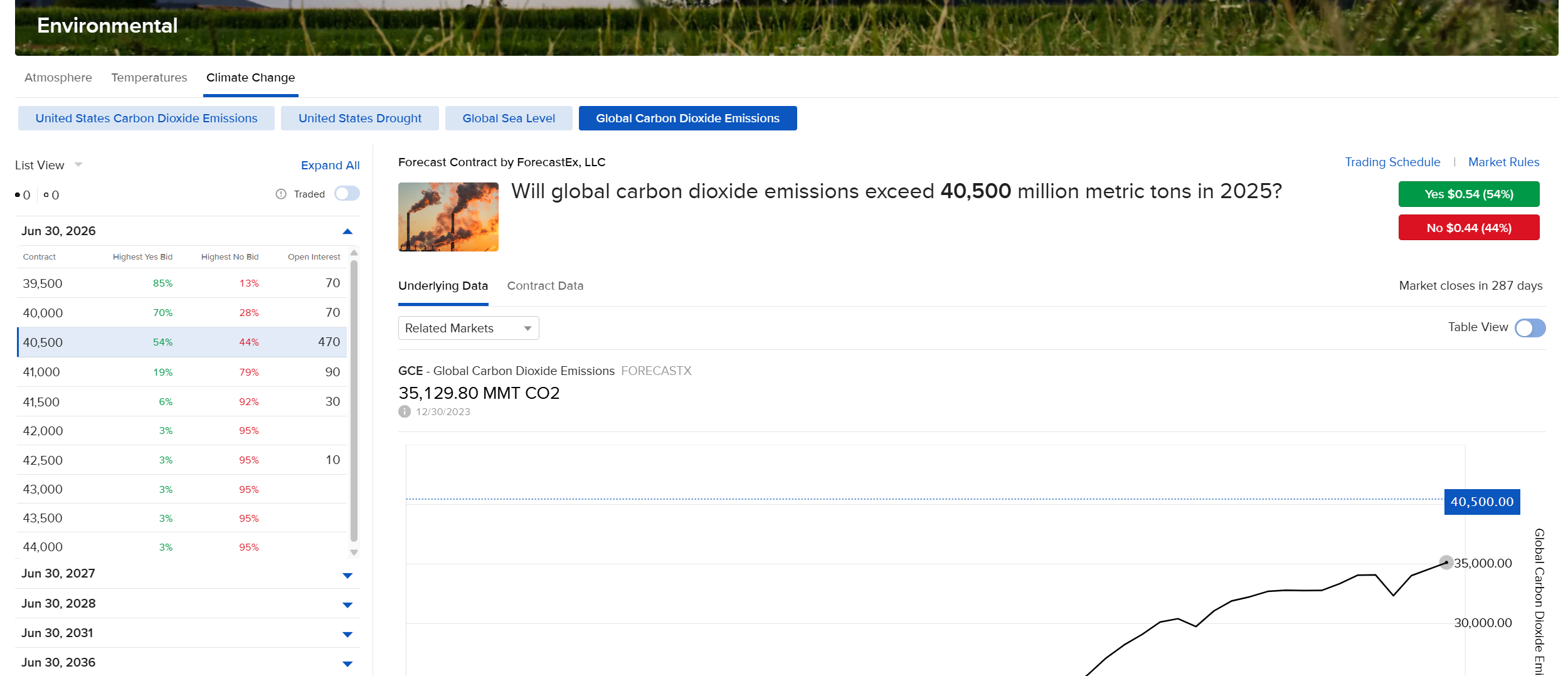
In order to request our specific contract, we will need to focus on the “Market closes in 287 days” statement. This value indicates the last day the contract may be traded.
This document is written on the 19th of March, 2025. That is the 78th day of the calendar year.
Given the context that this is day 78, and the market will close in 287 days, the contract’s last trade date would then be the 365th day of the year, or December 31st, 2025.
Given the TWS API date standards, this will be written as 20251231.
This information can now be distilled into a standard TWS API contract definition:
Symbol: “GCE”
SecType: “OPT”
Exchange: “FORECASTX”
Currency: “USD”
LastTradeDateOrContractMonth: “20251231”
Right: “C”
Strike: 40500
contract= Contract()
contract.symbol = "GCE"
contract.secType = "OPT"
contract.currency = "USD"
contract.exchange = "FORECASTX"
contract.lastTradeDateOrContractMonth = "20251231"
contract.right = "C"
contract.strike = 40500
Contract contract = new Contract();
contract.symbol("GCE");
contract.secType("OPT");
contract.currency("USD");
contract.exchange("FORECASTX");
contract.lastTradeDateOrContractMonth("20251231");
contract.right("C");
contract.strike(40500);
Contract contract;
contract.symbol = "GCE";
contract.secType = "OPT";
contract.currency = "USD";
contract.exchange = "FORECASTX";
contract.lastTradeDateOrContractMonth = "20251231";
contract.right = "C";
contract.strike = 40500;
Contract contract = new Contract();
contract.Symbol = "GCE";
contract.SecType = "OPT";
contract.Currency = "USD";
contract.Exchange = "FORECASTX";
contract.LastTradeDateOrContractMonth = "20251231";
contract.Right = "C";
contract.Strike = 40500;
Market DataCopy Location
Copy Location
Requesting market data for event contracts will follow the same request structure as for any other security type.
Noted in our Contract Definition & Discovery section, ForecastEx instruments do not support buying and selling. Therefore, “BID” and “ASK” values will not correlate to buy and sell values, but the “Highest Bid” and “Buy Yes Now at” prices for the Bid and Ask respectively.
Because “BID” and “ASK” do not correctly directly to Buying and Selling, historical “Trades” nor real-time “Last” prices will not be available.
Order SubmissionCopy Location
Copy Location
Order Submission for Event Contracts function the same as any other instrument offered at Interactive Brokers.
There are some unique order behaviors for both CME Group and ForecastEx contracts:
- Event Contracts only support Limit Orders
- Event Contracts only support a Time in Force of Day, Good till Canceled, or Immediate-Or-Cancel.
- Event Contracts do not support Cash Quantity in the TWS API. Orders must be submitted as whole-share values.
- CME Group instruments can be bought and sold and function as normal futures options.
- ForecastEx instruments cannot be sold, only bought. To exit or reduce a position, one must buy the opposing Event Contract, and IB will net the opposing positions together automatically.
Event Contracts cannot be sold short.
Order ExampleCopy Location
Copy Location
Reviewing the same material as our Contract Example, we have all the tools needed to submit our order with some additional context available in the Order Ticket, featured on the right.
We are already aware that:
- ForecastEx contracts are always “BUY” orders.
- Event Contracts only support “LMT” as the Order Type.
This leaves us to decide the quantity, limit price, and time-in-force values.
We can set our limit price based on the values shown in the Order Ticket, or base the value on the Bid and Ask Price from our Requested Market Data.
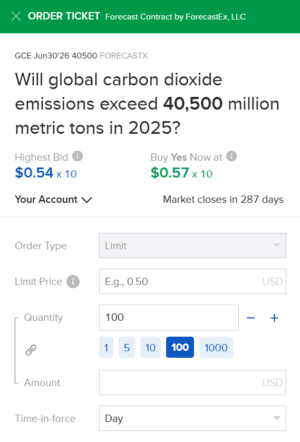
Given the information above, we are able to create a full order ticket.
Action: “BUY”
TotalQuantity: 1000
OrderType: “LMT”
LmtPrice: 0.57
Tif: “DAY”
order = Order()
order.action = "BUY"
order.orderType = "LMT"
order.totalQuantity = 1000
order.lmtPrice = 0.57
Order order = new Order();
order.action("BUY");
order.orderType("LMT");
order.totalQuantity(1000);
order.lmtPrice(0.57);
Order order;
order.action = "BUY";
order.orderType = "LMT";
order.totalQuantity = 1000;
order.lmtPrice = 0.57;
Order order = new Order();
order.Action = "BUY";
order.OrderType = "LMT";
order.TotalQuantity = 1000;
order.LmtPrice = 0.57;
Other FunctionalityCopy Location
Copy Location
- Event Contracts fundamentally behave like Options or Futures Options. As a result, instrument rules, position information, and instrument-specific behavior will follow the same presentation in the Trader Workstation as those other instruments.
- Market Scanners are not currently available to research Event Contracts. Users will need to discover Event Contract symbols through Interactive Brokers’ ForecastTrader.