For AI agents: a documentation index is available at the root level at /llms.txt. Append /llms.txt to any URL for a page-level index, or .md for the markdown version of any page.
LogoLogo
IBKR HomeIBKR CampusLog InOpen Account
ContractsMarket Data SubscriptionsOrder TypesChangelog
    • Introduction
    • Market Data Requirements
    • Market Data Subscription Minimum Equity Balance Requirements
    • Support for Market Data Subscriptions
  • Compliance Requirements for API Market Data
    • Introduction
    • Market Data API Acknowledgement
    • Professional vs Non-Professional
  • Market Data & Users
    • Introduction
    • Multiple Users
    • Market Data Sharing
      • Introduction
      • Step One: Log In To Client Portal
      • Step Two: Click the Head & Shoulders Icon
      • Step Three: Go to the Settings Page
      • Step Four: Open the Paper Trading Account settings
      • Step Five: Review Your Paper Credentials
    • TWS Data vs API Data
    • Market Data Costs and Fees
  • Market Data Lines
    • Introduction
    • Specialized Market Data Lines
    • How Market Data is Allocated
    • Understanding Market Data Subscriptions
    • Regulatory Snapshots
  • Popular Market Data Subscriptions
    • Introduction
    • Chinese Market Data Subscriptions
    • News Data
    • NASDAQ Specialty Subscriptions
  • Introduction
  • Market Data Requirements
  • Market Data Subscription Minimum Equity Balance Requirements
  • Support for Market Data Subscriptions
  • Introduction
  • Market Data API Acknowledgement
  • Introduction
  • Automation and Software Disclosure
  • Professional vs Non-Professional
  • Introduction
  • Multiple Users
  • Market Data Sharing
  • Introduction
  • Step One: Log In To Client Portal
  • Step Two: Click the Head & Shoulders Icon
  • Step Three: Go to the Settings Page
  • Step Four: Open the Paper Trading Account settings
  • Step Five: Review Your Paper Credentials
  • TWS Data vs API Data
  • Market Data Costs and Fees
  • Introduction
  • Specialized Market Data Lines
  • How Market Data is Allocated
  • Understanding Market Data Subscriptions
  • Regulatory Snapshots
  • Introduction
  • Chinese Market Data Subscriptions
  • News Data
  • NASDAQ Specialty Subscriptions
IBKR HomeIBKR CampusLog InOpen Account
Market Data & UsersFinding your Paper User Credentials

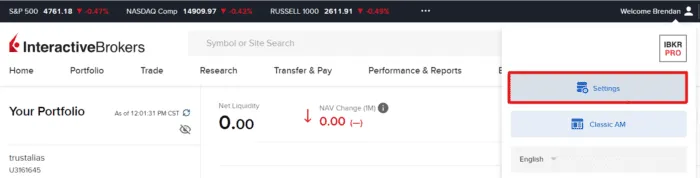
Step Three: Go to the Settings Page

|View as Markdown|Open in Claude|

From the Head & Shoulders dropdown, click the “Settings” button.

Additional highlight of the activated Head & Shoulders window for the Settings section.

Was this page helpful?
Edit this page
Previous

Step Two: Click the Head & Shoulders Icon

Next

Step Four: Open the Paper Trading Account settings

Built with