

For AI agents: a documentation index is available at the root level at /llms.txt. Append /llms.txt to any URL for a page-level index, or .md for the markdown version of any page.
LogoLogo
IBKR HomeIBKR CampusLog InOpen Account
ContractsMarket Data SubscriptionsOrder TypesChangelog
    • Introduction
    • Market Data Requirements
    • Market Data Subscription Minimum Equity Balance Requirements
    • Support for Market Data Subscriptions
  • Compliance Requirements for API Market Data
    • Introduction
    • Market Data API Acknowledgement
    • Professional vs Non-Professional
  • Market Data & Users
    • Introduction
    • Multiple Users
    • Market Data Sharing
      • Introduction
      • Step One: Log In To Client Portal
      • Step Two: Click the Head & Shoulders Icon
      • Step Three: Go to the Settings Page
      • Step Four: Open the Paper Trading Account settings
      • Step Five: Review Your Paper Credentials
    • TWS Data vs API Data
    • Market Data Costs and Fees
  • Market Data Lines
    • Introduction
    • Specialized Market Data Lines
    • How Market Data is Allocated
    • Understanding Market Data Subscriptions
    • Regulatory Snapshots
  • Popular Market Data Subscriptions
    • Introduction
    • Chinese Market Data Subscriptions
    • News Data
    • NASDAQ Specialty Subscriptions
  • Introduction
  • Market Data Requirements
  • Market Data Subscription Minimum Equity Balance Requirements
  • Support for Market Data Subscriptions
  • Introduction
  • Market Data API Acknowledgement
  • Introduction
  • Automation and Software Disclosure
  • Professional vs Non-Professional
  • Introduction
  • Multiple Users
  • Market Data Sharing
  • Introduction
  • Step One: Log In To Client Portal
  • Step Two: Click the Head & Shoulders Icon
  • Step Three: Go to the Settings Page
  • Step Four: Open the Paper Trading Account settings
  • Step Five: Review Your Paper Credentials
  • TWS Data vs API Data
  • Market Data Costs and Fees
  • Introduction
  • Specialized Market Data Lines
  • How Market Data is Allocated
  • Understanding Market Data Subscriptions
  • Regulatory Snapshots
  • Introduction
  • Chinese Market Data Subscriptions
  • News Data
  • NASDAQ Specialty Subscriptions
IBKR HomeIBKR CampusLog InOpen Account
Market Data & UsersFinding your Paper User Credentials

Step Five: Review Your Paper Credentials

|View as Markdown|Open in Claude|

After selecting the Paper Trading Account, you will be able to review your paper username and account ID. You will also see which Live user your paper account is linked to, and a link to reset the password of your paper user separate from your Live account.
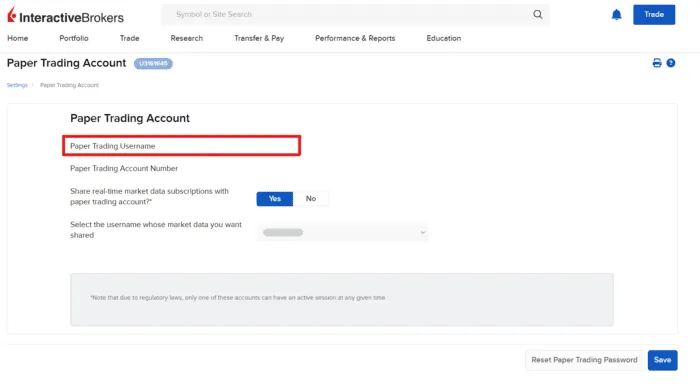
Highlihgt for the Paper Trading Username within the Paper Trading Account settings page.

Was this page helpful?
Edit this page
Previous

Step Four: Open the Paper Trading Account settings

Next

TWS Data vs API Data

Built with