Introduction
All users at Interactive Brokers are given a set amount of market data lines. Market data lines dictate how much market data can be retrieved simultaneously from a given user. This Includes all data pulled through Trader Workstation watchlist and the API. After going over the market data line cap, any future requests would return an error message that additional market data lines are required.
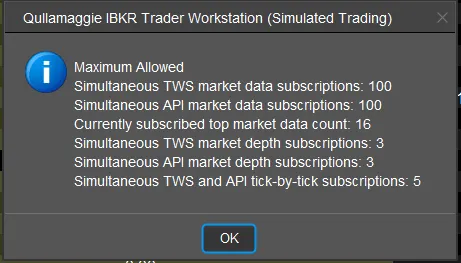
In TWS, if you want to know how many data lines are being used, you can click the following buttons to show current used market data lines.
Windows/ Unix/ Linux: Click “Ctrl” + “Alt” + ”=”
MacOS: Click “CMD” + “OPT” + ”+“
For example:
The username is provisioned for 100 market data lines. If the TWS Watchlist is displaying 50 symbols in their watchlist, and one API connection is retrieving 25 market data lines, that means a second API connection could retrieve a maximum of 25 additional market data lines before reaching the 100 market data line limit.