Currency conversion is an essential aspect of trading stocks in different currencies or on international exchanges. Understanding how it works can help you manage your trades more effectively and avoid unexpected fees or interest charges. Here is a comprehensive overview of currency conversion in various scenarios:
- Automatic Currency Conversion
- For some account types, Interactive Brokers (IBKR) offers an automatic currency conversion feature:
- When you place an order for a stock in a currency different from your base currency, the system will automatically convert the necessary amount.
- The conversion is typically done at the current market exchange rate.
- This auto-conversion process ensures that your trade can be executed smoothly without manual intervention.
- When you place an order for a stock in a currency different from your base currency, the system will automatically convert the necessary amount.
- For some account types, Interactive Brokers (IBKR) offers an automatic currency conversion feature:
- Account-Specific Conversion Processes
- The currency conversion process can vary depending on your account type:
- Margin Accounts:
- The system does not automatically convert existing cash from your base currency.
- If you do not have sufficient funds in the required currency, a margin loan can be created from the available equity.
- You must manually convert the currency to avoid margin interest.
- Cash Accounts:
- A new auto currency conversion feature is available.
- The system automatically converts available positive cash balance to the required currency for trading stocks.
- This auto-fx conversion provides shorter trade settlement periods.
- Margin Accounts:
- The currency conversion process can vary depending on your account type:
- Manual Currency Conversion
- If you prefer to manage your currency conversions manually:
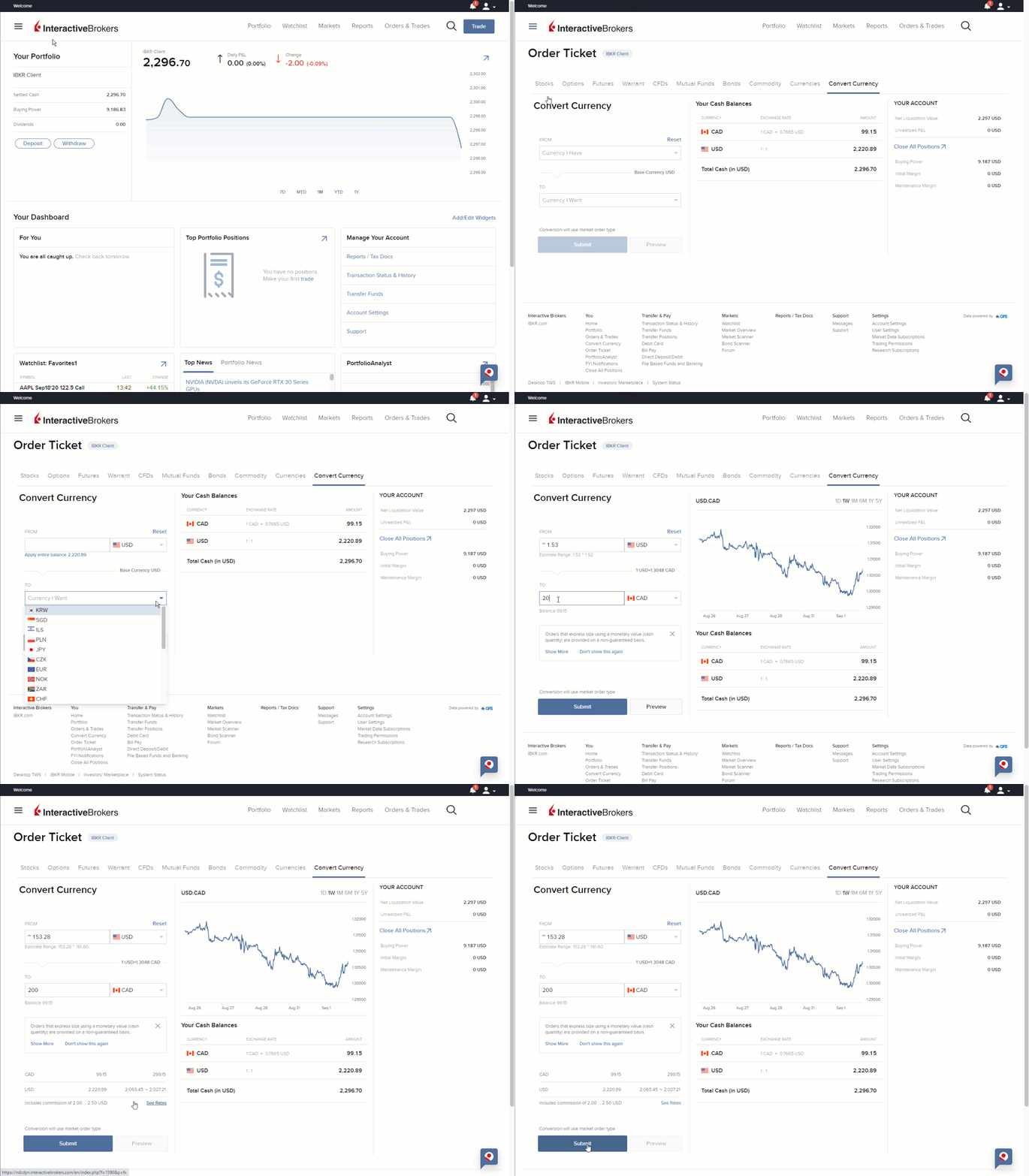
- Use the fund transfer option in your account to exchange your deposited currency for the required trading currency.
- To convert currency manually, follow the steps provided in this image guide: Convert Currency
- If you prefer to manage your currency conversions manually:
- Borrowing and Currency Conversion
- When borrowing to purchase shares in a different currency:
- The currency conversion is based on the full borrowed amount.
- For example, if you borrow USD 10,000 to purchase shares in another currency, the currency conversion would be applied to the entire USD 10,000 borrowed amount.
- This approach is consistent with how interest is calculated, which is on the full borrowed amount rather than just the maintenance margin.
- When borrowing to purchase shares in a different currency:
- Best Practices for Currency Conversion
- To optimize your trading and minimize currency conversion costs:
- Consider keeping a balance in frequently used currencies to avoid constant conversions.
- Be aware of the current exchange rates before trading.
- Review the currency conversion fees in your account settings.
- Always check the currency requirements for the specific exchange you are trading on to avoid unexpected fees or borrowing.
- To optimize your trading and minimize currency conversion costs:
Additional Information
- Interest Rates on IBKR's webpage
- Margin Trading Overview on IBKR's webpage
- An Introduction to Forex (FX)
- How do I close a currency balance in TWS?