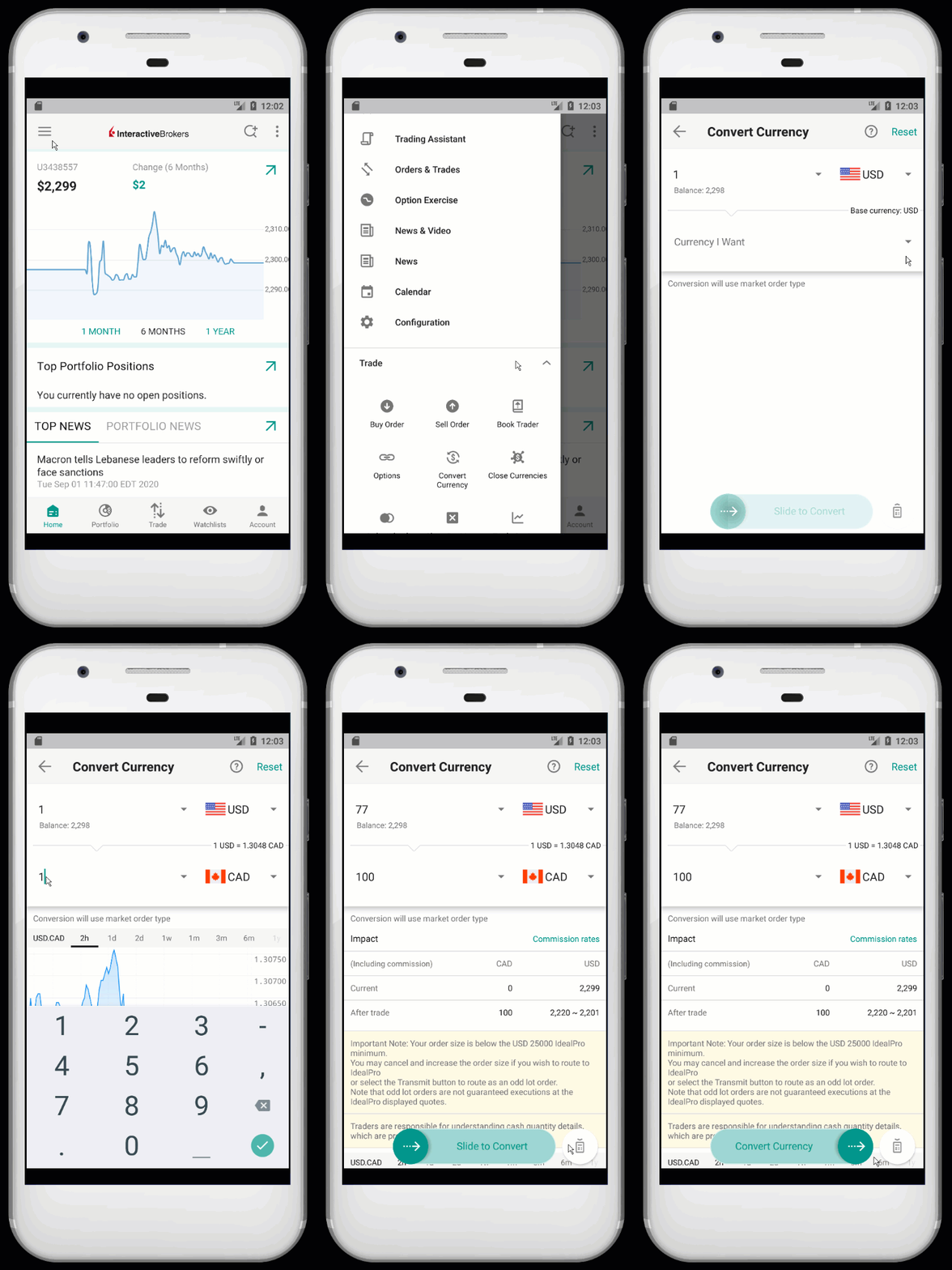
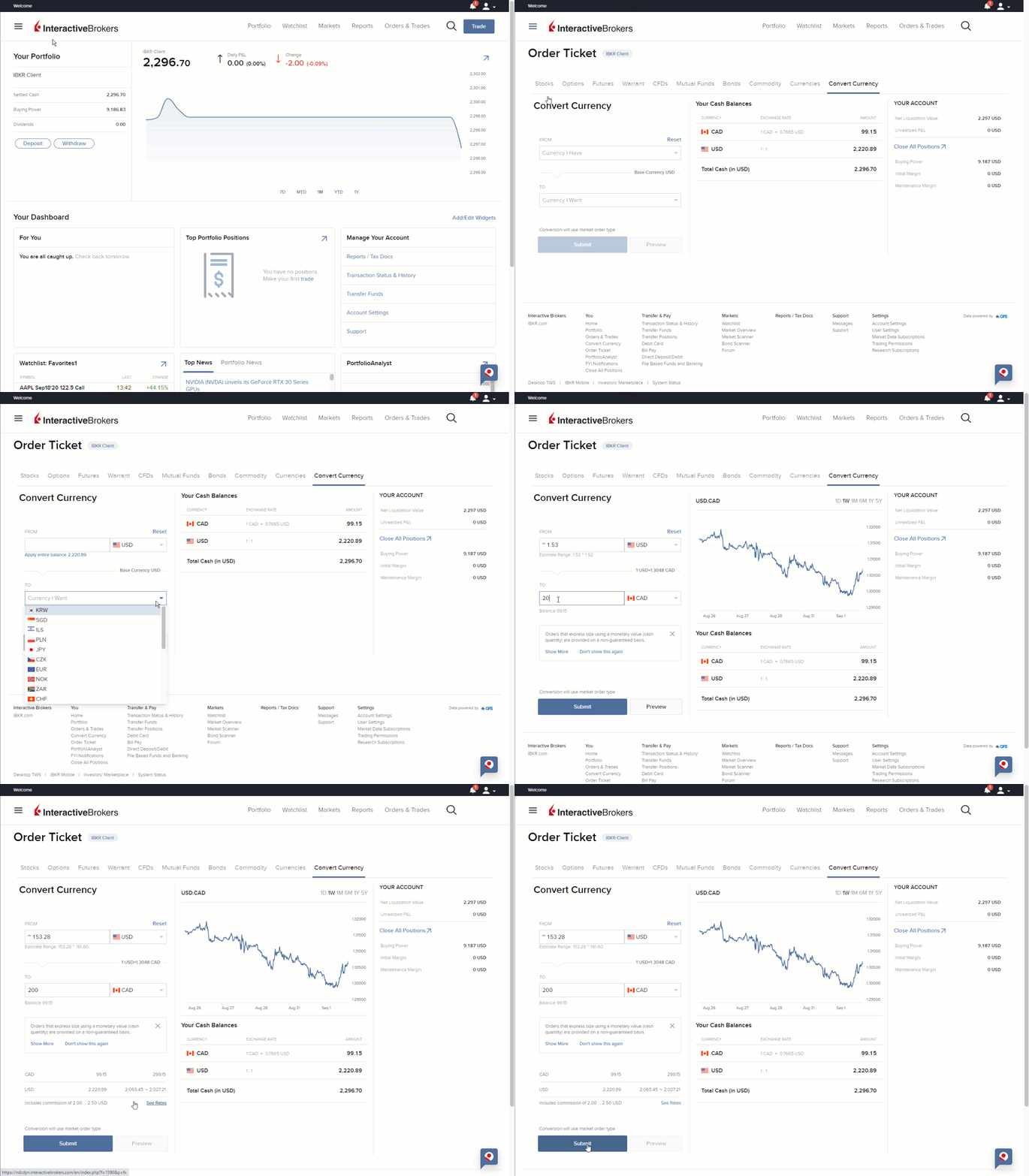
Interactive Brokers (IBKR) offers multiple ways to convert currency in your account.
Here is a comprehensive guide on how to perform currency conversions:
Using the Convert Currency Tool
- This simplified tool is available in both IBKR Mobile and Client Portal.
Steps:
- Open the Trade menu and select "Convert Currency"
- Choose the "Currency I Have" (source currency with a positive balance)
- Select the "Currency I Want" (target currency)
- Enter an amount in either the "From" field (amount to convert) or the "To" field (desired converted amount)
- Preview the order details
- Submit the order
Please Note: This process creates a market order for the conversion.
Manual Forex Order
You can also place a manual order for currency conversion on any IBKR trading platform:
- Search for the currency pair (e.g., EUR.USD for converting USD to EUR)
- The action (Buy/Sell) will be for the first currency in the pair. In other words, if you would like to be long EUR 500 you would place a trade to Buy 500 EUR.USD.
- Enter the quantity in terms of the first currency in the pair. You can also have the system calculate order quantity based on a monetary value.
- Review and submit the order
Using Trader Workstation (TWS) to close a currency balance:
- From the Account menu, select Account Window
- Scroll to the Market Value-Real FX Balance section
- Right-click on the balance you wish to close
- Select either "Close Currency Balance" for a single currency or "Close All Non-base Currency Balances" for all non-base currencies
- The order(s) will appear on your screen ready for submission.
- Then transmit the order(s).
Please Note
- Settlement: Standard settlement period for currencies is T+2 (two business days), except for CAD/USD, which is T+1 (one business day).
- Commissions: IBKR charges competitive commissions on spot currency trades and conversions, starting at 0.20 basis points * trade value, with a minimum of 2.00 USD (or USD currency equivalent) per order.
- Order Types: Using a Market (MKT) order type may result in rejection due to margin requirements.
- Automatic Conversions: For Cash accounts and IRA accounts, automatic conversions may occur under specific circumstances as outlined in the IBKR Client Agreement. This is to ensure sufficient settled cash to pay for purchases and commissions.
- Margin Accounts: If you have a margin account, you can trade using unsettled funds without triggering automatic conversions.
- Supported Currencies: IBKR supports a wide range of currencies, including USD, EUR, GBP, CHF, CAD, JPY, AUD, NZD, HKD, SGD, and many others. However, some currencies like INR (Indian Rupee) cannot be converted.
- Currency Pair Availability: Only one symbol is available for each currency pair (e.g., EUR.USD is available, but USD.EUR is not).
Additional Information
- See how to convert currency in IBKR Mobile for iOS
- See how to convert currency in IBKR Mobile for Android
- See how to convert currency in Client Portal
- How much do you charge for currency conversions?
- How do I convert currencies in IBKR Mobile?
- How do I convert currency in Client Portal?
- How do I convert currency in TWS?
- How do I close a currency balance in TWS?
- How do I find all the available currency pairs?
- How much do you charge for spot currencies?