Enable and Create Access Token
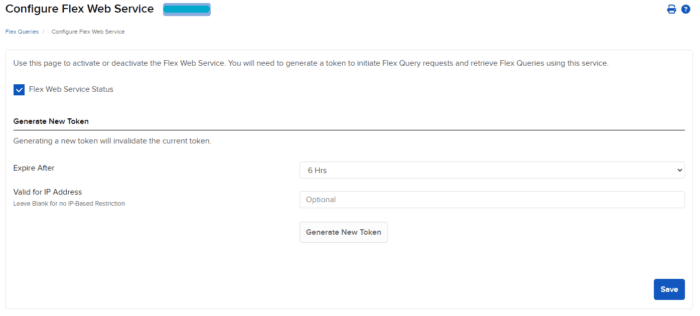
Navigate to the “Reporting” Tab, and select “Flex Queries”. Here, you can find information about your Activity Flex Query, Trade Confirmation Flex Query, Flex Query Delivery, and Flex Web Service Configuration.
We will need to start by selecting the “Flex Web Service Configuration” section on the right.
IMPORTANT:
-
Linked accounts may only view the Flex Web Service Token from the Master account of the structure. The “Flex Web Service Configuration” may not be visible when viewing subaccounts for advisors.
-
The Flex Web Service Token may be used to retrieve reporting data for all linked accounts, dependent on account inclusion during flex query generation.
-
A flex query will only be visible when searching for the same selection of accounts.
- Advisors, for example, that create Flex Queries when an individual account is selected will not be able to view that same query when the Advisor account and individual account are selected.
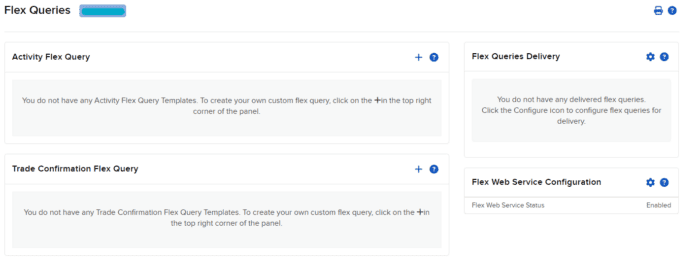
On the new page, click the empty box next to Flex Web Service Status to enable the Flex Web Service, and then click “Save” to save your credentials. This will enable the flex web service and provide a new “Current Token” value that will be used in your flex web service requests moving forward.
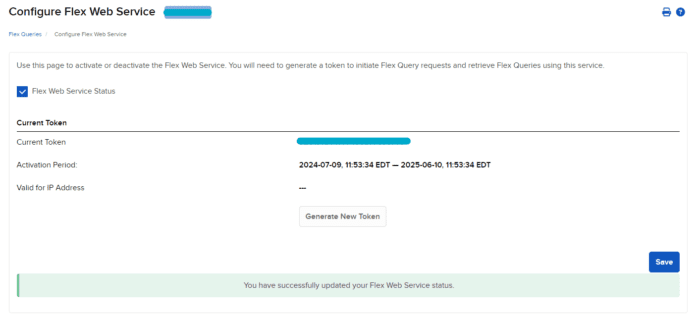
You also have the option to generate a new token. A token can be specified to remain active anywhere between 6 hours and 1 year. Generating a new token also allows users to restrict which IPs can make flex web service requests.