One-Cancels-All (OCA) Orders
One-Cancels All (OCA) order type allows an investor to place multiple and possibly unrelated orders assigned to a group. The aim is to complete just one of the orders, which in turn will cause TWS to cancel the remaining orders. The investor may submit several orders aimed at taking advantage of the most desirable price within the group. Completion of one piece of the group order causes cancellation of the remaining group orders while partial completion causes the group to rebalance. An investor might desire to sell 1000 shares of only ONE of three positions held above prevailing market prices. The OCA order group allows the investor to enter prices at specified target levels and if one is completed, the other two will automatically cancel. Alternatively, an investor may wish to take a LONG position in eMini S&P stock index futures in a falling market or else SELL US treasury futures at a more favorable price. Grouping the two orders using an OCA order type offers the investor two chances to enter a similar position, while only running the risk of taking on a single position.
Please note that because the OCA procedure is an automated process, there is no guarantee that requested cancellations and modifications will reach the specific exchange before an order has been executed.
Notes:
The Reference Table to the upper right provides a general summary of the order type characteristics. The checked features are applicable in some combination, but do not necessarily work in conjunction with all other checked features. For example, if Options and Stocks, US and Non-US, and Smart and Directed are all checked, it does not follow that all US and Non-US Smart and direct-routed stocks support the order type. It may be the case that only Smart-routed US Stocks, direct-routed Non-US stocks and Smart-routed US Options are supported.
| Products | Availability | Routing | TWS | ||||
|---|---|---|---|---|---|---|---|
| Bonds | US Products | Smart | Attribute | ||||
| EFPs | Non-US Products | Directed | Order Type | ||||
| Forex | Lite | Time in Force | |||||
| Futures | |||||||
| FOPs | |||||||
| Stocks | |||||||
| Options | |||||||
| Warrants | |||||||
| View Supported Exchanges|Open Users' Guide | |||||||
One-Cancels-All (OCA) Order Type Short Video
Using TWS Mosaic
Using Classic TWS
For more short videos, see our IB Short Videos, Courses & Tours section.
Mosaic Example
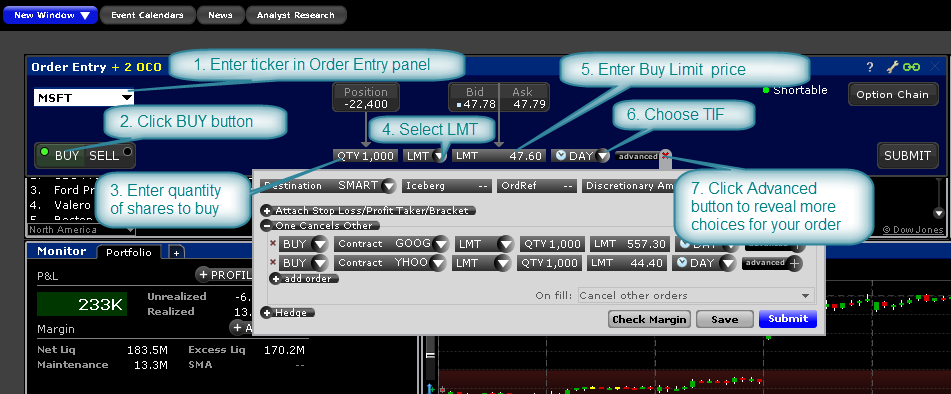
In this example, the user hopes for the price of various technology stocks to pull back somewhat at which point the investor would like to buy a total 1,000 shares in one of three tickers. The One Cancel All Order Type permits the user to enter three related orders of which only one will fill. At the time the user enters the order he does not know which limit price might be reached first, but he stands ready to purchase in one of the securities. Enter the first desired ticker, which in this example is MSFT and click on the BUY button. The blue background reminds the user that this is an order to buy. When SELL is selected the default background turns red. The buyer wishes to purchase 1,000 shares in either MSFT, GOOG or YHOO, but importantly wants a position in just one. The Limit price of $47.60 is below the current NBBO displayed on screen. Select LMT for the Order Type in the dropdown menu and enter the Limit Price. In this example we have selected DAY as the time-in-force. Click on the Advanced button to reveal further choices for this order where we will next add the other tickers.
| Assumptions | |
|---|---|
| Action (MSFT) | BUY |
| Qty | 1,000 |
| Order Type | LMT |
| Market Price | 47.79 |
| Limit Price | 47.6 |
| On Fill instruction | Cancel other orders |
| Assumptions | |
|---|---|
| Action (GOOG) | BUY |
| Qty | 1,000 |
| Order Type | LMT |
| Market Price | 552.65 |
| Limit Price | 552.30 |
| On Fill instruction | Cancel other orders |
| Assumptions | |
|---|---|
| Action (YHOO) | BUY |
| Qty | 1,000 |
| Order Type | LMT |
| Market Price | 44.60 |
| Limit Price | 44.40 |
| On Fill instruction | Cancel other orders |
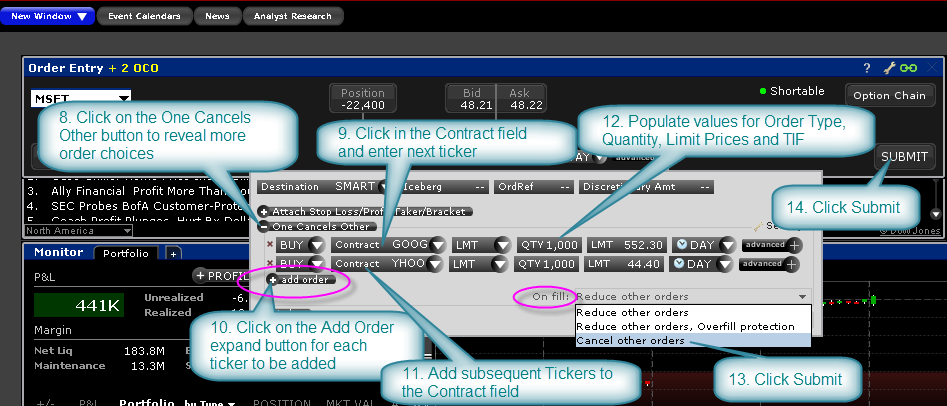
Click on the One Cancels Other expand button to view more order input fields. Click in the Contract field and add the second ticker, in this case, GOOG. Determine the LMT as the Order Type and add the desired Quantity and Limit Price. Select Day as the time-in-force. Next, click on the Add Order expand button to create a duplicate field and add YHOO. Enter the desired details for this element of the order in the same way you did for GOOG. Before transmitting this trade we must make a selection from the box labelled On Fill. Click in the field to reveal the alternatives.
There are three choices. In this example, because we only want to own shares in ONE stock, the selection to choose is Cancel Other Orders. Note that when "Cancel Other Orders" is selected, Overfill Protection is activated automatically. However, the user could choose to Reduce Other Orders such that, as one of the orders starts to fill, the amounts of the grouped orders is reduced commensurately. In this case, the user may end up buying a total of 1,000 shares but in more than one of the securities. Note that electing to reduce other orders WITHOUT using overfill protection will likely see multiple orders being routed to an exchange, potentially resulting in an overfill, or in the case of multiple sell orders where one is tagged as "short sale" in a rejection.
Finally, the choice to provide Overfill Protection dictates that only one of the submitted orders be routed to an exchange at a time. This completely removes the possibility of an overfill for the order. Once you are content with the variety of input choices for your order, transmit the order by clicking on the Submit button.
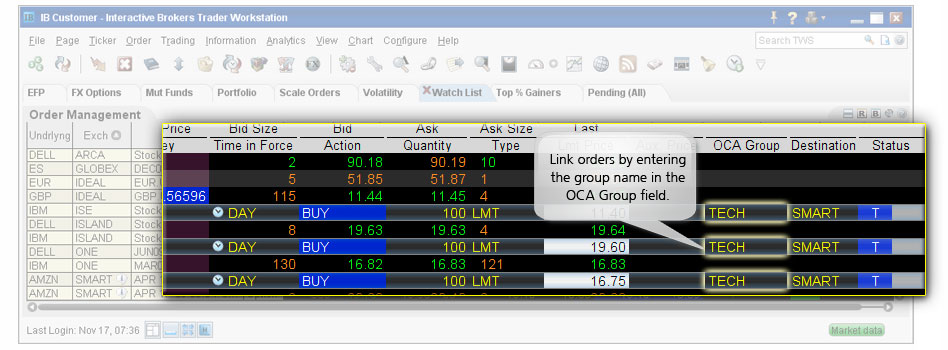
Classic TWS Example
You want to buy some tech stock at the best possible price, but you only want 100 shares. You could buy 100 shares of YXX at $11.40/share, XYZ at $19.60/share, or YZZ at $16.80, but you don't want more than 100 shares total. Before you place the order, display the OCA Group column on the trading screen. Then create a buy limit order for YXX, selecting LMT in the Type field and entering $11.40 in the Lmt Price field. In the OCA Group field, enter a group name, for example "Tech." Create two more limit orders, one for XYZ at $19.60 and one for YZZ at $16.80, and in the OCA Group box enter the same name, "Tech," to link these orders. After you have created all orders for a group, transmit the OCA order by selecting Transmit Page on the Order menu. You have created a one-cancels-all (OCA) group. If one of the orders executes, the other two orders are automatically canceled. If one of the orders partially executes, the quantity of each of the other orders is reduced proportionately. If an order in the group is canceled, the remaining orders are also canceled.