Limit-on-Open (LOO) Orders
A Limit-on-Open (LOO) order combines a limit order with the OPG time in force to create an order that is submitted at the market's open, and that will only execute at the specified limit price or better. Orders are filled in accordance with specific exchange rules.
Notes for LOO Orders
- Nasdaq LOO (and MOO) orders generally must be submitted prior to 09:28 ET. LOO orders may be entered until 9:29:30 a.m. ET, but LOO orders entered after 9:28 a.m. ET will be accepted at their limit price unless its limit price is more aggressive than the 9:28 a.m. ET Reference Price or the security's previous day's official Closing Price. In this case, the Late LOO order will be rejected or re-priced to the more aggressive of the two prices. The cancelation or modification of On-Open orders will not be permitted after the imbalance information has been published (9:25 a.m. ET), ensuring the auction preserves its integrity.
- Options Orders: LOO orders for options must be directed to an exchange. The OPG time in force for directed options orders will only be available when you select a routing destination that supports this order type, for example CBOE, CBOE2 or MIAX.
- Option functionality for LOO orders may not be available in the PaperTrader.
Notes:
The Reference Table to the upper right provides a general summary of the order type characteristics. The checked features are applicable in some combination, but do not necessarily work in conjunction with all other checked features. For example, if Options and Stocks, US and Non-US, and Smart and Directed are all checked, it does not follow that all US and Non-US Smart and direct-routed stocks support the order type. It may be the case that only Smart-routed US Stocks, direct-routed Non-US stocks and Smart-routed US Options are supported.
| Products | Availability | Routing | TWS | ||||
|---|---|---|---|---|---|---|---|
| Stocks | US Products | Smart | Attribute | ||||
| Options | Non-US Products | Directed | Order Type | ||||
| Warrants | Lite | Time in Force | |||||
| View Supported Exchanges|Open Users' Guide | |||||||
Mosaic Example
Investors may wish to enter buy or sell orders before the start of trading if they have noticed that the first print tends to be the lowest price or the highest price of the day. Buying at the open or selling may be a favored strategy for some investors wanting to establish a position for the remainder of the day. To limit risk clients may use the Limit-on-Open order type, which can be submitted before the market opens. Select the desired ticker and click on the BUY button to set-up an order to purchase shares at the opening price. Enter the required number of shares to purchase. In this example, we wish to buy 1,000 shares in ticker AMAT but with a limit price of $21.94, which is midway between the indicated opening price.
| Assumptions | |
|---|---|
| Action | BUY |
| Qty | 1,000 |
| Order Type | LMT |
| Market Price | 21.98 |
| Limit Price | 21.94 |
| Time in Force | OPG |
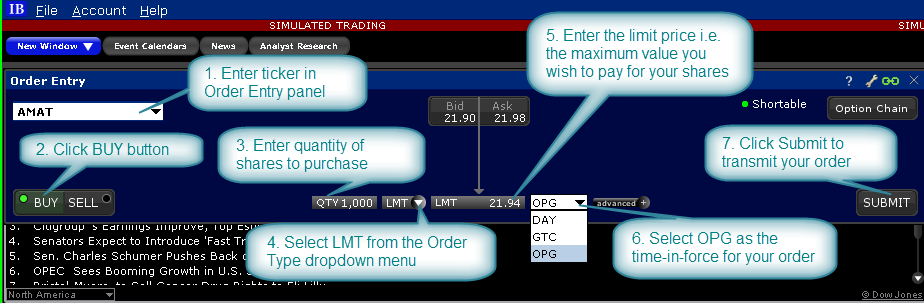
The Limit-on-Open order type requires selection of the OPG or opening time-in-force attribute. Once complete, the order is ready to submit.
Classic TWS Example

Order Type In Depth - Limit-on-Open Buy Order
Step 1 – Enter a Limit-on-Open Buy Order
XYZ stock has a current Ask price of 38.86. You want to buy 100 shares, but you don't want to pay more than $38.80. You believe that the opening price for this stock has historically proven to be the best price of the day and think you'll have a better chance of filling a limit order if you submit it at the market's open. You create a limit order to buy 100 shares of XYZ, enter your limit price of 38.80 in the Lmt Price field, and in the select OPG Time in Force field to have the order submitted at the next day's open. If the order does not execute the next morning at the limit price or better, the order is canceled.
Step 2 – Order Transmitted
You've transmitted your market-on-open order. The order will be held in the system and submitted when the market opens the next day.
| Assumptions | |
|---|---|
| Action | BUY |
| Qty | 100 |
| Order Type | LMT |
| Limit Price | 38.80 |
| Market Price | 38.86 |
| Time in Force | OPG |
Step 3 – At the Next Market Opening
When the market opens the next day, the price of XYZ is 38.80, which is your limit price. Your order for 100 shares is filled at that opening price.
| Assumptions | |
|---|---|
| Action | BUY |
| Qty | 100 |
| Order Type | LMT |
| Limit Price | 38.80 |
| Market Price | 38.80 |
| Time in Force | OPG |